GB - 11
CONNECTIONS
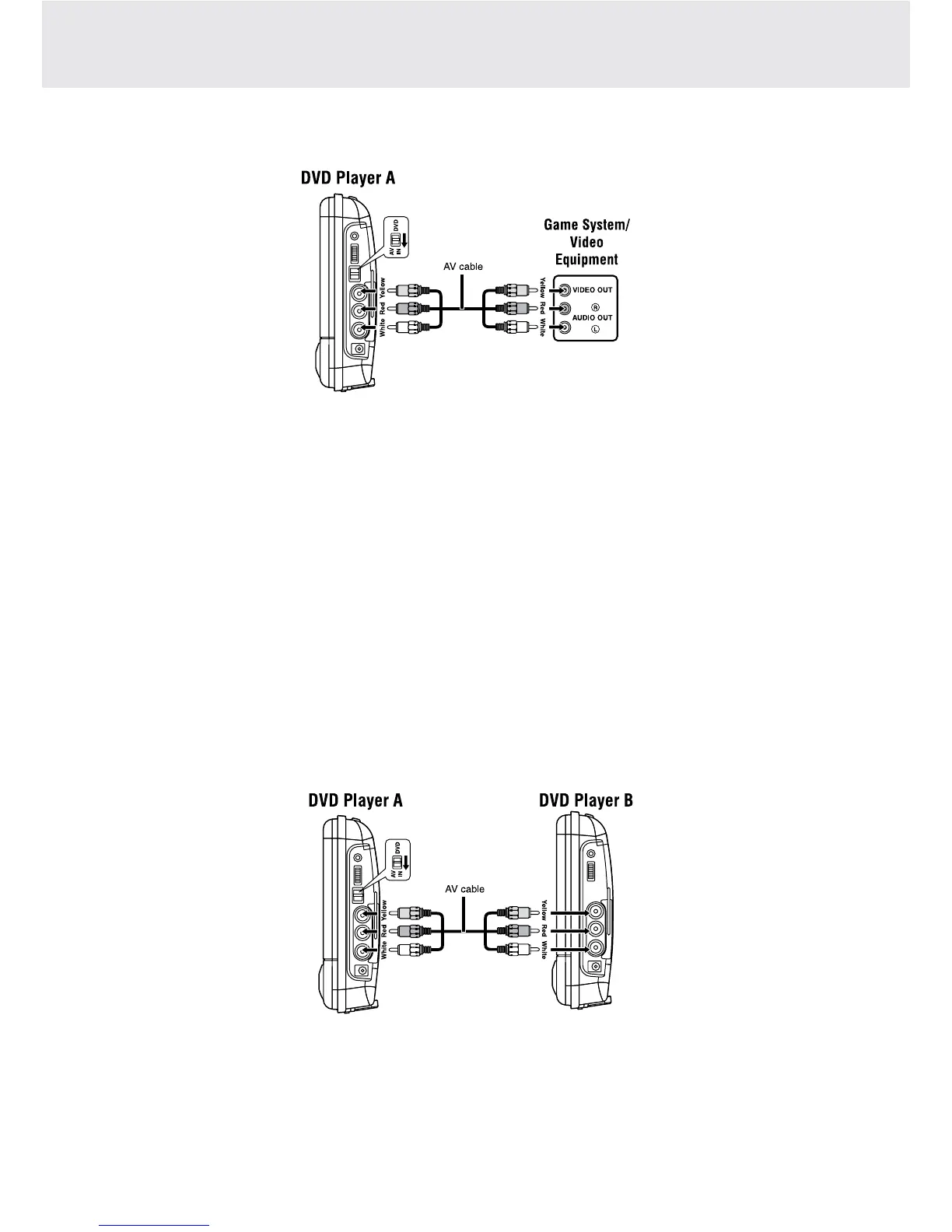
C. Connecting Game Systems/Video Equipments (for DVD Player A only)
Youcanconnectgamesystemorothervideoequipmentsforplayback.
Watching video equipment
1. ConnecttheotherequipmenttothemonitorusingaAVCable.
2. TurnontheDVDPlayerA.SlidetheDVD/AVINswitchtoAVIN.
3. Turnonthevideoequipmentandfollowtheinstructionsprovidedwithittoplayback.
Notes:
• MakesuretousethecorrectAVcable.Connectingtheplugsincorrectlymaycauseaweaksignal.
• IfyouhaveamonoVCR,thevolumelevelfromthespeakerswillbelow.
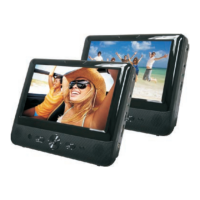
D. Watching a DVD on DVD Player A and B together
YoucanwatchthesameDVDonPlayerAandB.
Watching on Player A and B
1. ConnectPlayerAandBusingtheincludedAVcable.
2. TurnonPlayerAandB.SlidetheDVD/AVINswitchonPlayerAtoAVIN.
3. PlayaDVDonPlayerA;theotherplayerwillplayatthesametime.


 To Next Page