GB-6
CONTROL REFERENCE GUIDE
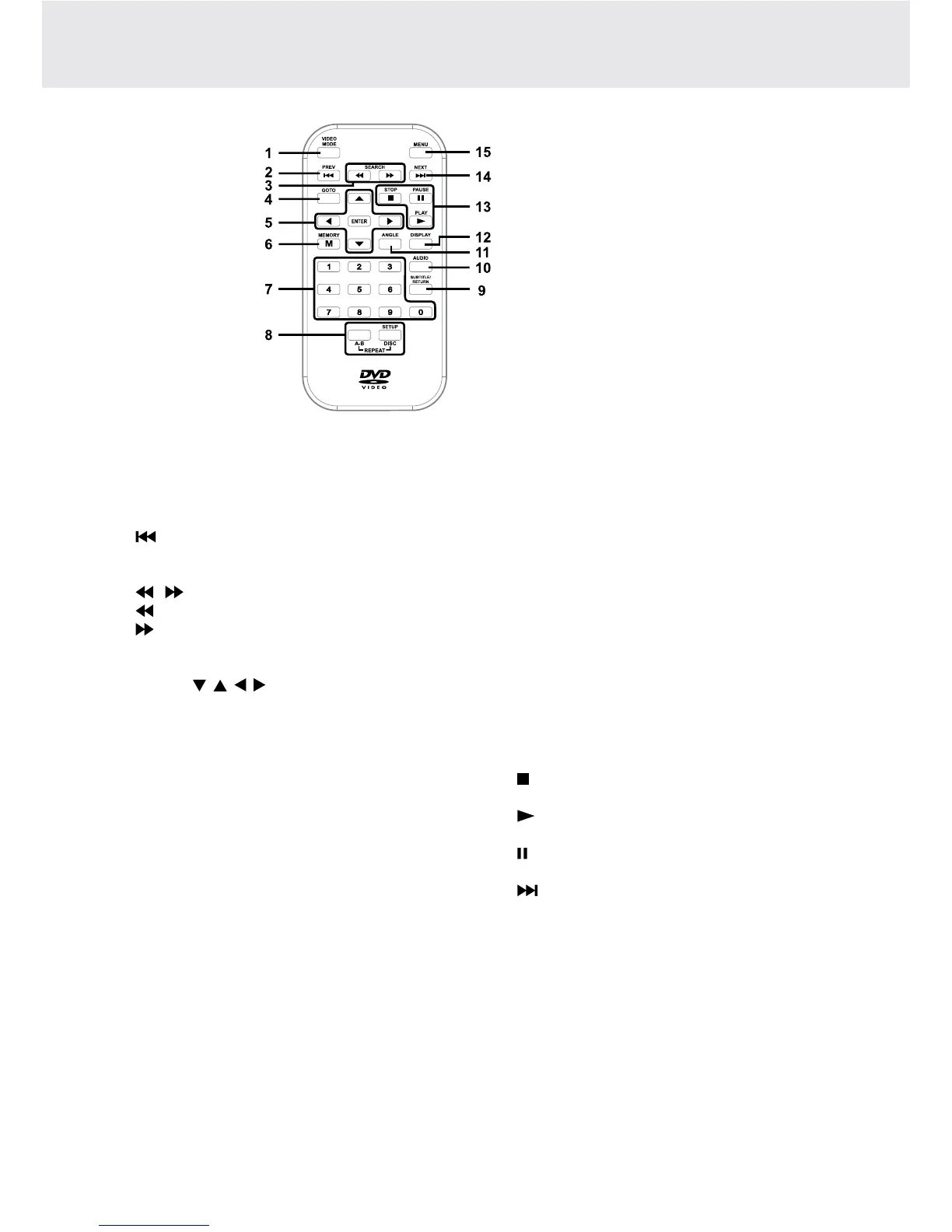
Remote Control
1) VIDEO MODE Button
AdjustsBrightness,Contrast,ColourorViewMode
oftheLCDscreen.
2) PREV Button
Movesbackthroughtitles,chaptersortracksona
disc.
3) / SEARCH Buttons
SEARCH:Fastreverseplayback.
SEARCH:Fastforwardplayback.
4) GOTO Button
SkipsdirectlytoalocationonaDVD.
5) Cursor ( , , , ) Buttons
Movesbetweenselectionsonamenuscreenand
adjustscertainsettings.
ENTER Button
Conrmsselectionsonamenuscreen.
6) MEMORY Button
In STOP mode, sets titles/chapters in a favorite
order.
7) Number (0 - 9) Buttons
Use when creating programs, entering parental
controlpasswordorlocatingatitle/chapter/trackor
specific time.
8) REPEAT A-B Button
Performspoint-to-pointrepeatplaybackonaDVD
orCD.
REPEAT DISC Button
RepeatsaDVDchapterortitle.
RepeatsaCDtrackortheentiredisc.
SETUP Button
Instopmode,itbringsuptheunit’sSETUPmenu.
9) SUBTITLE Button
Selectsoneofthesubtitlelanguagesprogrammed
onaDVD(ifavailable).
RETURN Button
ReturnstonormaloperationafterusingtheSETUP
menuofaDVD.
10) AUDIO Button
Selectsoneof the audio soundtracksona DVD
(ifmorethanoneisavailable)orselecttheaudio
outputmodeonaCD.
11) ANGLE Button
Switches between multiple camera angles when
the DVD you are playing has been programmed
with multiple camera angles.
12) DISPLAY Button
Showsstatusinformationonthescreen.
13) STOP Button
Stopsplayingadisc.
PLAY Button
Startsorresumesplaybackofadisc.
PAUSE Button
Pausesplaybackandframeadvance.
14) NEXT Button
Movesforwardthroughtitles,chaptersortrackson
a disc.
15) MENU Button
EntersandexitsthemainDVDmenu.
Note:
The included remote controls have different color
keys to identify which unit they operate. The remote
controlwithbluekeysoperatesUnit A whichhas
a blue stripe on the front of the unit. The remote
control with green keys operates Unit B, with a
similar green stripe on the front of the unit.


 To Next Page