GB-21
CUSTOMIZING THE FUNCTION SETTINGS
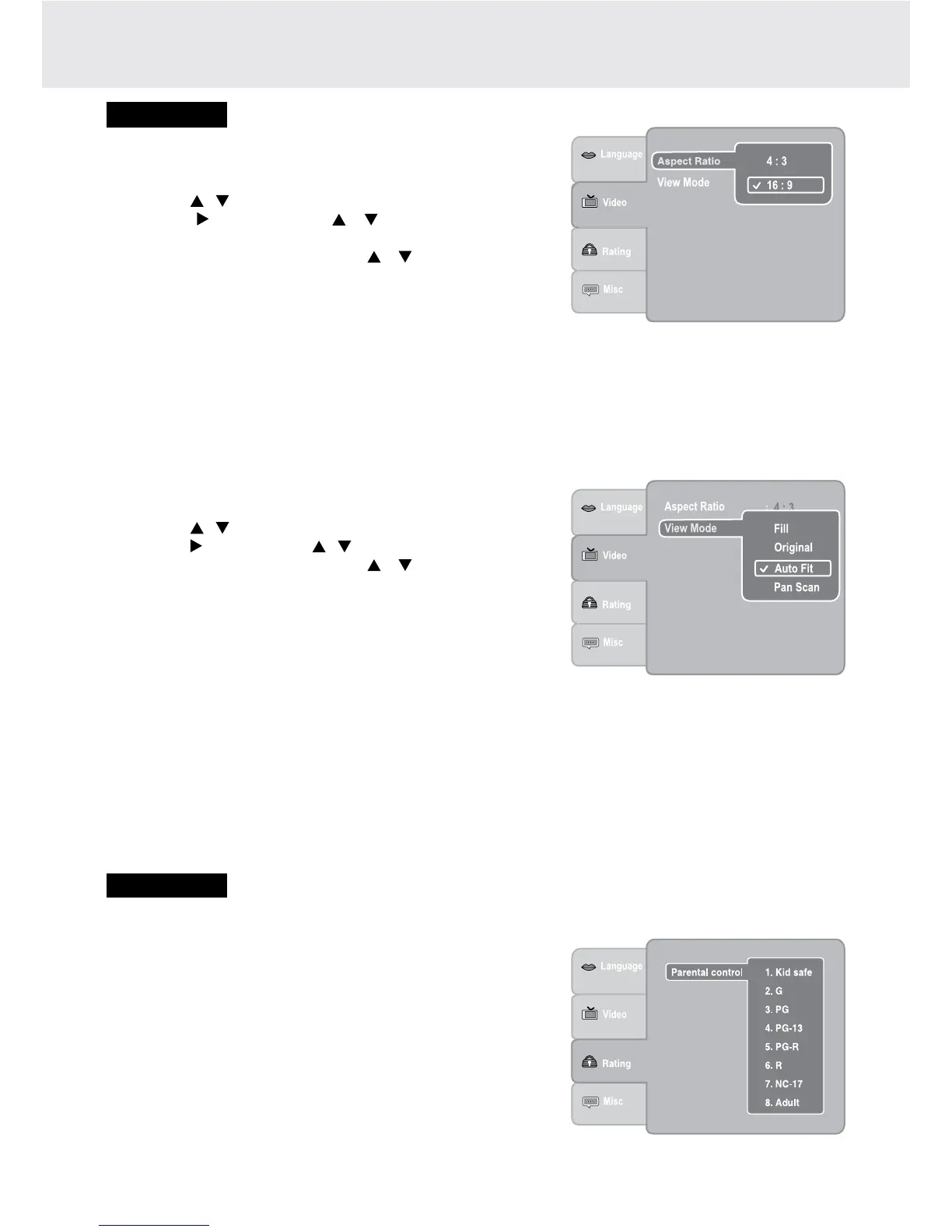
Aspect Ratio
1. PresstheSETUP button in stop mode.
2. Pressthe / buttontoselectVideo.
3. Press the button, then the / button to select Aspect
Ratio.
4. Press the ENTER button, then the / button to shift and
change the aspect ratio.
5. PresstheENTER button.
6. PresstheSETUP button or RETURNbuttontoexitthemenu.
VIDEO
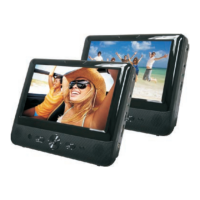
Fill Fillthescreenwithdecodedimage.
Original Displayimageasitsoriginalsize.
AutoFit Automaticallytthedecodedimageonscreenwithoutdistortion.Blackbarswillbepresentontop/
bottomorleft/rightofscreen.
PanScan Selectwhenastandard4:3TVisconnected.DisplayspicturescroppedtollyourTVscreen.Sides
of the picture are cut off.
Note:DependingontheDVD,youmaynotbeabletoviewthemodeasselected.
Note:
• The displayable picture size is preset on the DVD. Therefore, the playback picture of some DVDs may not
conform to the picture size you select.
• WhenyouplayDVDsrecordedinthe4:3picturesizeonly,theplaybackpicturealwaysappearsinthe4:3picture
sizeregardlessoftheAspectRatiosetting.
• Select16:9toconformtotheLCDscreenontheunit.AlwaysbesurethatyourAspectRatioconformstothe
actualTVinuseifyouconnecttheunittoaTV.
View Mode
1. PresstheSETUP button in stop mode.
2. Pressthe / buttontoselectVideo.
3. Pressthe button, then the / buttontoselectViewMode.
4. Press the ENTER button, then the / button to shift and
changetheViewMode.
5. PresstheENTER button.
6. PresstheSETUP button or RETURNbuttontoexitthemenu.
RATING
Parental Control
DVDsareratedaccordingtotheircontentandsomeareequipped
with a password function. The contents allowed by parental lock
levelandthewaya DVD iscontrolledmayvaryfrom disctodisc.
For example,ifthe disc allows, youcould lock outviolentscenes
unsuitable for children or you could lock out playback of the disc
altogether.
You cannot play password function equipped DVDs rated higher
than the level you selected unless you cancel the parental lock
function.


 To Next Page