GB-18
You can play a specific title or chapter repeatedly. (Title
repeat, chapter repeat, A-B repeat)
Repeating a Chapter
1. WhiletheDVDisplaying,presstheREPEAT DISC
button until the
Repeat Chapter
indicator displays on the
screen. The current chapter is played repeatedly.
Repeating a Title
2. WhiletheDVDisplaying,presstheREPEAT DISC
button until the
Repeat Title
indicator displays on the
screen. The current title is played repeatedly.
To Resume Normal Playback
3. WhiletheDVDisplaying,presstheREPEAT DISC
button until the
Repeat Off
indicator displays on the
screen.
You can play a single track or the whole disc
repeatedly.
Repeating a Single Track
1. While the CD is playing, press the REPEAT DISC
button until the
Repeat single
indicator displays on the
screen. The current track is played repeatedly.
Repeating a Whole Disc
2. While the CD is playing, press the REPEAT DISC
button until the
Repeat all
indicator displays on the
screen. The whole disc is played repeatedly.
To Resume Normal Playback
3. Pressthe REPEAT DISC button until the
Repeat Off
indicator displays on the screen.
You can play a specific section repeatedly.
Repeating a Specific Section
1. While the disc is playing, press the REPEAT A-B
buttonatthebeginningofthesection(
Rep A-
is
displayed) you want to play repeatedly.
2. PresstheREPEAT A-B button again at the end of
thesection(
Rep A-B
is displayed).
3. The Unit will immediately begin replaying your
selection.
To Resume Normal Playback
4. While the disc is playing, press the REPEAT A-B
button until the
RepAB off
indicator displays on the
screen.
Note:
• SomediscsmaynotpermitA-Brepeatoperation.
• YoucannotsettheA-Brepeatfunctionforasegment
that includes multiple camera angles.
• You can specify a segment only within the current
title or track.
• There may be a slight difference between point A
and the location where playback actually resumes
depending on the disc.
Playing Titles/Chapters in a Favourite Order
Youcancombineyourfavouritetitles/chaptersandplaythemintheorderyoudetermine.
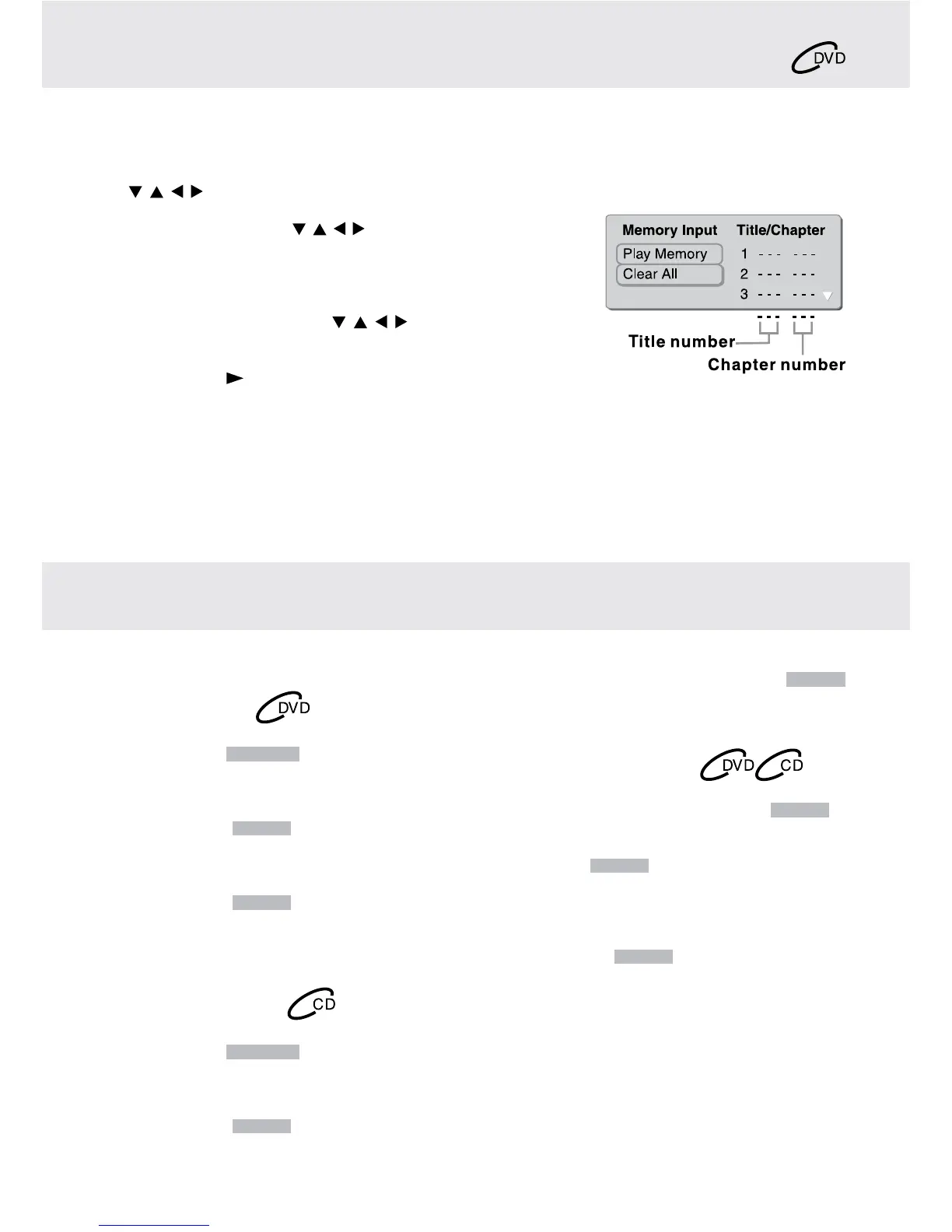
1. WhenaDVDisstopped,presstheMEMORY button and the following display appears.
2. Selecttheitemsintheorderyouwantbypressingthenumberbuttons.EachtimeyoupresstheCursorbuttons
( , , , ),thespaceishighlighted.Highlightwhereyouwanttoenter,thenpressthecorrespondingnumber
buttons.
3. PresstheCursorbuttons( , , , )tomovethehighlightedbartoPlay
Memory,thenpresstheENTERbutton.TheDVDplayerstartsmemory
playback.
4. Toresumenormalplaybackfrommemoryplayback
(a) PresstheMEMORY button in stop mode.
(b) PresstheCursorbuttons( , , , ) to move the highlighted bar
to“ClearAll”,thenpresstheENTERbutton.Alltheinputprograms
will be cleared.
(c) Pressthe PLAY button to resume normal playback.
Note:
• IfthetitleorchapternumbersyouenteredisnotpermittedbytheDVD,afteryoupresstheENTER button, it will
restoreto---.Youshouldre-entercorrectnumbers.
• Somediscsmaynotpermitmemoryplaybackoperation.
• Ifyouselectrepeatduringmemoryplayback,theDVDplayerrepeatsthecurrentmemoryplayback.
• IfyoupresstheMEMORYbuttonwhilethedisplayappearsontheTVscreen,thedisplaydisappears.
• TheprogrammedselectionswillbeclearedwhenyouopenthedisctrayorturnofftheDVDplayer.
DVD PROGRAMMABLE MEMORY
REPEAT PLAYBACK


 To Next Page