GB-15
Playing a Disc
1. SlidetheSTANDBY / ONswitchtotheONposition.SeeCUSTOMIZING THE FUNCTION SETTINGS before
proceedingtostep2.
2. Pressthe OPEN button and hold the front panel to open the disc door.
3. Holdthediscbyitssidesandgentlypushitontothespindle,withlabelsidefacingtowardyouuntilyouheara
“click”.
4. Gentlypushthediscdoorclosed.Ittakesashortwhileforyourunittoloadthedisc.Afterloading,formostDVDs,
theunitwillautomaticallytakeyoumainmenuorstartplaying.Iftheunitdoesnotautomaticallystartplayingthe
DVD,pressthe PLAY button.
Pausing Playback (Still Mode)
Pressthe PAUSE button. To resume normal playback, press the PLAY button.
Eachtimeyoupressthe PAUSE button, the picture advances one frame.
Stopping Playback
Pressthe STOP button at the location where you want to interrupt playback. To resume playback at the position
where the disc was stopped, press the PLAY button.
Ifyoupressthe STOPbuttontwice,theunit’smemorywillbeclearedandpressingthe PLAY button will reset
the disc to the beginning.
Fast Forward / Fast Reverse
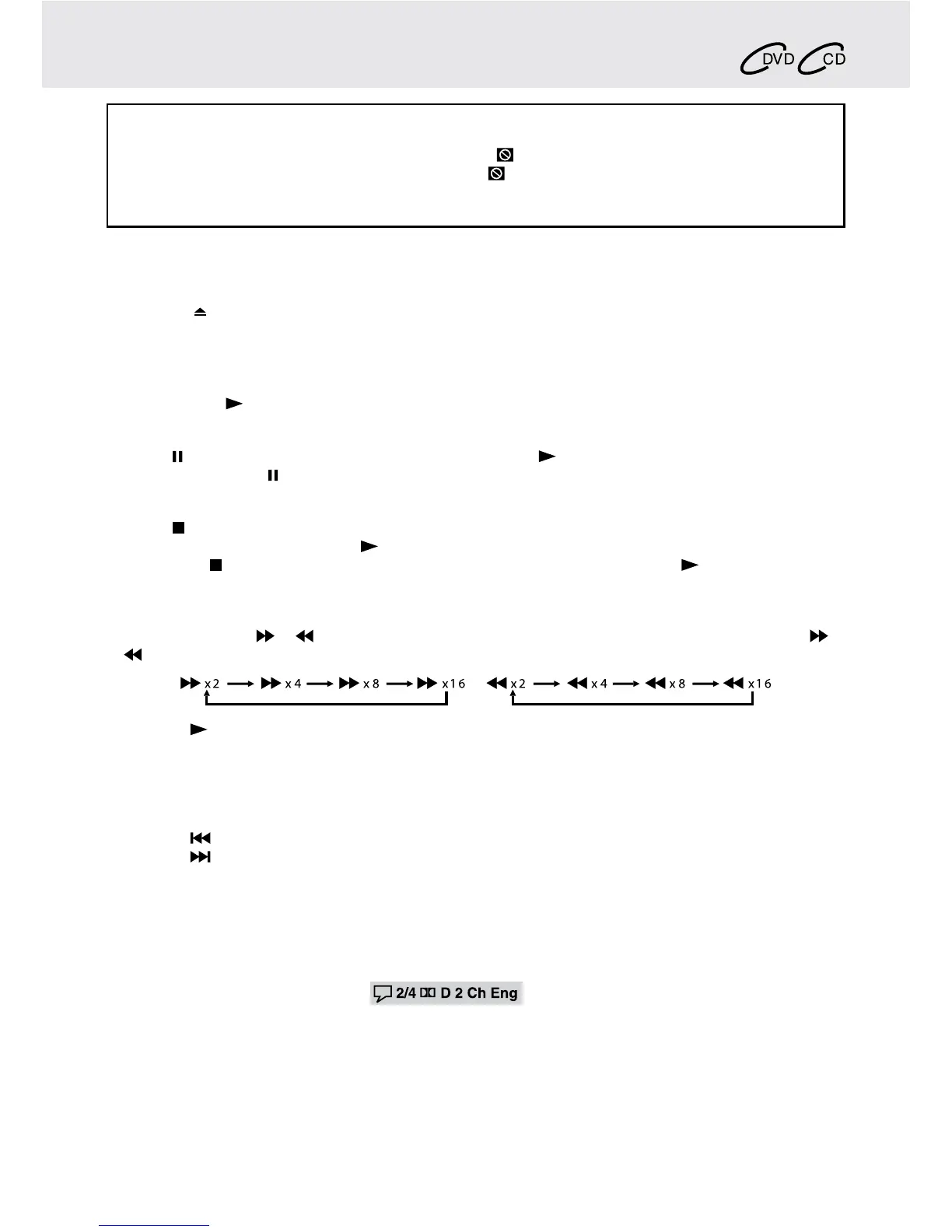
1. PresstheSEARCH or SEARCHbuttonwhenadiscisplaying.EachtimeyoupresstheSEARCH or
SEARCHbutton,theplaybackspeedchangesinthefollowingsequence:
2. Pressthe PLAY button when you reach the desired point to resume normal playback.
Note:
• TheDVDplayermutessoundandsubtitlesduringreverseandforwardscanofDVDs.
• Thefastplaybackspeedmaydifferdependingonthedisc.
Skip (Forward / Reverse)
• Pressthe PREVbuttontogobacktocurrentorpreviouschapters/tracks/titles.
• Pressthe NEXTbuttontoadvancechapters/tracks/titles.
• ForaudioCDs,usethenumberbuttonsontheremotecontroltojumpimmediatelytothedesiredtracknumber.
Audio Selection
OnsomeDVDs,thesoundisrecordedintwoormoreformats.Followthedirectionsbelowtoselectthepreferred
language and sound system.
1. Whileadiscisplaying,presstheAUDIO button to show the current audio format number.
e.g.
2. PresstheAUDIO button repeatedly to select the desired audio format.
Note:
• IfonlyoneaudioformatisrecordedontheDVD,thenumberdoesnotchange.
• SomeDVDsallowyoutochangeaudioselectionsusingthediscmenuonly.Ifthisisthecase,presstheMENU
button and choose the appropriate language on the disc menu.
• Youcanselectdifferentaudiochannels(Stereo,LeftorRight)onanAudioCDbypressingtheAUDIO button
repeatedly.
This owner’s manual explainsthe basic instructions
for operating thisunit. Some DVDsareproducedin
a manner that allows specific or limited operation
during playback. Therefore, this unit may not respond
toalloperatingcommands.THISISNOTADEFECT.
Please refer to the instructions accompanying the
specicDVDinquestionformoreinformationabout
theoptionsavailableonthatDVD.
“
”mayappearonthescreenduringoperation.A“
”meansthatthedesiredoperationisnotpermitted
by the unit or disc.
PLAYING A DISC
Basic playback


 To Next Page