Page 5
User instructions
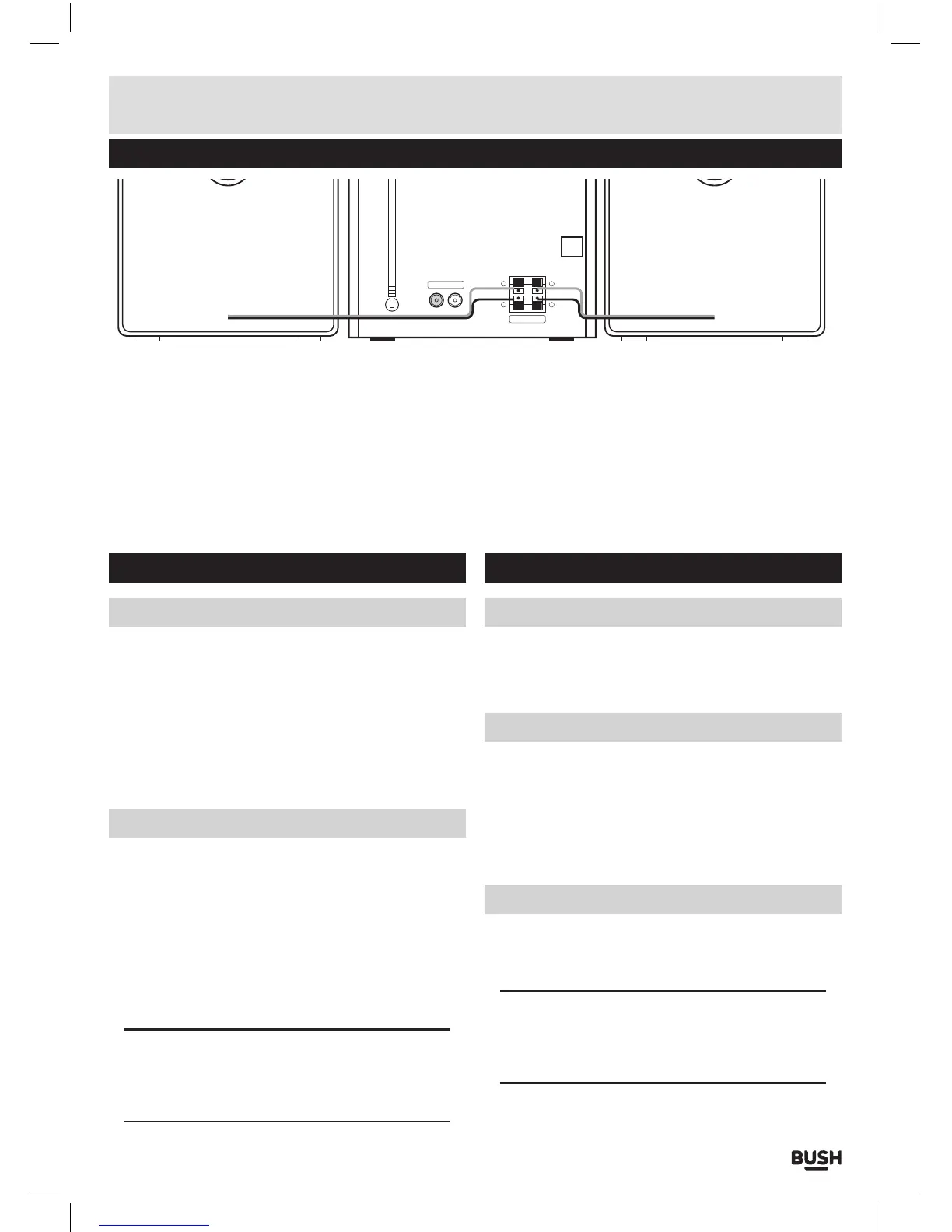
Speaker connections
R
SPEAKER
+
-
L
+
-
LINE-IN
Connect the speaker wires as shown above.
1: Take the RIGHT speaker cable and insert the WHITE
cable into the RED terminal on the rear of the unit
marked with an ‘R’. You will need to push the RED
spring clip towards the rear of the unit to allow the
wire to be inserted.
2: Repeat the process for the BLACK cable from the
RIGHT speaker. But insert this wire into the BLACK
terminal underneath the RED one also marked ‘R’.
3: Take the LEFT speaker cable and insert the WHITE
cable into the RED terminal on the rear of the unit
marked with an ‘L’. You will need to push the RED
spring clip towards the rear of the unit to allow the
wire to be inserted.
4: Repeat the process for the BLACK cable from the
LEFT speaker. But insert this wire into the BLACK
terminal underneath the RED one also marked ‘L’.
Power supply & standby
Connecting the mains power
Before connecting the power, ensure all the speaker
connections (above) are correct & secure.
1: Connect the mains plug to a UK mains outlet.
2: Switch the UK mains outlet ON.
3: Press the POWER button (9) on the main unit.
4: Press the STANDBY button either on the remote
control (21) or on the main unit (2).
Standby function
This function will enter a power saving mode that
enables the unit to be quickly powered on.
1: Press the STANDBY button either on the remote
control (21) or on the main unit (2) to wake the unit
from STANDBY mode.
2: To enter STANDBY mode press the STANDBY button
either on the remote control (21) or on the main unit
(2).
NOTE: This unit is designed to enter STANDBY
mode automatically after 20 MINUTES of
inactivity. Press the STANDBY button to wake the
unit.
General operation
Mute
1: To temporarily silence playback of any mode press the
MUTE button (36) on the remote control.
2: Press once more to resume the audio output.
Volume controls
1: Press the VOL+ button (39) on the remote control
or rotate the VOLUME control (11) clockwise on the
main unit to increase the volume level.
2: Press the VOL- button (38) on the remote control or
rotate the VOLUME control (11) anti-clockwise on the
main unit to increase the volume level.
Switching modes
1: Press the SOURCE button on the remote control
(48) or main unit (5) repeatedly until you reach the
required input.
NOTE: When in CD or USB mode. If no disc is
found, but a USB device is the unit will switch to
USB mode. Likewise if a disc is found but no USB
drive then CD mode will be selected.



 To Next Page