INSTRUCTION, USE AND
MAINTENANCE MANUAL
GB
Page 26 of 67
AT THE END OF MOUNTING OP-
ERATION, THE MACHINE RO-
TATES THE MANDREL IN THE
OPPOSITE DIRECTION OF THE
SAME MOUNTING, SO THAT THE
PREVIOUSLY INSERTED BLOCKS
CAN BE EASILY REMOVED.
AT THE END OF THE UPPER BEAD
MOUNTING THE MACHINE STOPS.
Quickly press the assent pedal (Fig. 16 ref. C) twice:
the tools and the bead breaking rolls reach completely
open position.
The screen page below is displayed.
Now the machine is ready to perform a new cycle with
the same rim and tyre.
Remove the assembled wheel from the mandrel and
position the new wheel to be disassembled on it.
Lock the wheel and bring the valve next to the upper
bead breaking roll.
Press the assent pedal (Fig. 16 ref. C) twice to start
a new tyre demounting/mounting operation.
11.3 "Machine use in “AUTO” mode without
PC management”
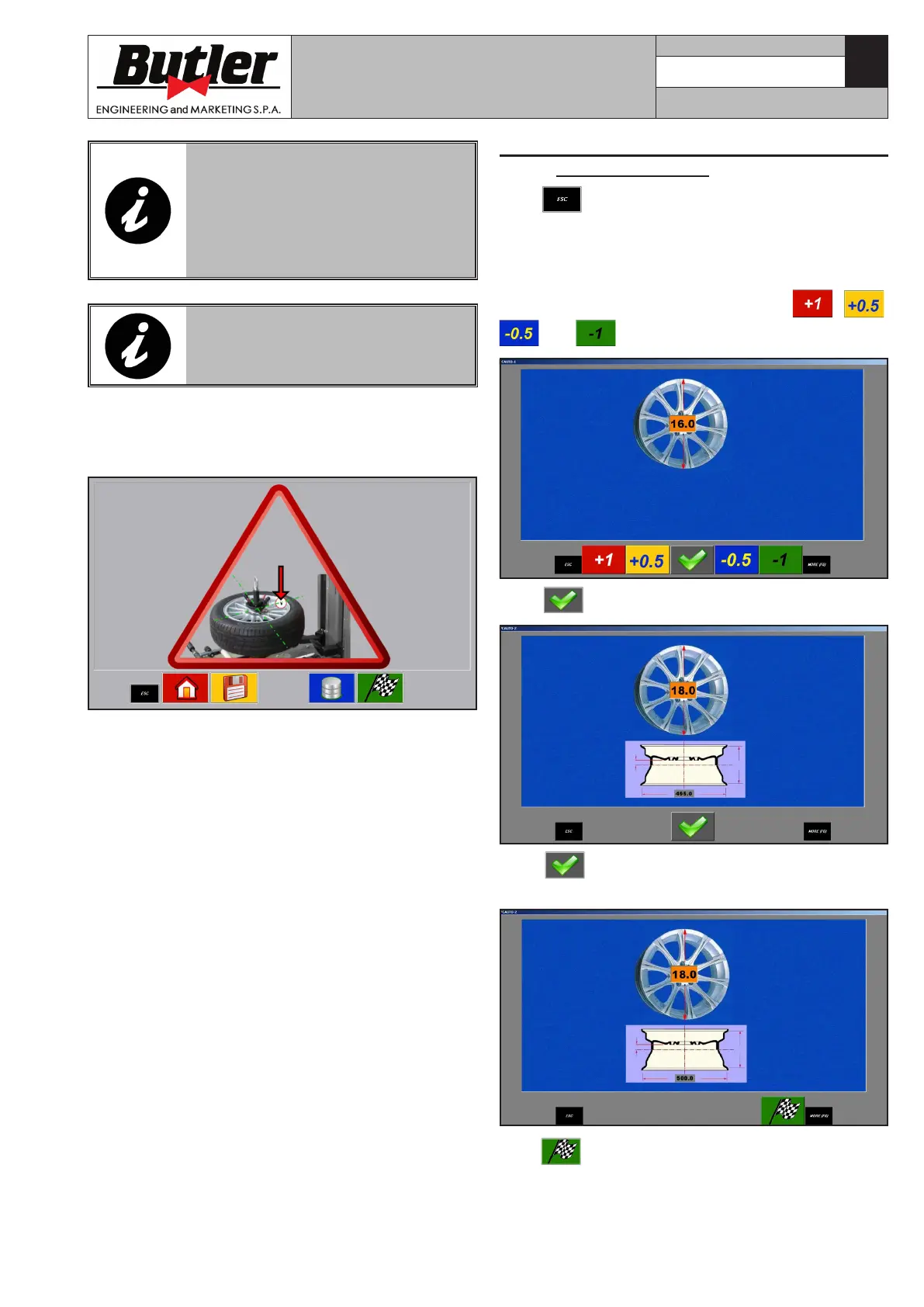
Press key from the screen page with the selection
of the type of program to be used (see Chap. 11.2.3:
“Read in of rim/tyre combination in memory
bank”), the machine is set to “AUTO” without the cycle
management from the PC. This mode allows the setting
of the diameter of the rim at issue: press
, ,
and keys.
Press key to display the following screen page.
Press to confirm the diameter to be used: the
following machine screen page is displayed.
Press : the tools diametrically position themselves
onto the base of the inserted rim: therefore the opera-
tions can be started using the keys on the control panel.
CAPTURE 4 - CAPTURE 4 FI
7104-M007-4_B



 To Next Page