INSTRUCTION, USE AND
MAINTENANCE MANUAL
GB
Page 20 of 67
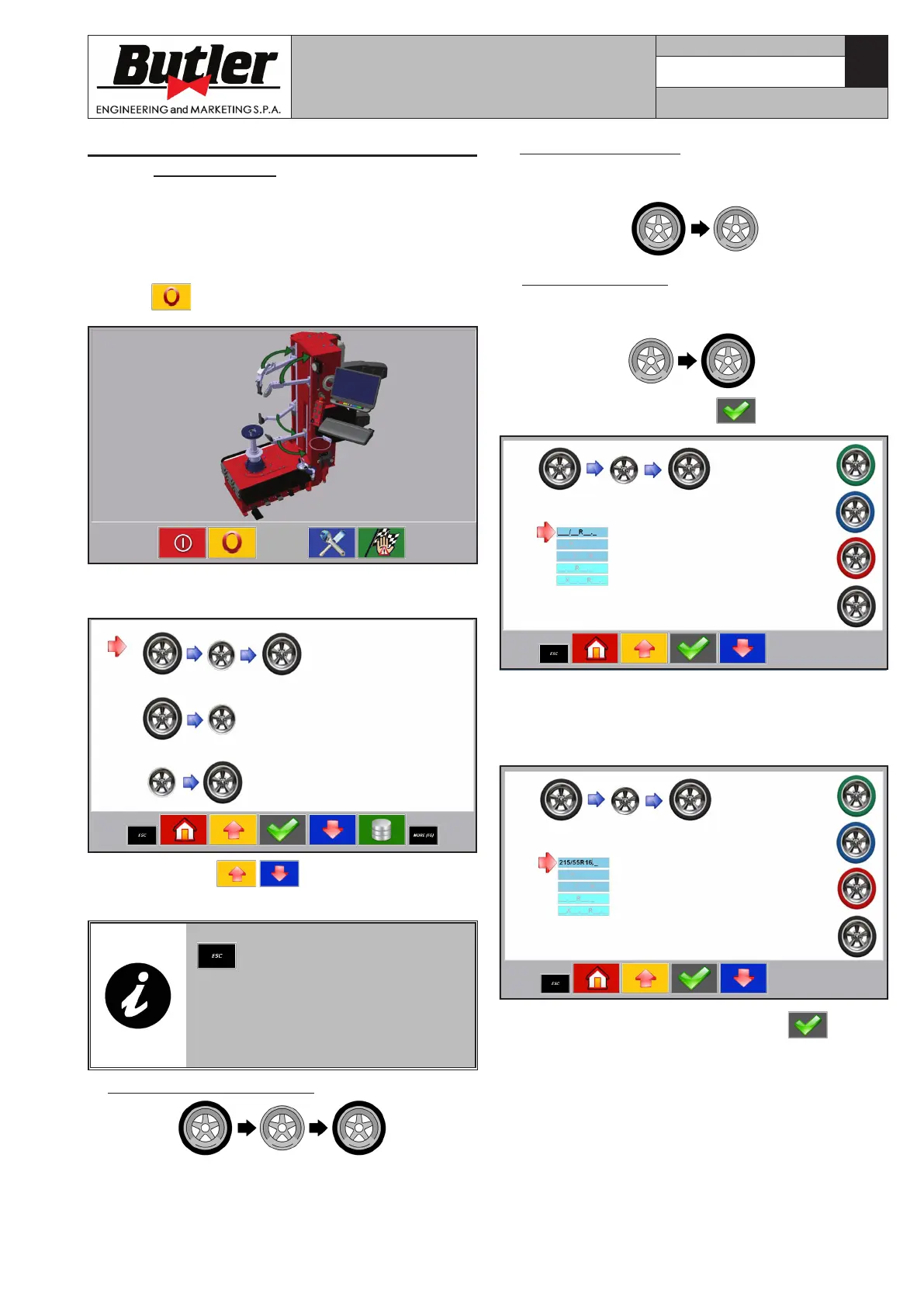
B. Repeated demounting (at the end of an operation,
the machine is automatically set for the following
demounting operation).
C. Repeated mounting (at the end of an operation,
the machine is automatically set for the following
mounting operation).
3. Confirm the selection with key.
4. Keystroke the tyre sizes by the push-button panel.
Such information will subsequently allow to recover
the match tyre/rim from the memory bank (eg:
215/55R16.0).
5. Confirm the entered values pressing .
The more suitable demounting program for the in-
serted sizes will be automatically selected after the
analysis of such data:
• Green coloured tyre (soft program);
• Blue coloured tyre (standard program);
• Red coloured tyre (Run-Fflat or UHP - Ultra High
Performance program).
11.2.3 Read in of rim/tyre combination in
memory bank
The computer is equipped with a memory bank where
rim/tyre combinations can be stored.
In order to enter a new rim/tyre combination carry
out the following operations from the main screen
page (Home):
1. Press
key in order to reset the machine.
At the end of reset operation the screen page below is
displayed.
2. Use the arrows to select the type of cycle
to be executed.
IN THIS SCREEN PAGE, PRESS
TO SET THE MACHINE TO
“AUTO” WITHOUT THE CYCLE
MANAGEMENT FROM THE PC
(SEE CHAPT. 11.3 “MACHINE USE
IN “AUTO” MODE WITHOUT PC
MANAGEMENT”).
A. Tyres mounting/demounting (ordinary activity).
CAPTURE 4 - CAPTURE 4 FI
7104-M007-4_B



 To Next Page