16
PART EERHT
Note. If the home position is not detected within 10 minutes, the main display will show
an Err 1 message to indicate a controller error and an audible alarm will sound. The
error condition can only be cleared by removing and re-applying the power.
IF PROBLEM PERSISTS, PLEASE CALL YOUR BWT STOCKIST OR CONTACT
OUR TECHNICAL HELP DESK ON 01494 838 100.
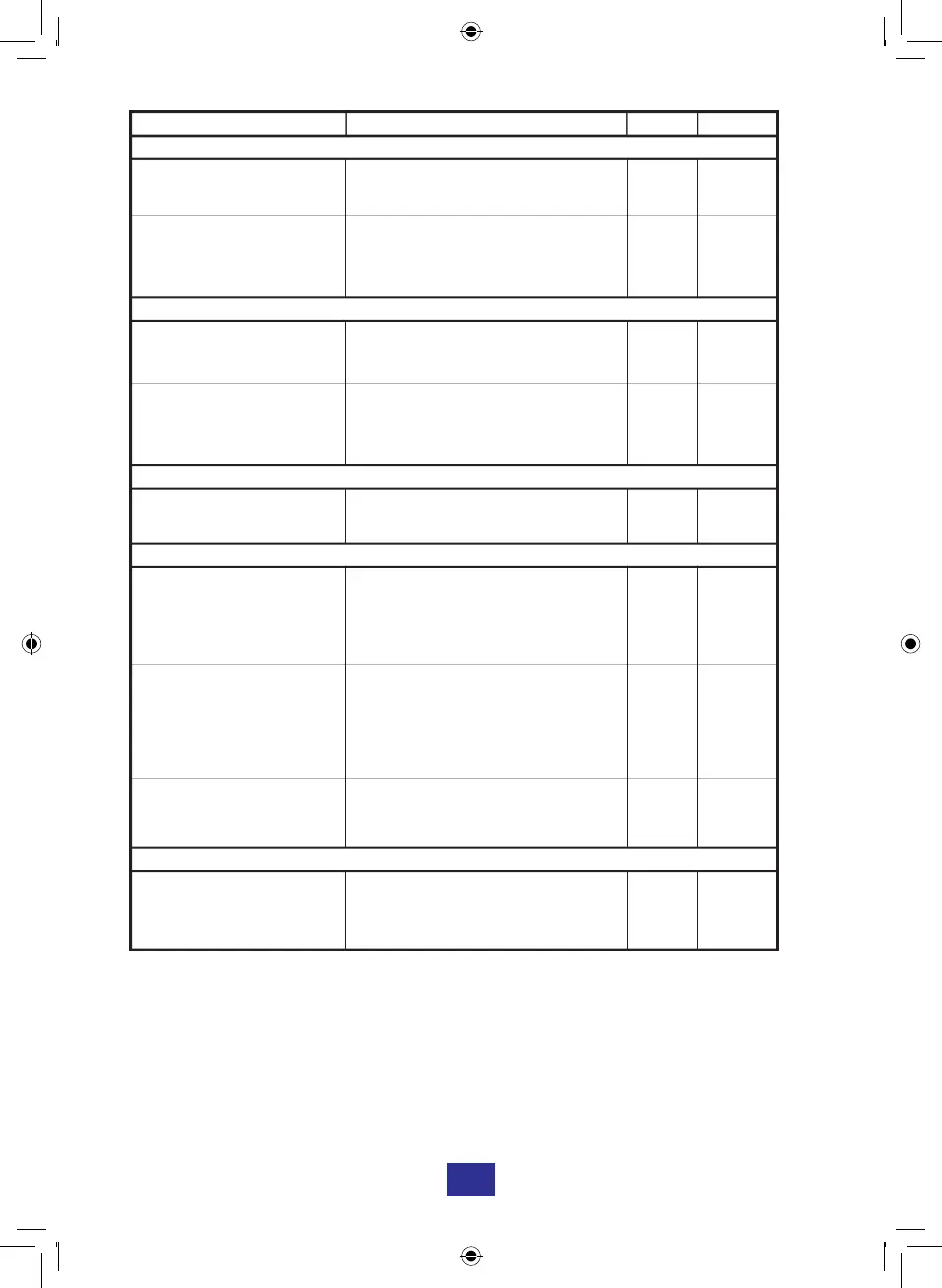
CHECKLIST SOLUTION Page Section
PROBLEM: NO WATER
Is the mains stop valve
open?
Open the mains stop valve. 11 9
Are the inlet and outlet
valves of the water softener
open?
Open the inlet and outlet valves to
the water softener.
11 9
PROBLEM: WATER RUNS FROM THE DRAIN CONSTANTLY
Is the unit in recharge
mode?
If yes, this is normal, wait until the
recharge is complete.
5
There should be no flow to drain in
the service position. Isolate the
softener and call for service
.
11 9
PROBLEM: EXCESSIVE SALT USAGE
Check the hardness
setting.
Reduce the hardness if incorrect. 11-12
PROBLEM: ELECTRONIC DISPLAY
The display shows error
code "Err 1", audible alarm
sounds, (see note below).
Check all the connections are
secure. Turn the power off for 10
seconds then turn back on, allow
the system to reset.
10 5
The display shows error
code "SALt", and an
audible alarm sound.
The low salt alarm is active. Fill the
brine cabinet with salt. Pressing the
SET key will reset the salt alarm to
full capacity of
salt.
10 6
Is the digital display blank? Check the power is turned on and
all the connections are secure.
10 5
PROBLEM: UNIT REGENERATES AT THE WRONG TIME
Is the present time correct?
Is the regeneration time
correct?
Reset the present time.
Reset the regeneration time.
12
12
1
3
12
8
11
9
3


 To Next Page