BYD M6 AUTO Owner’s Manual
Other Equipments 1-97
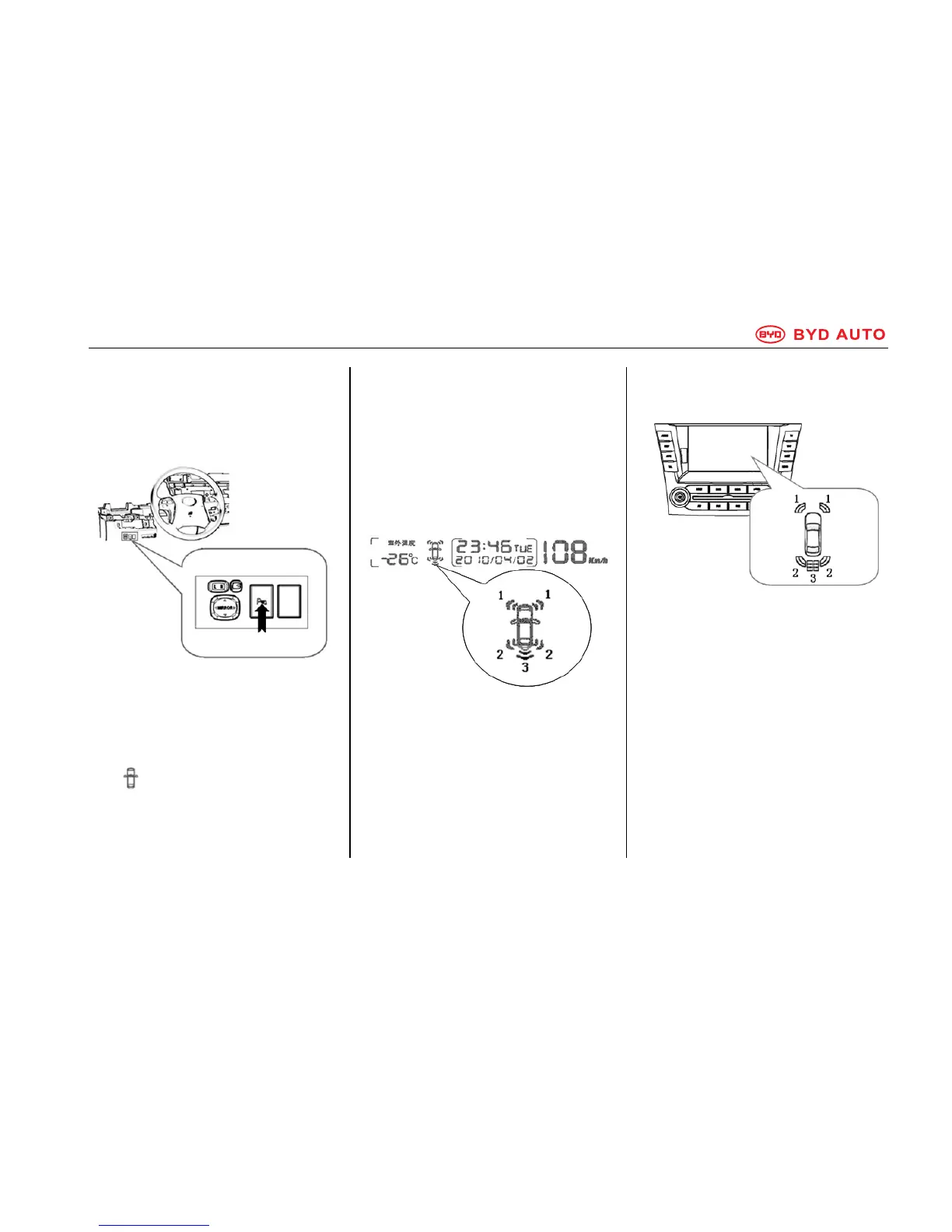
Parking Assist Switch
The parking assist switch is located at
the left bottom side of the steering
wheel.
The parking assist system works if
you press the switch when the Start
button is at ON, and the shift lever is
at P or any gear other than Neutral.
Turn on: press the switch.
The indicator on the multifunction
screen comes on and the buzzer
sounds once.
Turn off: press the switch again.
Display
When an obstacle is detected, an icon
will be displayed on the multifunction
screen and touch screen, depending
on the form of the obstacle and its
distance to the vehicle.
y Multifunction Display
1. Front corner sensors working
2. Rear corner sensors working
3. Rear center sensors working
y Touch Screen Display (if
equipped)
1. Front corner sensors working
2. Rear corner sensors working
3. Rear center sensors working
When an obstacle is detected, the
image will be displayed automatically.
If there is no front or reversing vision
signal, the image will be displayed on
the full screen.



 To Next Page