8
2. Flight
2-5. Pattern Flying
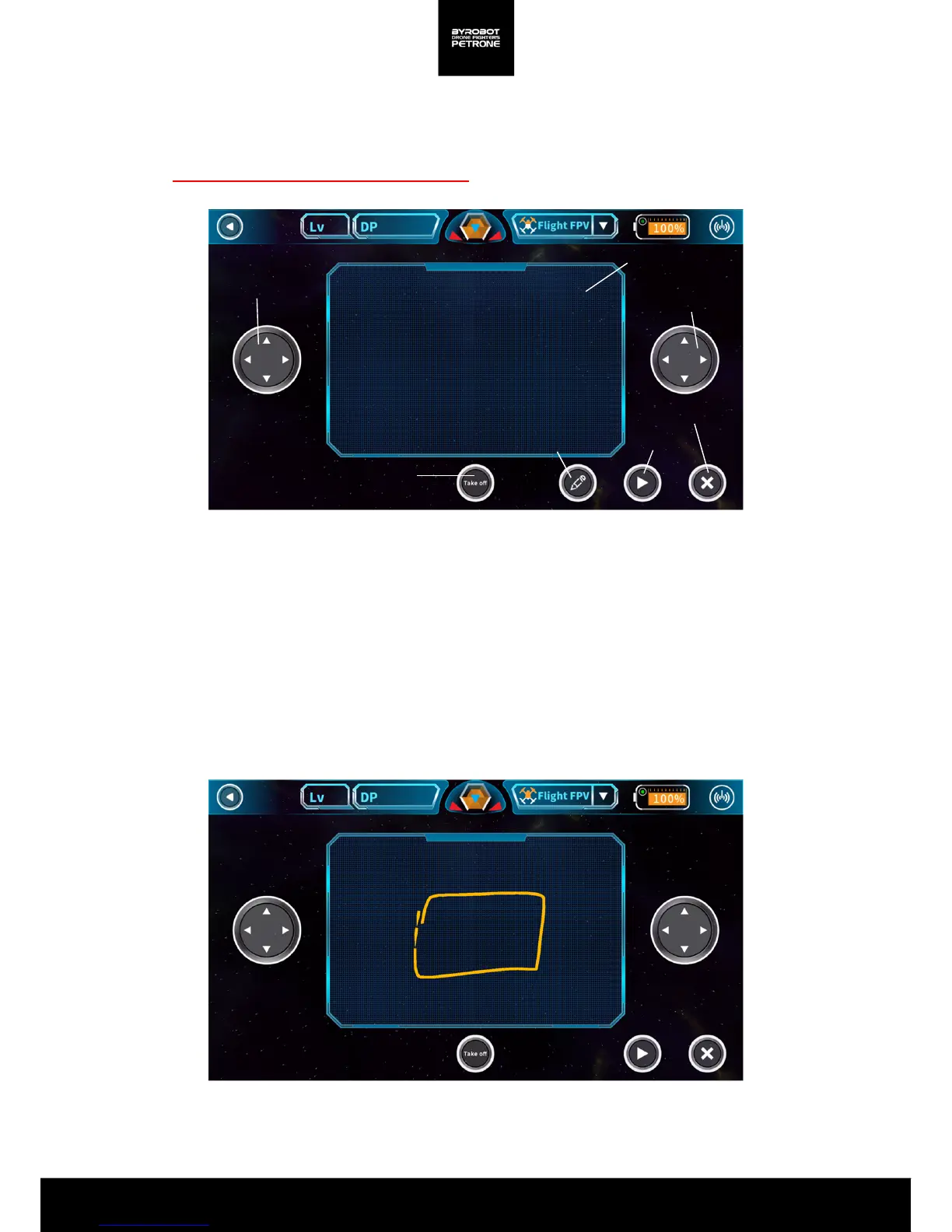
Petrone flies itself through the pattern drawn by the user.
Please ensure the enough space before flight.
<Picture 2-5B. Drawing Patterns>
<Picture 2-5A. Screen for Voice Control>
Left stick
Right stick
Take off / Landing
Delete/Cancel
Drawing Panel
Start to fly
Draw
1. Press the ’Drawing Patterns’ button and draw the pattern you want on the drawing screen.
2. Take off with the ‘Take-off’ button.
3. Use the left and right stick to move it to a suitable space for the pattern flight.
(Look around carefully for obstacles, keep the proper altitude.)
1. Press the ‘Start the Flight’ button to start the pattern flight.
2. In an emergency, you can control by yourself using the left and right sticks.
In addition, You can stop the pattern flight by pressing the “Delete Pattern /Cancel"
button then it will hover at the spot.


 To Next Page