5
2. Flight
2-2-2. Control Changes by settings (See 2-7. Settings to change settings)
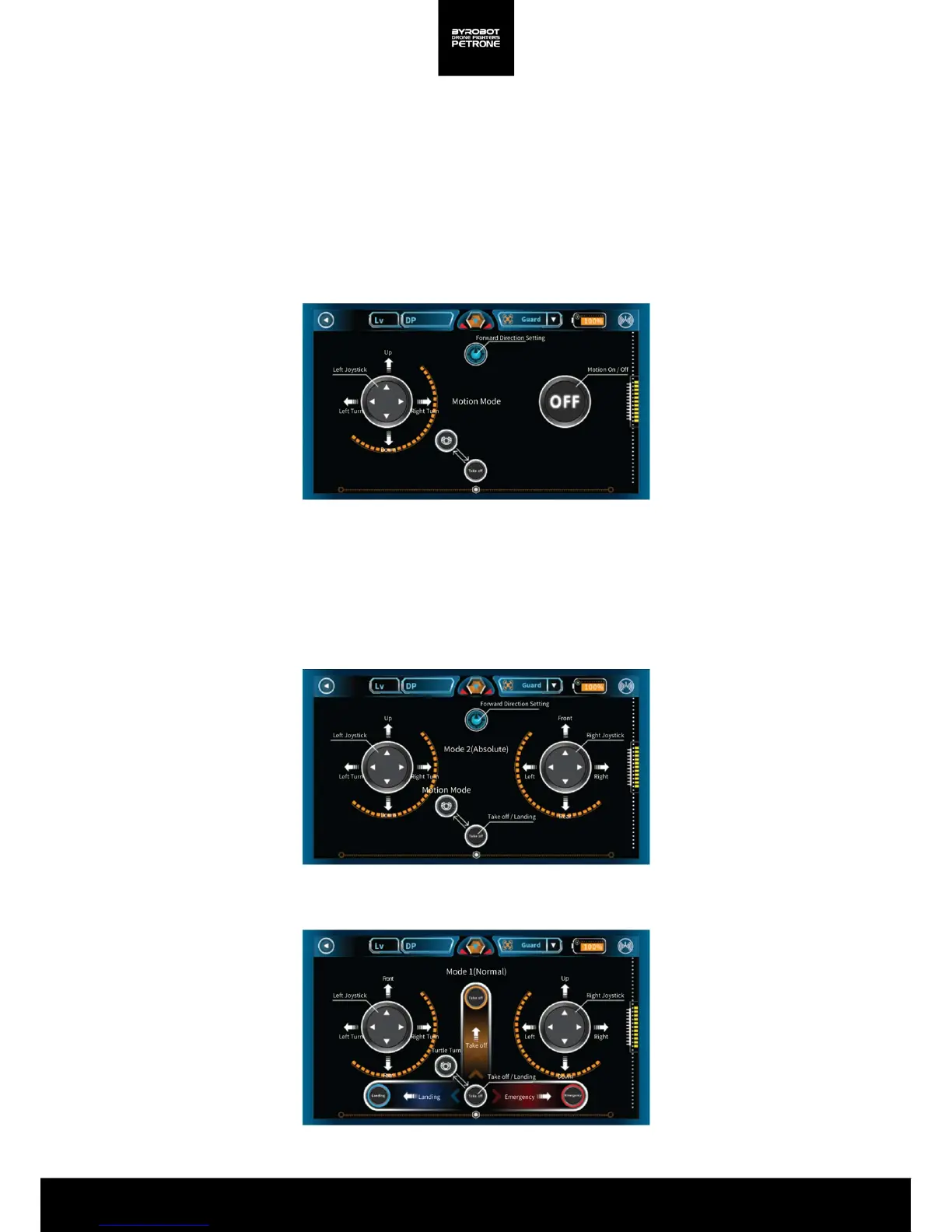
<Picture 2-2D. Screen for Solo Play(Mode 1/Normal)>
Motion Sensor is automatically turned on in Motion Control Mode and you can turn it off
according in some conditions.
You can only move forward/ backward or left/right in Motion Control and to move up/ down
you need to control with the left stick.
The Smartphone used as a controller must have the Gyro sensor.
When set for forward direction, coordinates is set depending on the placed direction of the
airframe, and you can easily steer it regardless of the direction of rotation of the airframe in
flight.
Motion Control
<Picture 2-2B. Screen for Solo Play(Motion Control)>
< Picture 2-2C. Screen for Solo Play(Mode 2/Absolute)>
Absolute(Mode 1, Mode 2, available in Motion Control)
Mode 1/Normal


 To Next Page