Before the actual flight, please practice enough through the Simulator in the
application (See 2-3. Simulator)
2-2-1. Basic Control(Take- off/Landing/Move)
2-2. Start the Flight: Solo Play
4
2. Flight
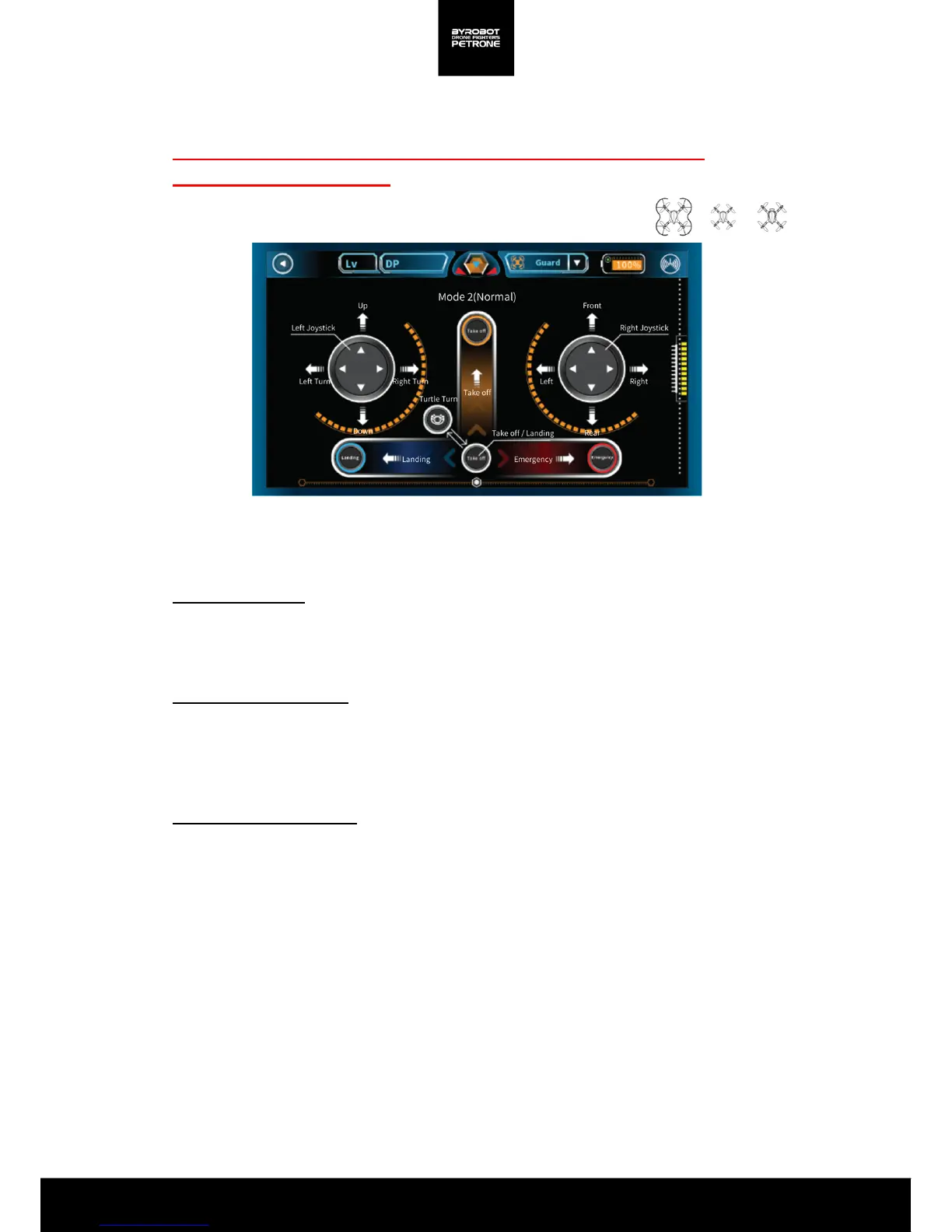
<Picture 2-2A. Screen mode for Solo Play(Mode 2/Normal)>
Take-off
Place the rear green lights of Petrone on a flat ground to point at you.
Press and sweep up the ‘Take off' button located in the bottom center of the screen, then it takes off.
About 20 seconds of time is required for sensor stabilization for hovering.
Please use the steering stick for Up / Down controls after takeoff.
Landing
Press and sweep to the left the ‘Stop' button located in the bottom center of the screen for landing
Airframe slowly descends and when it sits down on the ground completely, propellers stop
automatically .
Please make sure the ground condition is suitable for landing.
Emergency
Press and sweep to the right the 'Stop' button located at the bottom center of the screen and then
hold.
Immediately stop the motor in the urgent situation or when there is a problem with the airframe.
Please be careful for the damage and injury since it may fall off directly when used in the air.
Up / down, left / right turn
Move the left stick up or down, Petrone will rise/ descend.
Move the left stick to the left or right, Petrone will turn left / right at the place.
Forward/ backward, left / right movement
Move the right stick up or down, Petrone will move Forward/ backward.
Move the right stick to the left or right, Petrone will move left / right.
Turtle Turn
If Petrone is upside down at the ground, the takeoff / landing button turns in to a turtle shape.
Press this button then 2 propellers will spin and Petrone will return to its original state.
Use on a flat ground without obstacles.


 To Next Page