6
2. Flight
2-2-3. Drive Mode (See 2-7. Settings to change settings)
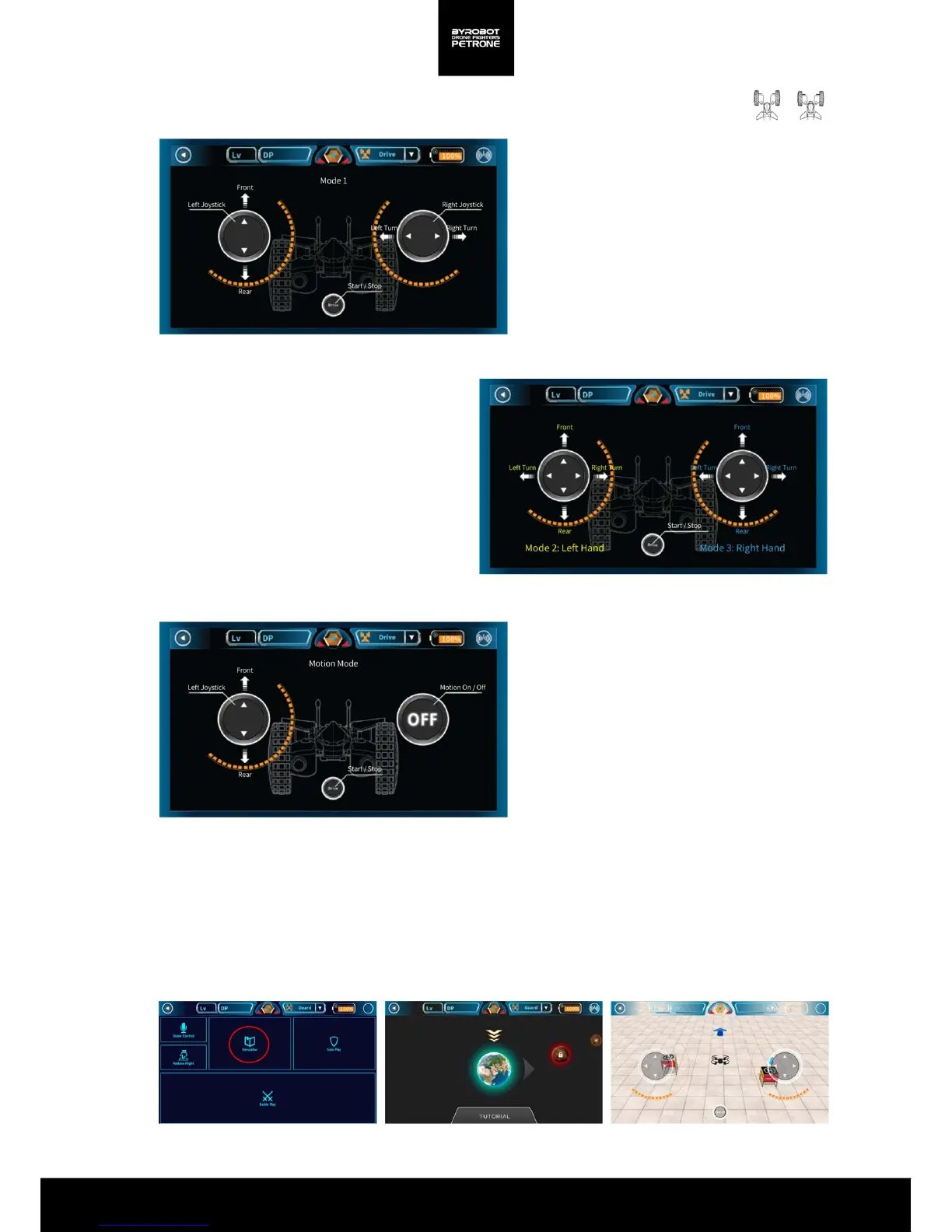
Mode 1(Mode for Both Hands)
Left stick for forward/backward movement
Right stick for left/right turn
<Picture 2-2E. Petrone Drive Mode 1(Mode for Bothe Hands)>
Mode 2 (Left Hand Mode)
Left stick only for forward/backward movement
and left/right turn
Mode 3(Right Hand Mode)
Right stick only for forward/backward
movement and left/right turn
<Picture 2-2F. Petrone Drive Mode 2, 3>
Motion Control
Motion control for left/right turn
<Picture 2-2G. Petrone Drive Motion control>
2-3. Simulator
<Picture 2-3A. Screen for Simulator>
You can learn how to control through a game.
Before the actual flight, please practice the basic flight enough through the Simulator .


 To Next Page