15
4. My Information
4. My Information
1) Open the app and pair with Petrone. (See 1-4. Smartphone Connection)
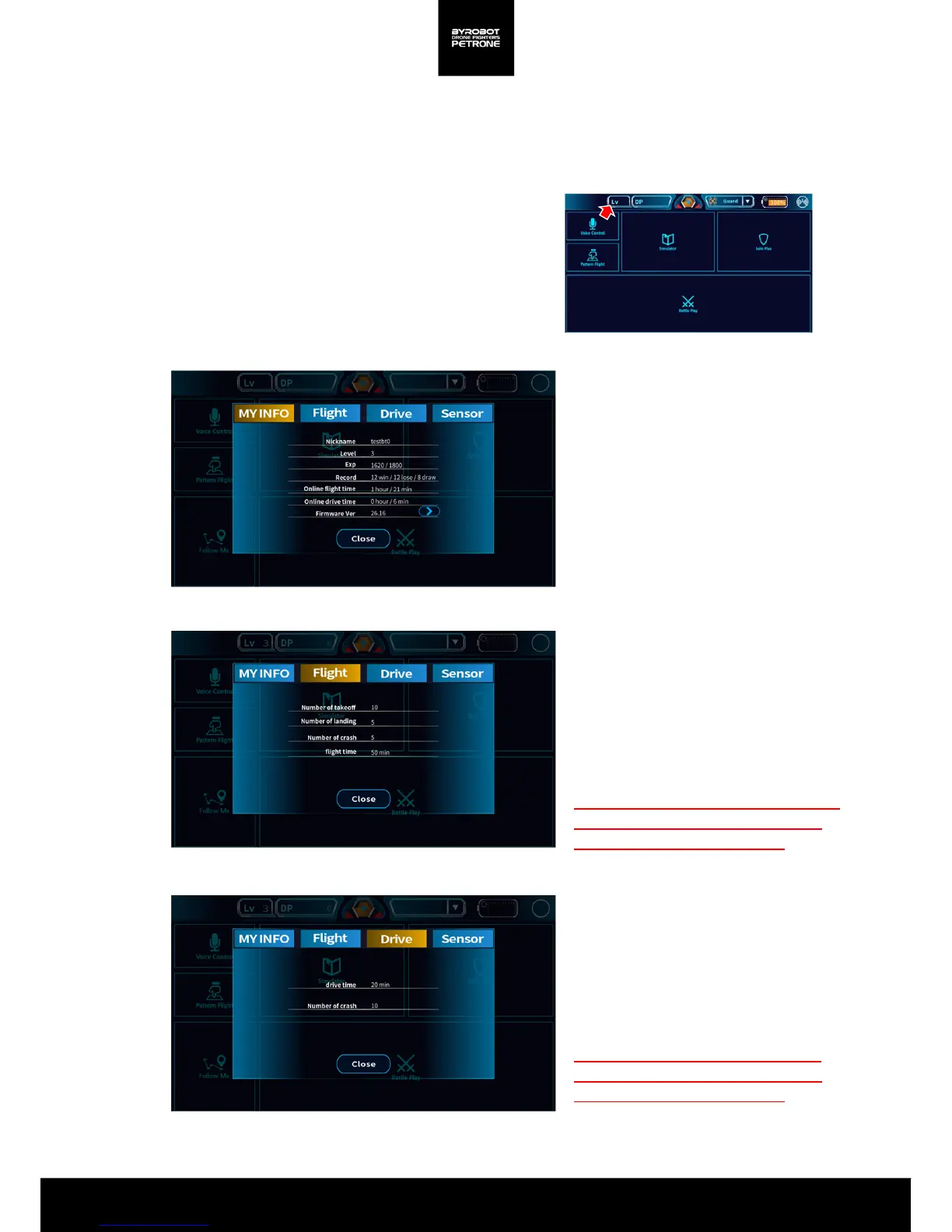
Check My Information after Log In
If you login, you can check your Level /
EXP / Records / Online Flight Time /
Online Travel Time /Firmware Version.
(See 1-3. Account Registration and Log In)
Flight Information
In pairing with Petrone, you can see the
number of Takeoff / Landing / Crash and
Total flight time. You can check without
logging in.
Since the flight time and the number of
crash are reflected in the AS policies,
please check before AS request.
2) Press ‘My Information’ button.
<Picture 3A. My Information(Log In)>
<Picture 4B. Flight Information>
<Picture 4C. Travel Information>
<Picture 3A. My Information>
Travel Information
In pairing with Petrone, you can see
the number of Crash and Travel time.
You can check without logging in.
Since Travel time and the number of
crash are reflected in the AS policies,
please check before AS request.


 To Next Page