2. Flight
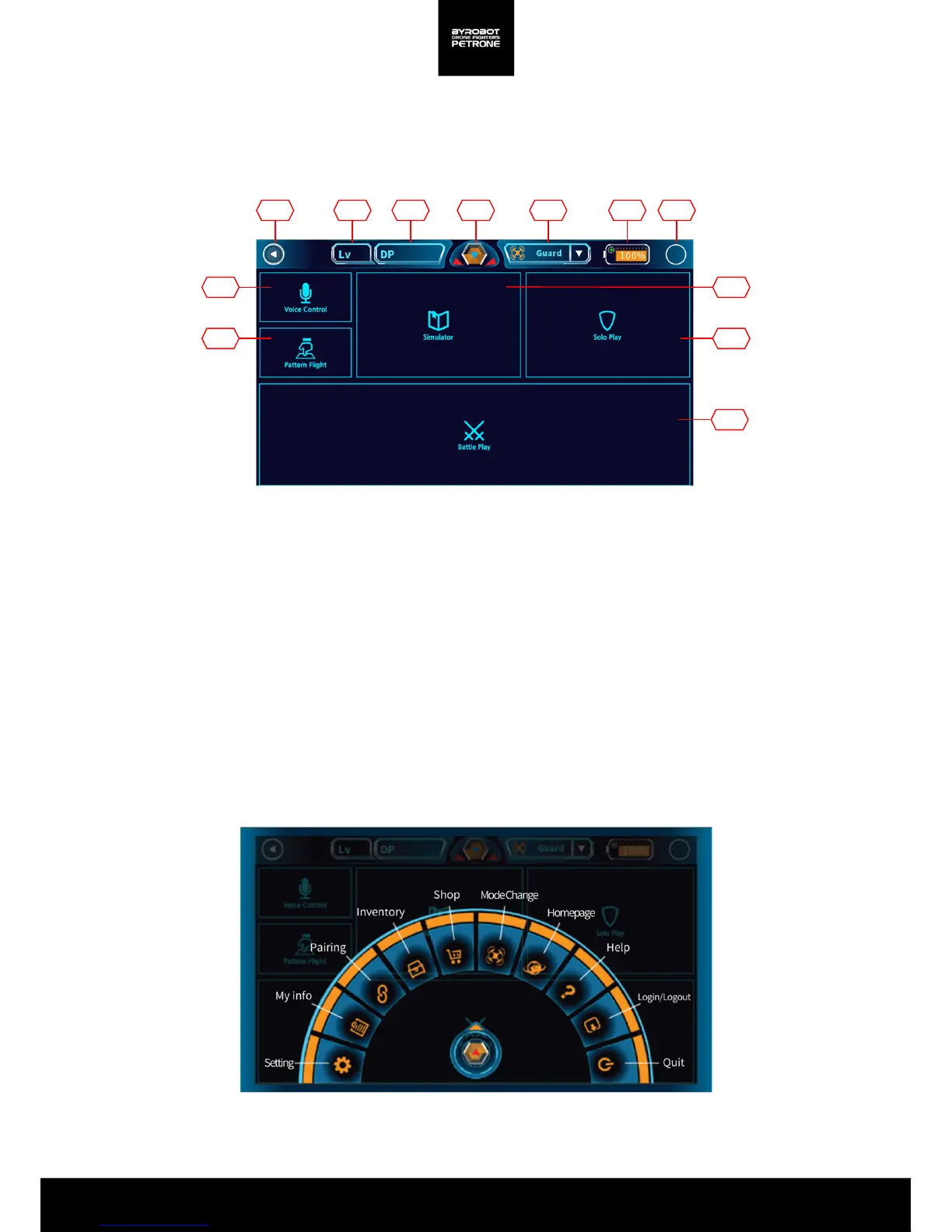
2-1. Manual for Main Screen
1 2 3 4 5 6 7
10
8
911
12
<Picture 2-1A. Main Screen>
<그림 2-1B. Quick Menu Bar>
2
2. Flight
Quick Menu Bar
1. Back: Go back to the previous screen.
2. My Information: Check your account information and usage information for the Petrone.
3. DP Store: Battle item store for the Battle play
4. Quick Menu: Easy access to frequently used menus from anywhere
5. Change Modes: It changes the control mode according to the type of attached accessory.
6. Battery: Battery status of the Petrone
7. Connection Status: The status of the connection with the Petrone
8. Simulator: Control the Petrone in a virtual space and learn basic controls.
9. Solo Play: Fly the Petrone freely.
10. Battle Play: Flight Battle Play with more than 2 Petrones.
11. Voice Control:Control with your voice.
12. Pattern Filght: Control the Petrone by drawing a pattern on the screen.


 To Next Page