9. Instructions for connecting with the remote controller
DREAM factory default settings is that remote controller and aircraft already
matched. please use it as soon as aircraft turn it on. But if remote controller
have been replaced or other reasons that will cause the drone and the remote
controller not match, please complete the match as follows.
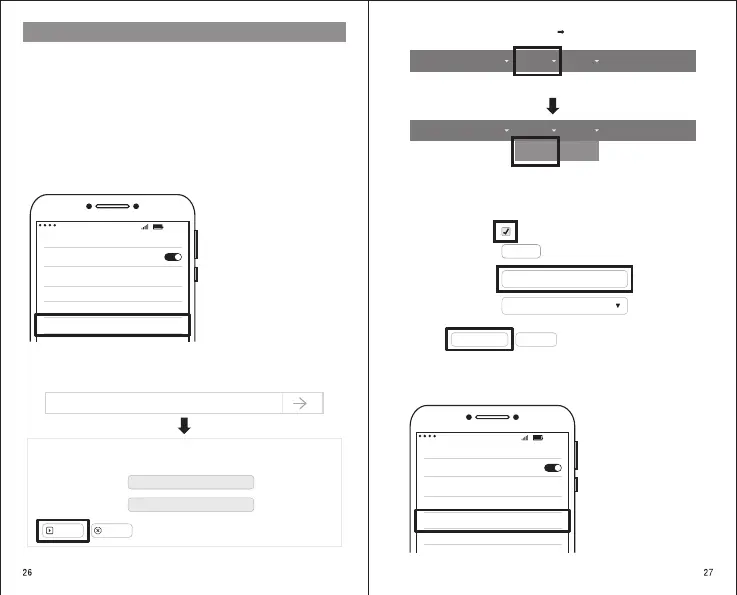
1)、Turn on the drone and remote controller power ;
2)、Turn on the phone,entering Settings - Wireless LAN to view the list of current
Wi-Fi sources. There are three different wifi on the list. Wi-Fi of the drone:
C-FLY-Drone-xxxxx ( xxxxx is the serial number);
Wi-Fi of the remote controller: C-FLY-Controller-xxxxxx;
Remote control settings Wi-Fi: C-FLY-Setting-xxxxx ;
3)、Select C-FLY-Setting-xxxxx and connect:
4)、Enter the website http://192.168.188.1., the account name: root, password:
admin. Click Long in to enter the next page.
09:5 9
WLAN
ON
C-FLY-Drone- xxxxxx
C-FLY-Controller- xxxxxx
C-FLY-Setting- xxxxxx
Select “C-FLY-Setting-
xxxxx” and connect.
192.168.188.1
Authorization Required
Please enter your username and password.
Username
Password
root
admin
Login
Reset
Fill in account: root
Fill in the password
Click to Longin to enter the next page.
LEDE
Status Network System Logout
LEDE
Status Network System Logout
Wireless
6)、Change the serial number of the Drone SSID to match the serial number of the drone,
xxxxx is part of the C-FLY-Drone-xxxxx and save and exit to complete the binding.
Enable
Scan
Drone SSID
Drone Encryption
Scan
C-FLY-Drone-xxxxx
No Encryption
5)、Enter the web page, select Network Wireless.
Click on Network
Click on Wireless
Need to change to the
same serial number
as the drone
Save & Apply
Reset
Click on save and exit
7)、Setting on the phone - select and connect Wi-Fi : C-FLY-Controller-xxxxxx. The remote
controller successfully match to the drone and can operate the drone normally.
09:5 9
WLAN
ON
C-FLY-Drone- xxxxxx
C-FLY-Controller- xxxxxx
C-FLY-Setting- xxxxxx
Select Remote Wi-Fi Once
connected, the binding is
complete.
Must check
Select Network
Select Network


 To Next Page