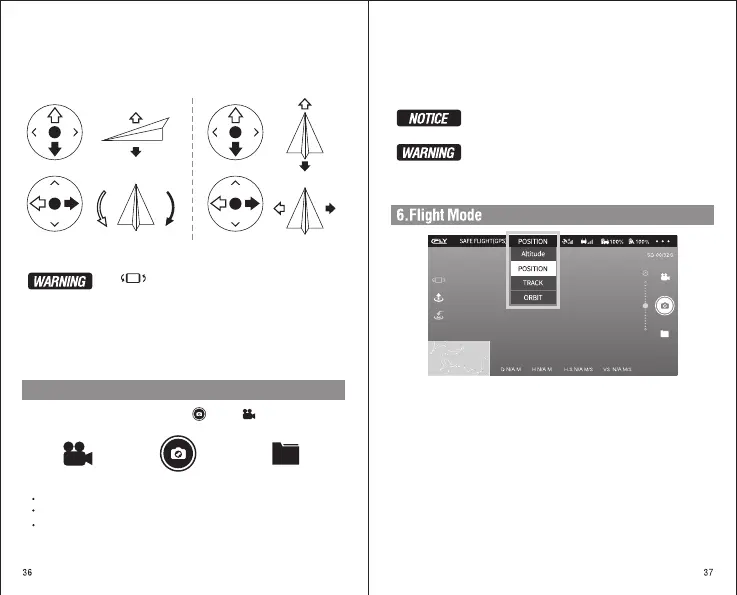
Please keep the phone balance. The phone must support gravity
sensing mode.
Upward
Left joystick Right joystick
Downward
Left
rotation
Right
rotation
Forward
Backward
Left Right
4).After launching the aircraft, it can push the left and right virtual
joystick to fly the aircraft. (The below Picture is in the left hand
throttle mode 2)
Click enable gravity induction, can through shaking phone
manipulation of the aircraft to go forward, backward, or to the left,
to the right flight , the feature depend on mobile phone performance,
please use this feature carefully.
5.Photo and Video
During the flight, you can use the “Photo / Video ” on the APP to take
photos of the current scenery.
Record Video Take Picture
File
Click again video button.The video icon turns white, it means stop recording.
When the video is finished, video is stored in the folder.
Click the “Photo” button to store a photo in the folder.
Click on the "video" button ,the video icon will turn red, and the video will begin.
Aerial photography tips:
1).Carefully check whether the parts of the aircraft are normal before flight.
2).Try to take photos or videos in GPS Position mode.
3).Choose clear, breezy weather for shooting.
4).Test flight before flight in order to shoot wonderful view.
5).Push the joystick as small as possible during the flight to keep the aircraft flying smoothly.
Please do not check the picture or video during the flight, otherwise
it will possibly cause accident.
In order to avoid possible damage and loss, please ensure that the
camera is not shielded. High temperature may caus damage to the
camera and even cause injury.
Click on the section above, pop up the flight mode
selection and select the appropriate mode for flight.
The aircraft can select this mode automatically when the GPS signal is
good, (the green light indicates of aircraft always bright),In this mode,
the aircraft will be automatically positioned via GPS, so it has better
flight stability.
POSITION MODE:
ORBIT MODE:
After entering the mode of “Fly around the point”, the aircraft will rotate
by itself at its current position.Maneuvering the aircraft forward and
backward, can change the radius of the circle.


 To Next Page