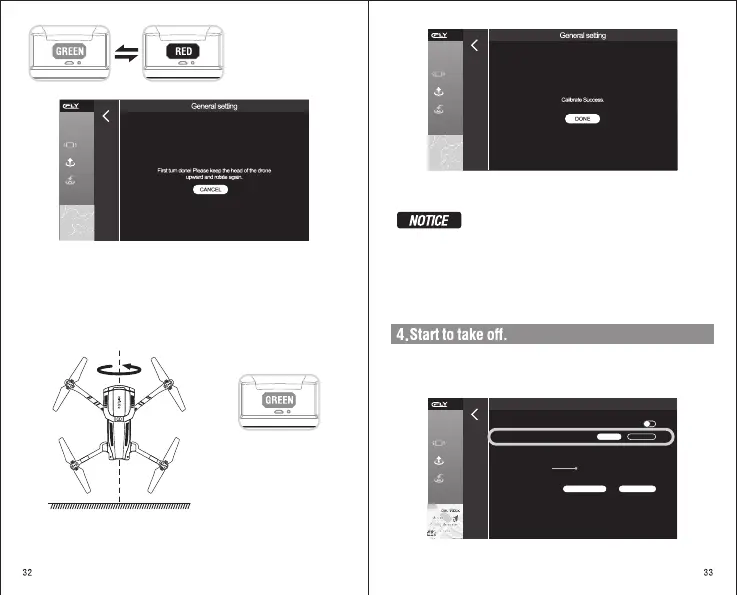
The indicator light turns red
when the horizontal calibration
passes, and the green light
flashes alternately
Displayed on the APP
First turn done! Please keep the head of the drone upward and rotate again.
Second Step: vertical Calibration
Move the aircraft nose up to the ground vertically
After completion: the aircraft
status indicator light will be
switched to green flashing or
always green, and the compass
calibration is successful.
After changing the flight area, please be sure to calibrate the compass
before the first flight.
In the process of use, such as the “Blue and green light flashing”, which
means the compass is abnormal, the compass must be calibrated.
Please keep away from magnetic fields during calibration.
Displayed on the APP Calibrate Success.
The general remote control mode of the aircraft is "left hand mode", which
can change in the c-flyAPP Setting .
1).Select remote control mode
Beginner mode
Virtual Joystick Setting
Voltage
Low power alarm
Sensor calibration
Beginner mode, limited distance 50m, height 30m.
LEFT HAND
RIGHT HAND
-0.0 0% Current power
28%
General Setting
COMPASS CALIBRATION GYRO CALIBRTION


 To Next Page