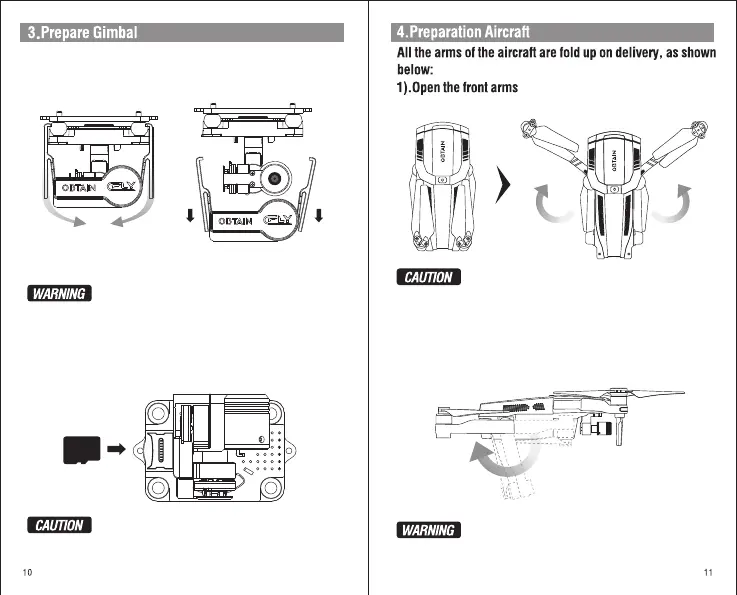
Press fixed bracket on lower end of the bracket lightly,
make it out of the gimbal, then remove it to another place
Please must remove fixed bracket before start-up aircraft,
otherwise it will cause gimbal damaged, Please put fixed bracket
on gimbal after aircraft power off to keep gimbal away from
damaged.
2).Insert the Micro TF Card in the TF Card Slot.
TF
Do not install or remove the Micro TF card when the aircraft
is powered on, otherwise, it causes data storage false.
Please turn the arm carefully. Excessive force will result in
damage to the arm.
Down and backward Rear arm
Do not break the rear arm outside, otherwise the arm will be
damaged.
1).Remove the fixed bracket:
In order to avoid damage in the course of transportation,the gimbal installed
fixed bracket when product packed,Please must remove fixed bracket before
start-up aircraft.
2).Down and backward Rear arm
Expand the front arm horizontally, as follows:
The two rear arms go down first and then rotate backward to the level
state. As shown as below:


 To Next Page