D 30.0 M H 10.0 M H.S 10.0 M/S VS 2.0 M/S
D 30.0 M H 10.0 M H.S 10.0 M/S VS 2.0 M/S
When the aircraft lands and the propeller stops rotating, turn off the aircraft
power (tap once, then press for 3 seconds)
Please turn off the aircraft power before exiting the C-FLY APP
Short-press and then
Long-Press 3s
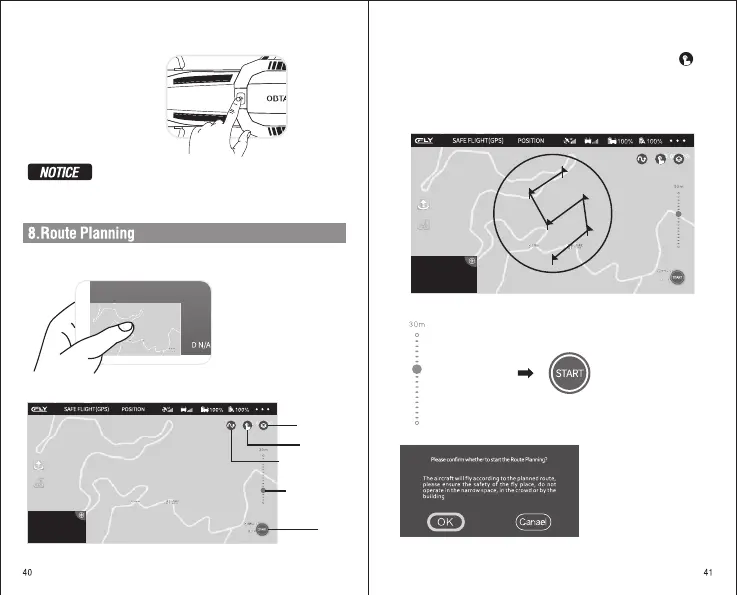
In the APP, click the small map in the bottom left corner, which can bring
up the current map/route planning.
Click the small map to
pop up the route plan
Map Mode
Route Planning
WayPoint
Start
Route planning interface
Start Waypont
Before using, please ensure that the aircraft and mobile phone are fully
charged, and the flight mode is a smart fixed-point mode. Click to
start Route flight, and read the notes
On the current map, click on the screen according to your own needs,
and then click “ START ” to start pointing to the flight and read the notes.
The aircraft will fly to the point of the path by itself.
Draw the air waypoint in the circle
Adjust Height
Adjust the height
(default 30 meters)
Click START
Read the notes and then OK


 To Next Page