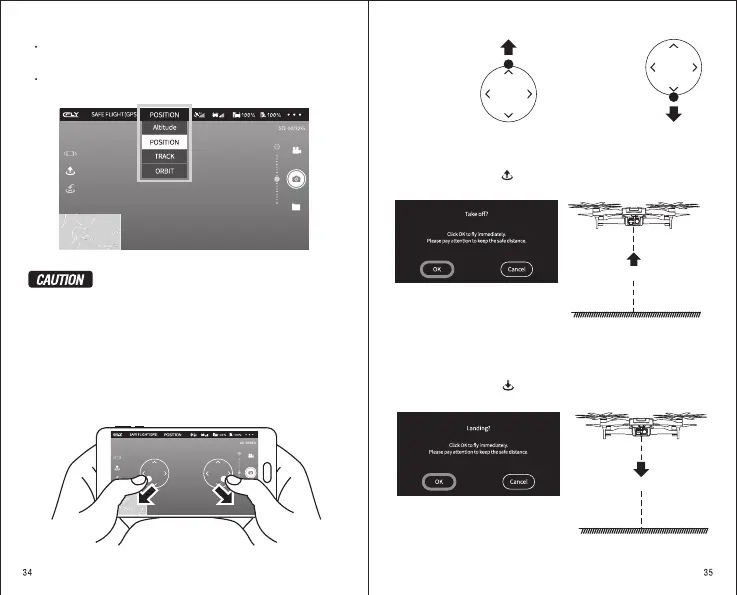
2).The initial mode is “POSITION”
Click on the flight mode and select.
D 30.0 M H 10.0 M H.S 10.0 M/S VS 2.0 M/S
The first flight is recommended to use intelligent GPS Position
mode, familiar with operation and other modes.
Please confirm the remote control mode before flying.
The aircraft light indicates always green light, indicating a good GPS
signal and positioning.
The aircraft status indicator green light flashing, means that the GPS
signal difference is not located.
D 30.0 M H 10.0 M H.S 10.0 M/S VS 2.0 M/S
3).Takeoff mode: please stay away from the aircraft during
this process.
Manually take off: Click on the left and right blank of the screen, the virtual
joystick will be popped and the launch aircraft will be activated through the
virtual joystick.
External take off Aircraft
Default is the mode 2
Take off:
Slowly push the
throttle up and
the aircraft takes
off
Landing:
Slow down the throttle,
and when the aircraft
hits the ground, keep
the throttle Joystick
in the lowest position
until the propeller stops
spinning.
Automatic take-off: Click auto take-off button, pop-up confirmation page.
Click “OK” and the aircraft will take off.
Please pay attention to keep the safe
distance.
1.2m
The aircraft took off to a height of 1.2m
Automatic Landing: Click auto Langing button, pop-up confirmation page.
Click “OK” and the aircraft will Landing.
Please pay attention to keep the safe
distance.
Automatically vertical landing


 To Next Page