EasyManua.ls Logo

C-TEC XFP501E/CA - User Manual

Default Icon
24 pages
Print Icon
To Next Page IconTo Next Page
Loading...
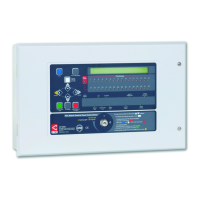
CAST XFP
Networkable
Analogue Addressable
Fire Alarm Control Panel
1 Loop 16 Zone Panel
Part No. XFP501E/CA
1 Loop 32 Zone Panel
Part No. XFP501/CA
2 Loop 32 Zone Panel
Part No. XFP502/CA
User Manual
& Log Book
Approved Document No. DFU5020000 Rev 3
Question and Answer IconNeed help?

Do you have a question about the C-TEC XFP501E/CA and is the answer not in the manual?

Overview

The CAST XFP is a networkable analogue addressable fire alarm control panel designed for comprehensive fire detection and alarm management in buildings. It comes in various configurations, including 1-loop 16-zone, 1-loop 32-zone, and 2-loop 32-zone models, catering to different building sizes and complexity requirements. The panel's primary function is to provide an early warning of fire, facilitating timely evacuation and enabling swift action to mitigate fire spread, all in accordance with a predetermined fire management plan.

Function Description

The CAST XFP panel is an intelligent system that works with a wide range of compatible fire detection devices. It offers detailed information about fire conditions, displaying the name and location of activated detectors and the order in which they triggered an alarm. This granular detail is crucial for efficient response and investigation. The system also provides comprehensive information on fault conditions, aiding in quick diagnosis and resolution.

The panel's operation is governed by a multi-level access system:

  • Access Level 1 (General User): This level is accessible to everyone and allows users to scroll through fire or fault conditions, view disablements or zones under test, test the panel's lamps (LED indicators and display), and determine the total number of times the panel has been in a fire condition. It also serves as the entry point to Access Level 2.
  • Access Level 2 (Authorised User): Accessible to trained personnel, this level enables users to silence or reset fire conditions, resound alarm sounders, disable or enable parts of the system (zones, sounders, outputs, relays, devices), set the panel's time and date, and manage event history. Access is gained via a four-digit code or a keyswitch.
  • Access Level 3 (Engineering/Programming Level): This level is strictly for authorised system engineers for programming and maintenance tasks. Unauthorised access is prohibited to ensure system integrity and safety.

The panel features a clear 80-character display that provides prioritised feedback on the system's status. In normal conditions, it displays the time, date, and system status (e.g., "Normal," "Normal: occupied," "Outputs delayed," "Disablements active," "Zone tests active"), along with site-specific text.

In the event of a fire, the panel's general Fire indicator flashes, the internal sounder pulses, and the relevant Fire Zone indicator(s) flash. The display shows the number and name of the zone(s) in fire, and if multiple zones are affected, it indicates the first and last zones to go into alarm, along with the total number of zones in fire. Pressing the "More Information" button reveals details about the specific device that triggered the alarm and allows scrolling through multiple activated devices.

For 1st-stage fire conditions, which can be configured for zone dependency or investigation delay, the internal sounder pulses, the relevant Fire Zone indicator flashes, and the display shows the last zone to enter a "1st-Stage" fire condition. The "More Information" button provides details about the device and, for investigation delays, counts down the remaining time before a full alarm.

Fault conditions are indicated by flashing Fault indicators, a pulsing internal sounder, and an appropriate fault message on the display, often specifying the zone and device involved. The "More Information" button provides additional details, including the unique ID code and address of the faulty device for service engineers.

Usage Features

The CAST XFP panel is designed for ease of use, with intuitive controls and clear indicators.

  • LED Indicators:

    • Liquid crystal display: Provides detailed system status information.
    • (General) Fire: Flashes red for fire conditions, steady red when silenced.
    • Fire Zones: Flash red for alarm, steady red when silenced, indicating the specific zone(s) in fire.
    • Supply Present: Lit green when all power supplies are functioning.
    • Test: Lit yellow when in walk test mode.
    • Accessed: Lit yellow when in Access Level 2 or 3.
    • General Disablement: Lit yellow if any zone, sounder, output, or relay is disabled.
    • Phased Evacuation: Flashes yellow during phased evacuation.
    • General Fault: Flashes yellow for fault conditions, always accompanied by another fault indicator.
    • Power Supply Fault: Lit yellow if power supply, mains, or battery issues exist.
    • System Fault: Lit yellow for system errors (e.g., microprocessor fault); remains lit until reset at Access Level 2/3.
    • Sounder Status: Flashes yellow for faulty sounders or sounder disablement.
    • Delays Running: Flashes yellow if output delays are programmed or running.
  • Button Controls:

    • More Information: Displays additional details on fire or fault conditions.
    • Scroll Up/Down (▲/▼): Used to navigate vertically through fire/fault conditions, user menus, manipulate settings, and input codes.
    • Accept (►): Used to scroll horizontally through menus, accept options, and input codes.
    • Escape (◄): Used to escape options and input codes.
    • Menu: Provides access to user menus.
    • Silence Internal Sounder: Silences the panel's internal sounder.
    • Control Panel Reset: Resets the panel (Access Levels 2 & 3 only).
    • Silence / Resound Sounders: Silences or resounds system sounders (Access Levels 2 & 3 only).
    • Investigate: Starts the investigate timer function (Access Levels 2 & 3 only), if enabled.
  • Keyswitch Control: Turning the keyswitch to position 'I' grants instant Access Level 2.

Maintenance Features

The CAST XFP panel incorporates features that support routine maintenance and system integrity.

  • Routine Weekly Testing: Users are advised to perform weekly tests, including an indicator lamp test, operating a manual call point or automatic detector, checking sounder operation, and resetting the system. This ensures all zones are tested in rotation over time.
  • Routine Monthly Testing: Authorised service personnel should verify the system's standby power supply or batteries monthly.
  • Quarterly and Periodic Inspection, Testing, Servicing, and Maintenance: An ongoing periodic plan, compliant with BS5839-1 Clause 45, is recommended. This work should be carried out by a competent specialist fire alarm servicing organisation.
  • Lamp Test Function: Available at Access Level 1 and 2, this function allows users to test all LED indicators and the display to ensure they are working correctly.
  • Alarm Counter: The panel tracks the total number of fire alarm conditions, which can be displayed and cleared at Access Level 2. This helps monitor system activity and identify potential issues.
  • Event Log: The panel maintains an event log of up to 499 events, which can be viewed and reset at Access Level 2. This log provides a chronological record of system activities, aiding in troubleshooting and compliance.
  • Disablement Functions: At Access Level 2, authorised users can temporarily disable zones, sounders, outputs, relays, devices, or fault relays for maintenance purposes. This allows for isolated testing or work without triggering false alarms or unnecessary activations. All disablements should be regularly reviewed and re-enabled when no longer necessary.
  • System Set-Up Data Chart: This chart, to be completed by the system engineer, records critical information about zone functions, including normal operation, dependencies, investigate facilities, and output delays. It also records changes to the Access Level 2 code.
  • Fire Alarm Log Book: A comprehensive log book is provided for recording all system events, including tests, fire alarms, false alarms, faults, and maintenance activities. This is crucial for compliance with regulations like BS5839-1 and for maintaining a complete history of the system's operation. It includes sections for user details, site address, responsible persons, system design/installation/commissioning/acceptance/verification details, and service contact information.

The CAST XFP panel is designed to be a robust and reliable fire alarm solution, offering detailed control and monitoring capabilities to ensure the safety of occupants and the protection of property. Regular maintenance and adherence to user responsibilities are key to its effective operation.

C-TEC XFP501E/CA Specifications

General IconGeneral
TypeAddressable Fire Alarm Control Panel
Loops1
Sounder Circuits2
Monitored Inputs4
Programmable Relays3
Event LogUp to 500 events
Input Voltage230V AC
Number of Auxiliary Outputs2
Operating Temperature Range-5°C to +40°C
Dimensions385mm x 310mm x 90mm
StandardsEN54-2, EN54-4
Battery Capacity7Ah (Maximum)
Battery Backup24 hours
Relative Humidity95% non-condensing
Weight8kg

Related product manuals