EasyManua.ls Logo

CAB PX Q Series - User Manual

CAB PX Q Series
30 pages
Print Icon
To Next Page IconTo Next Page
Loading...
Service Manual
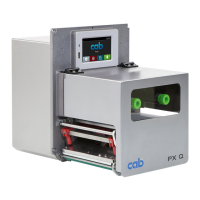
PX Q
MADE IN GERMANY
Print Module

Questions and Answers

  • N
    Natalie Morales MDAug 8, 2025
    How to fix communication issues with CAB PX Q Industrial Equipment interface?
    • J
      James GarciaAug 8, 2025
      If communication via an interface on your CAB Industrial Equipment is not functioning, verify that the interface configurations of the printer and computer match. For an Ethernet connection, confirm the IP address and subnet mask are correct. Inspect the interface cable for any damage, and if needed, replace it. If the interface has completely lost functionality, consider replacing the PCB CPU.
  • W
    wshahAug 12, 2025
    What to do if CAB PX Q Industrial Equipment prints no image but transports medium?
    • R
      ronnie77Aug 12, 2025
      If your CAB Industrial Equipment is transporting the medium but not producing a print image, start by checking the plug connections at the printhead. Next, examine the printhead cable for any signs of damage; replace it if necessary. Also, check the automatic ribbon saver. If these steps don't resolve the issue, you may need to replace either the printhead or the PCB CPU.
  • E
    erinhoodAug 16, 2025
    How to troubleshoot medium transport problems in CAB PX Q Industrial Equipment?
    • A
      Alexandria YorkAug 16, 2025
      If the medium is not being transported in your CAB Industrial Equipment, check the electrical connections between the PCB CPU and the motor, and inspect the drive mechanism. If problems persist, consider replacing the PCB CPU or the motor.
  • T
    Tina RochaAug 20, 2025
    Why does my CAB PX Q have no display function?
    • X
      xjohnsonAug 21, 2025
      If your CAB Industrial Equipment's display is not functioning, first check the cable connection between the PCB CPU and the control panel. If the connection is secure, the next steps are to replace the control panel or the PCB CPU.
  • E
    Eric BarrettAug 26, 2025
    What to do if CAB Industrial Equipment shows voltage too low 24 V?
    • J
      jeffrey69Aug 26, 2025
      If the voltage is too low (24 V) in your CAB Industrial Equipment, check the voltage at measurement point +24V. If the voltage is too low, replace the power supply unit. If the voltage is correct, replace the PCB CPU.
  • C
    Crystal ButlerAug 29, 2025
    How to fix broken printhead thermistor in CAB Industrial Equipment?
    • D
      dhoweAug 29, 2025
      If the printhead thermistor is broken in your CAB Industrial Equipment, and it is determined that the thermistor at the printhead is defective, replace the printhead.
  • K
    Kristen HarrisonSep 3, 2025
    What does voltage error V mean on CAB PX Q Industrial Equipment?
    • T
      tina43Sep 3, 2025
      If the CAB Industrial Equipment shows a voltage error indicating that the voltage of the battery on the PCB CPU is too low, replace the PCB CPU.

CAB PX Q Series Specifications

General IconGeneral
Voltage Rating100 - 240 V AC
Print MethodThermal Transfer
Print Resolution203 dpi
InterfacesUSB, Serial, Ethernet
TypeIndustrial Printer
MaterialMetal
Standards ComplianceCE, FCC, RoHS

Related product manuals