EasyManua.ls Logo

CADDX xGenConnect - Page 131

Default Icon
166 pages
Print Icon
To Next Page IconTo Next Page
To Previous Page IconTo Previous Page
Loading...
xGenConnect Installation and Programming Guide 119
Channel set up for push notifications is automatically performed by the
UltraSync+ app when required. The panel will assign the next available
channel and matching event list number. No configuration via the web pages
or DLX900 is required.
Programming Sequence
6. Communicator
17. Event Lists
5. Channels
a) Options
b) IP Config
c) Ethernet
d) Radio
e) Dial IP
6. Communicator
f) Email
17. Event Lists
g) Remote Access
h) System Event Reporting
18. Channel Groups
18. Channel Groups
Instructions
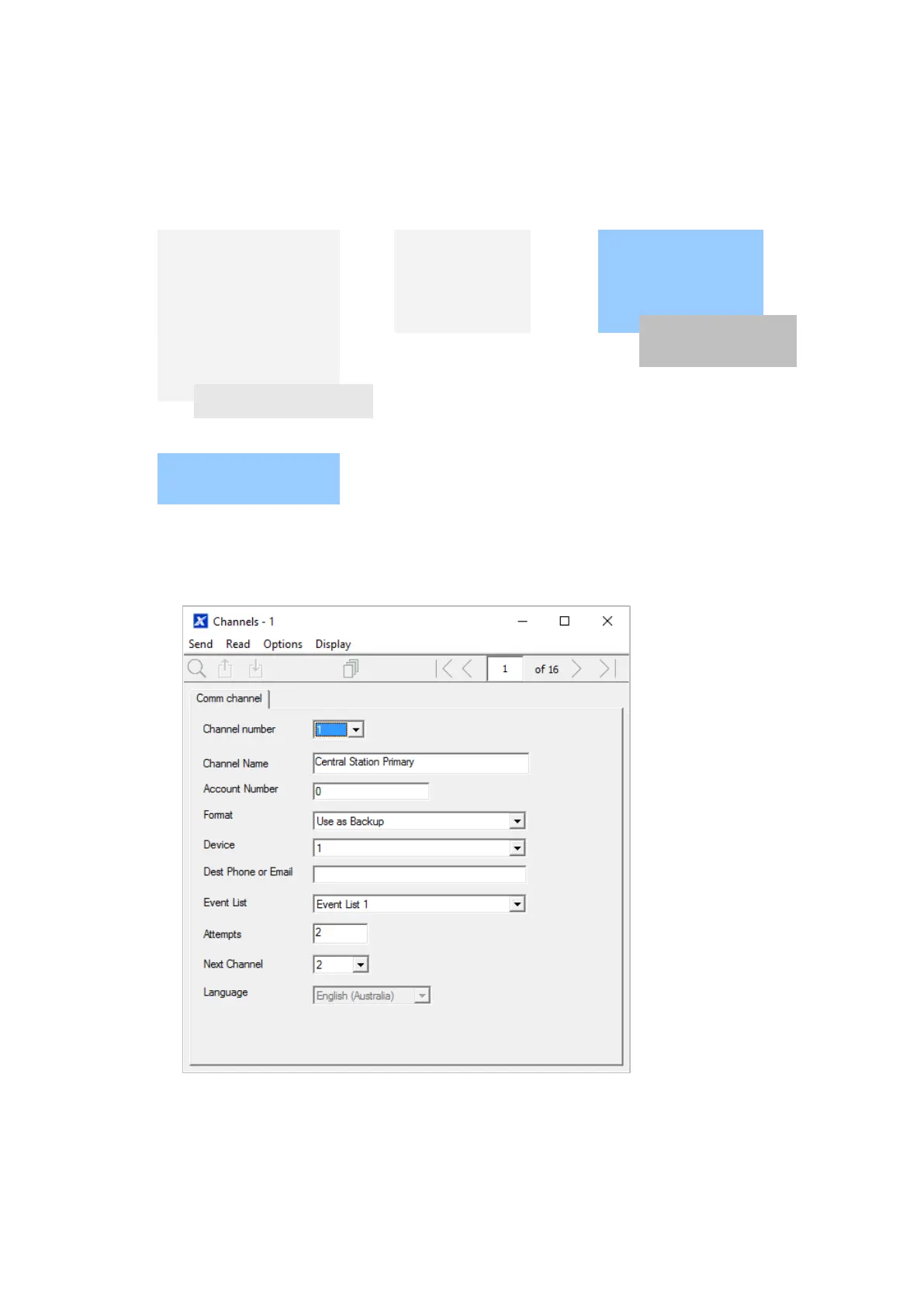
1. Go to Channels.
2. Enter an Account Number up to 8 digits, hex values are accepted.
3. Select the Format of the communication channel, this will automatically use
the settings programmed for that Format in the Communicator menu.
4. Select the reporting device, by default Device 1 is the xGenConnect panel.

Table of Contents