EN1805CMINSA Rev. 5 2021-10
47
www.cafection.com 800-561-6162
SERVICE & INSTALLATION MANUAL - Encore 29
Service Mode
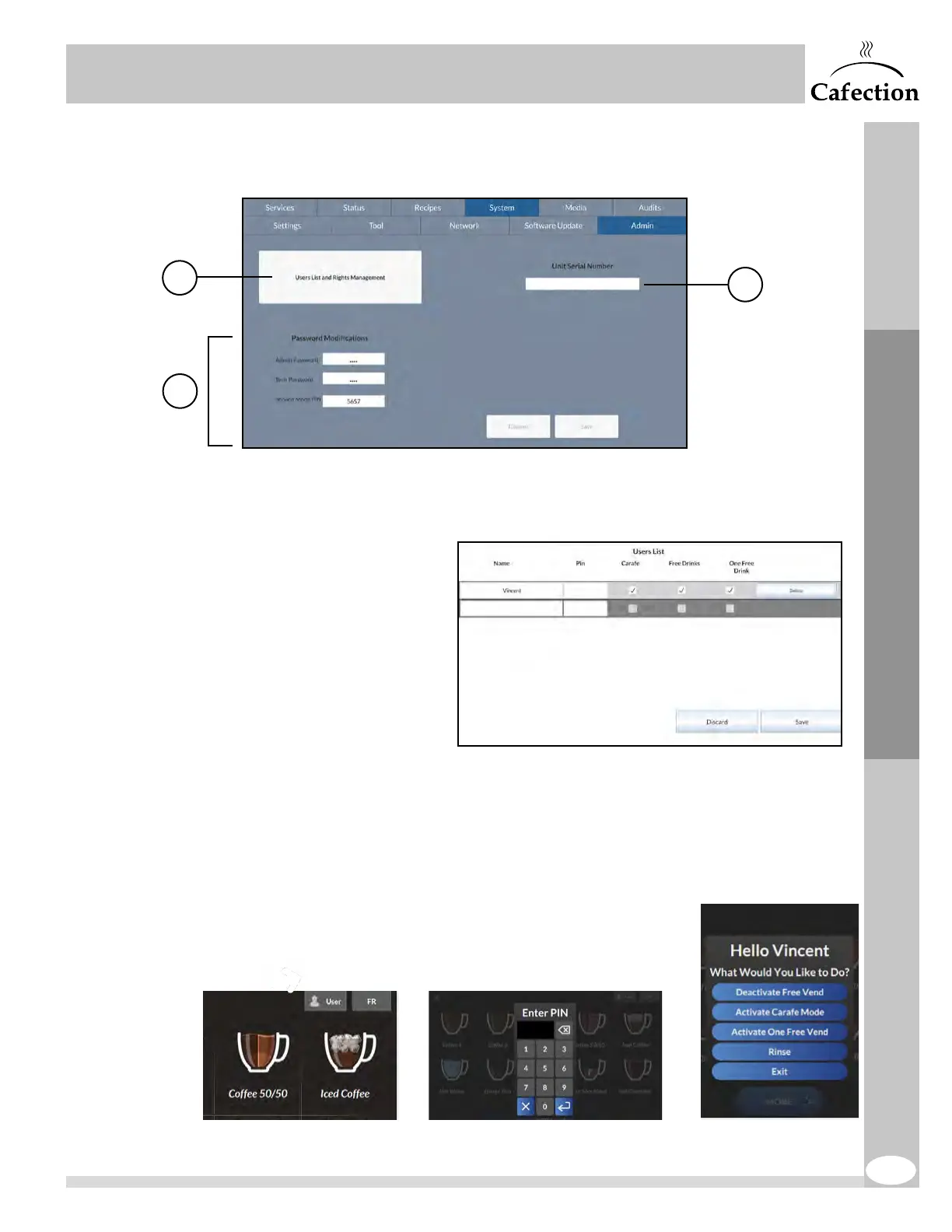
6.6.5 Admin Sub Tab
The Admin sub tab is available to level 4 users only (see section6.1).
1. This button is used to create a list of users authorized to activate Carafe mode,
FreeVend mode and/or order one free drink directly from the selection screen.
- To create a new user,
click on a blank field
under the Name section
and enter the name of
the user.
- Enter a PIN from 1 to
9999 (for a minimum
security, a PIN of 4digits
is recommended).
- Check the box for each
authorization that needs
to be granted to this
user.
- Press on Save & Exit and save changes.
If at least 1 user is created, a user icon appears on the selection screen (top right
corner). When the user presses on this button, a pop-up window with a numeric
keyboard appears. Once the user has entered a correct PIN, he will be able to activate
the authorization(s) he has been granted. If the user enters an incorrect PIN five times
in a row, the user icon will be locked. To unlock it, enter and exit
Service mode by tapping in order on the top left, bottom left
and bottom right corners of the screen (see section6).
1
3
xxxx-xxxx-xxxx-xxxx
2



 To Next Page