ENCORE LITE Rev. 3 05/2018
www.cafection.com 800-561-6162
48
SERVICE & INSTALLATION MANUAL for Cafection's Encore Lite
Service Mode
Wi-Fi (Wireless Network)
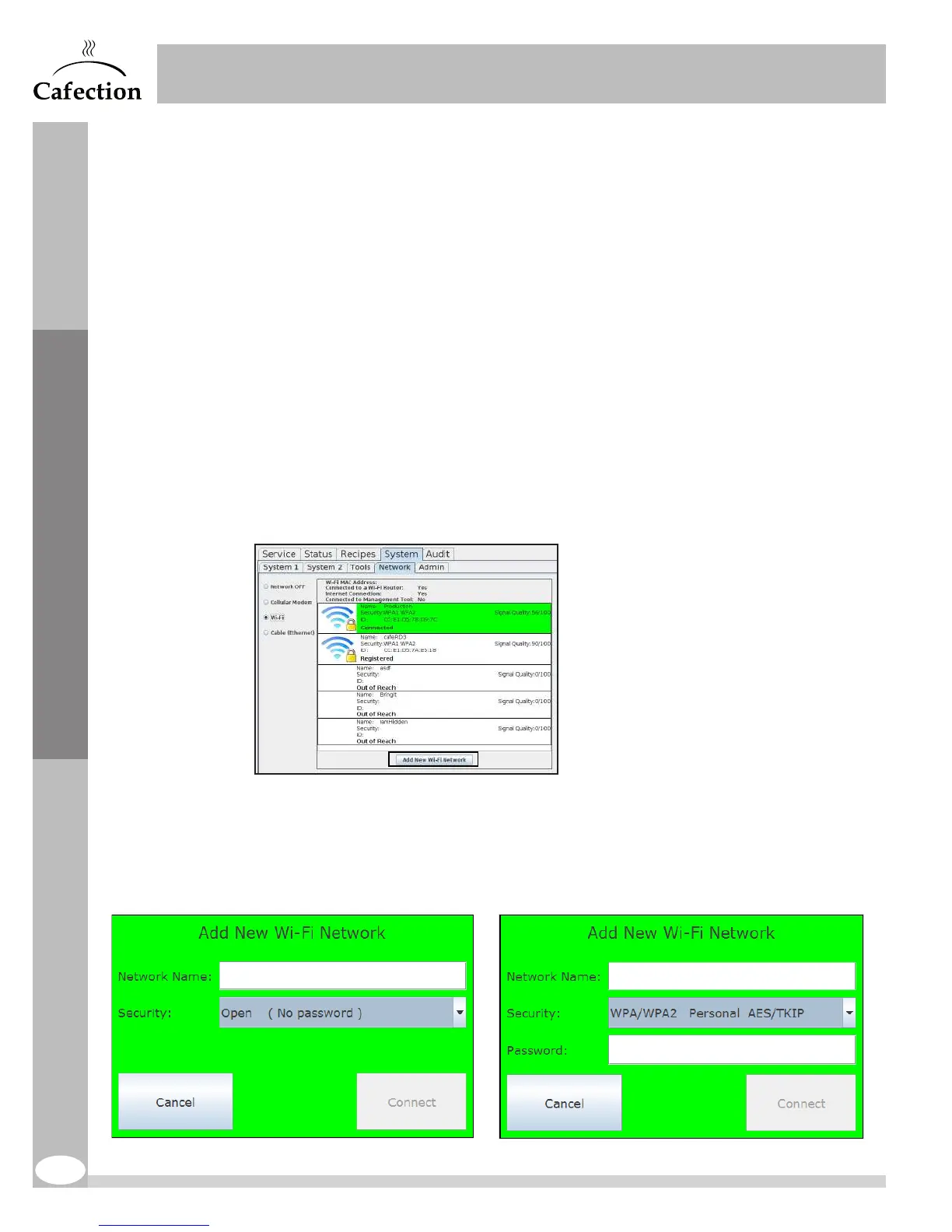
To connect the brewer to a wireless network (Wi-Fi), check the "Wi-Fi" box and select the
desired network in the list.
The security type of the network should automatically be determined by the brewer. If the
brewer cannot determine the type of security, select it manually. The person in charge of IT
on-site will be able to provide this information.
The coffee brewer is compatible with the following encryption methods:
No encryption (OPEN)
No password required. Press on the "Connect" button. The computer screen will
automatically restart.
WPA1/WPA2 Personal AES/TKIP
Enter the network password. Press on the "Connect" button. The computer screen
will automatically restart.
Add New Wi-Fi Network
If the wireless network is invisible or not showing in the list, press on the "Add New Wi-Fi
Network" button.
The network name (ESSID), its security type and its password (if applicable) are required.



 To Next Page