9
3 Overview of appliance
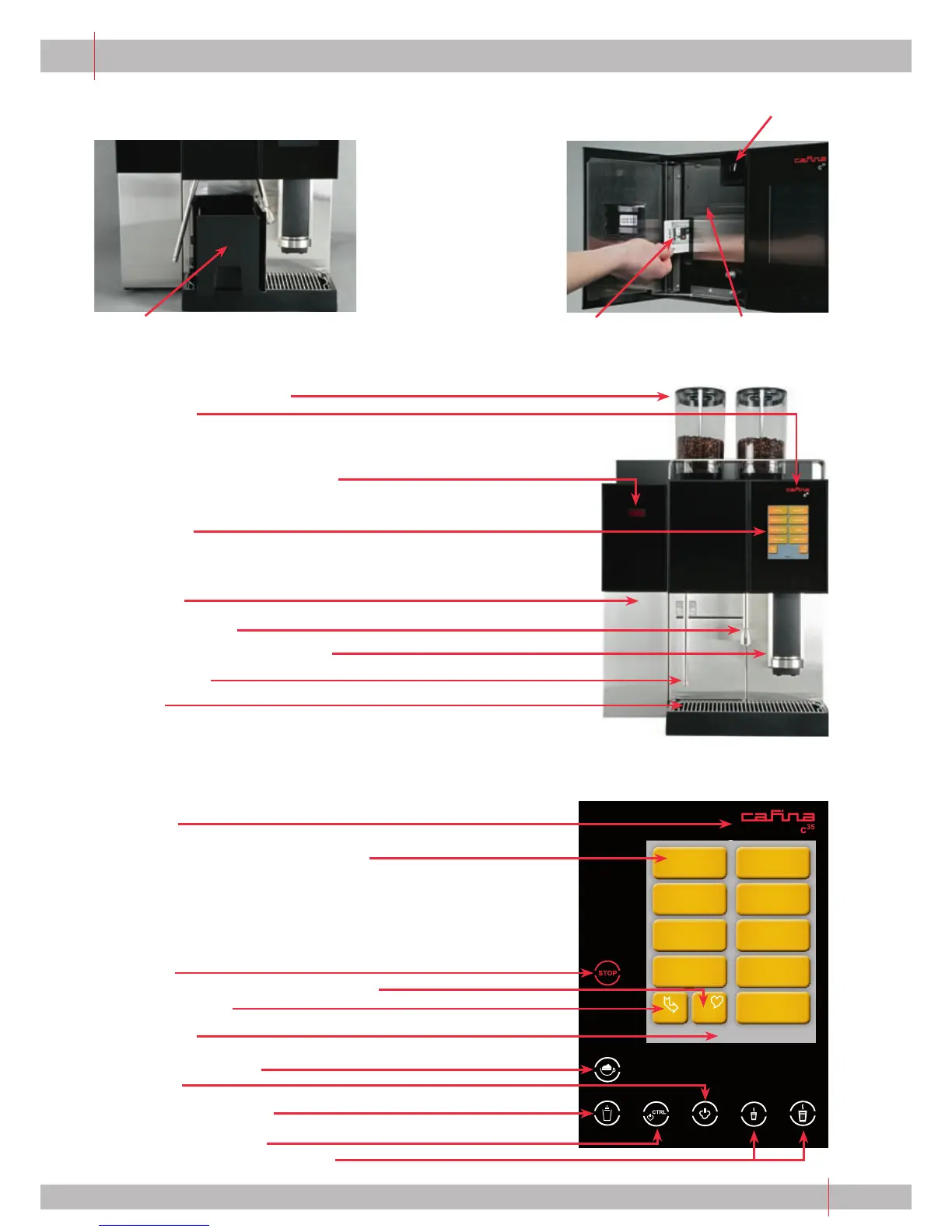
Coff ee bean hopper with lid
Status light
When the appliance is connected to the power supply,
the company logo is lit red.
Temperature display for milk cooler
Control panel
Milk cooler
Hot water dispenser
Product outlet (height-adjustable)
Steam dispenser
Drip tray
Page 1
Ristretto
Café Crème
*
Espresso
**
Cappuccino
Coffee Latte Macchiato
Coffee White Doppio
next page decaf
Hot milk
Insertion chute with spoon for decaff einated
coff ee powder or cleaning tablets
Chip card slot Milk jet cover
Grounds drawer
3.1 Overview
Status light
Control panel with product selection key
Stop key
Preselection key for coff ee (decaff einated)
Page selection key
Page display
Moussy foam (optional)
Steam key
Solid milk foam (optional)
Steam Control (optional)
Hot water keys (manual/portioned)
3.2 Control panel with the function keys


 To Next Page