49
Changing LanguagesChanging Languages
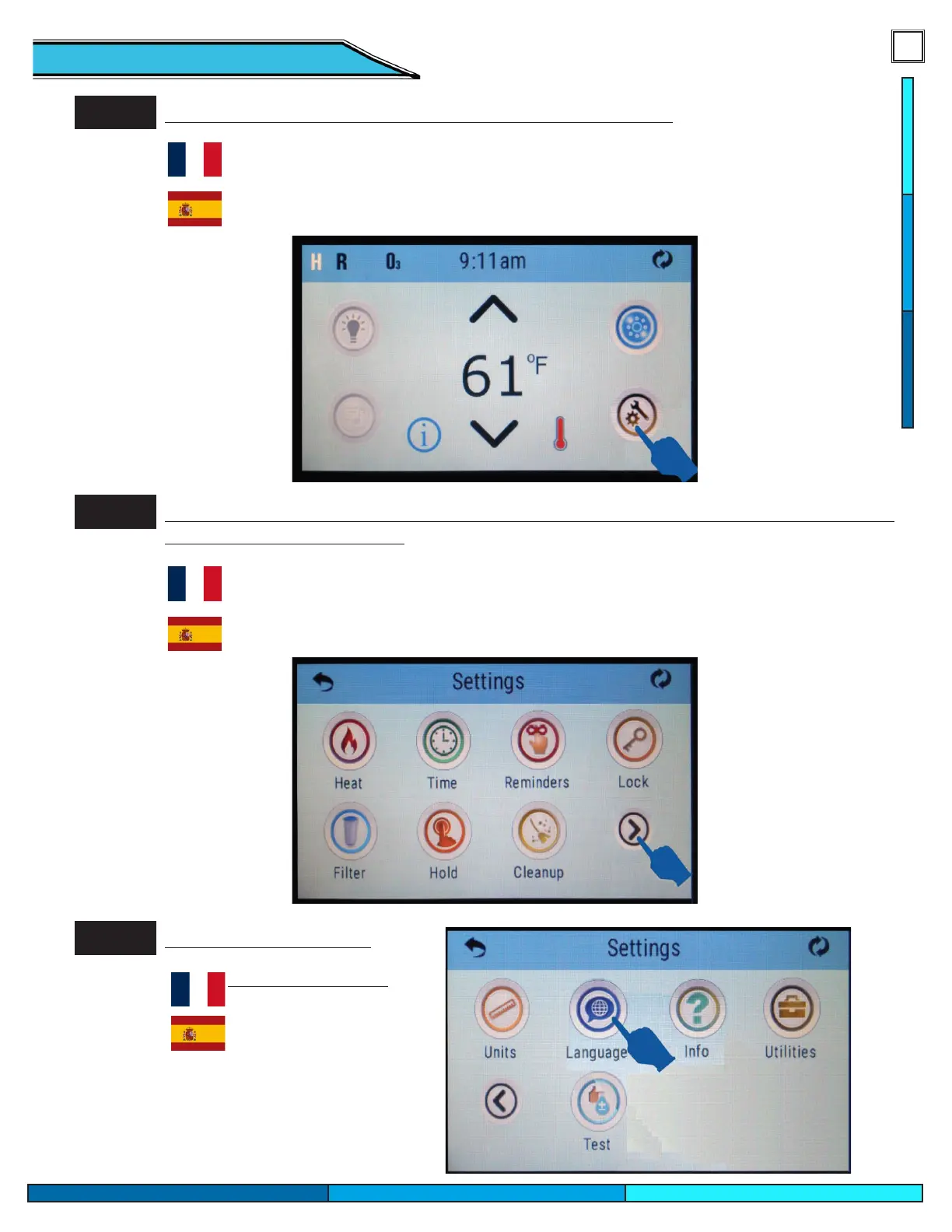
Step 1.
Touch the Settings Icon at the lower right portion of the screen.
Appuyez sur l’icône Paramètres dans la partie inférieure droite de l’écran.
Toque el ícono de Conguración en la parte inferior derecha de la pantalla.
Step 2.
Touch the right arrow icon at the lower right portion of the screen. Pressing this allows you
to navigate to the next screen
Appuyez sur l’icône de èche droite dans la partie inférieure droite de l’écran. En appuyant dessus, vous pouvez
accéder à l’écran suivant
Toque el icono de echa derecha en la parte inferior derecha de la pantalla. Al presionar esto, podrá navegar a la sigui-
ente pantalla.
Step 3.
Touch the Language icon
Appuyez sur l’icône Langue
Toca el ícono de Idioma



 To Next Page