55
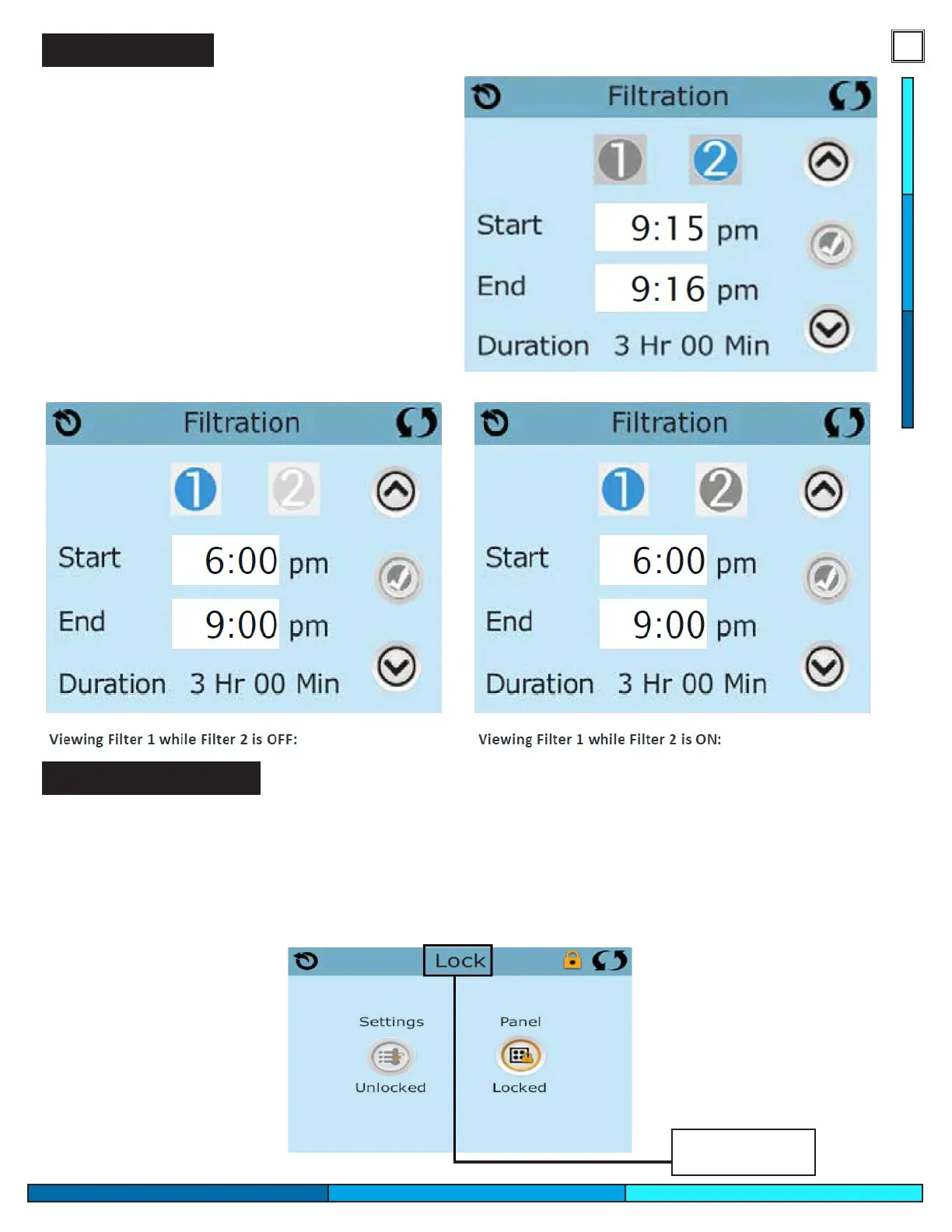
Adjusting Filtration
Filter Cycles are very important in maintaining
water clarity within your spa. Each setting can be
adjusted by increments of 15 minutes. Most spa
owners are able to maintain water clarity with a
total of 3-4 hours of ltration per day. Your spa is
able to have two separate lter cycle times based
on your spa usage. By default ltration 1 is active,
you can activate the second cycle by tapping the “2”
icon and setting a time, conrmed with the check-
mark on the right side of the screen. To maintain
optimal ltration, make sure you perform regular
maintenance on your lter cartridge. Systems with
a 24hr circ pump must set the start time from
12pm to 12am to activate the circ pump features.
Panel Locking/Unlocking
You can restrict panel operation to prevent unwanted modications to your spa settings, or spa operation.
To lock either the panel or the settings select the settings tab, and press the “Lock” icon. The panel will show
two icons, representing panel and settings. You may choose which kind of restrictions you want to activate.
locking settings will restrict access to the spas settings, activating panel lock will restrict all spa panel oper-
ations. If you wish to unlock the display, place your nger on the top where the words “Lock” appear, hold
your nger for about 5 seconds and the panel will unlock to its regular operations.
Press for 5
seconds


 To Next Page