10
9LMLY [V [OL VWLYH[PUN PUZ[Y\J[PVUZZ\WWSPLK ^P[O[OL IYVHKIHUKYV\[LY VY
modem, or contact the Internet service provider for questions related to
setting up of a router or modem.
Note: Only connect the LAN port of the player to an Ethernet port that
supports 10BASE-T or 100BASE-TX. Connecting to any other ports or jacks,
such as a phone jack, can damage the player.
Using the wireless adaptor
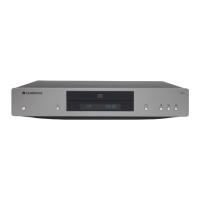
;OL^PYLSLZZHKHW[VYPUJS\KLK^P[O[OL*?<OHZILLUWYLJVUÄN\YLK[V^VYR
with your player. Other wireless adaptors will not work.
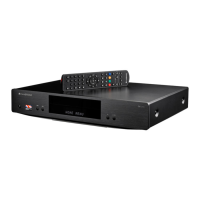
A USB extension cable is provided with your CXU. This can be used if desired
to move the wireless dongle to a more convenient location.
Note:
4HRL Z\YL [OL IYVHKIHUK 0U[LYUL[ JVUULJ[PVU PZ H]HPSHISL HUK [OL >P-P
function on your wireless router or access point has been turned on, and
plug the adaptor into the rear USB 2.0 port of your CXU.
(M[LY JVUULJ[PUN [OL HKHW[VY ZVTL UL[^VYR JVUÄN\YH[PVU PZ YLX\PYLK
Please refer to the 'Network Setup' section of this manual.
29. A/B
7YLZZ[VTHYRHZLNTLU[IL[^LLU(HUK)MVYYLWLH[LKWSH`IHJR;OLÄYZ[
press marks point A, the second press marks point B.
30. Subtitle
Press to access subtitles where available.
31. Repeat
Press to access Repeat function. Each press will cycle as follows:
DVD / DVD-Audio!9LWLH[*OHW[LY9LWLH[;P[SL9LWLH[(SS9LWLH[6Ɉ
Blu-ray Disc!9LWLH[*OHW[LY9LWLH[;P[SL9LWLH[6Ɉ
CD / SACD!9LWLH[6UL9LWLH[(SS9LWLH[6Ɉ
32. Dim
Adjusts the brightness of the front panel display.
33. Zoom
7YLZZ[VJ`JSL[OYV\NO[OL]HYPV\ZaVVTTHNUPÄJH[PVUZHUKIHJR[VUVYTHS
display).
Note: Zoom features may not be available with certain DVD or Blu-ray discs.
34. Res
Press to switch the output resolution to the TV.
Connecting to a wired network
;OL*?< Z\WWVY[Z[OL )+3P]LMLH[\YLVɈLYLK VU ZVTL)S\YH` +PZJ [P[SLZ
)+3P]LVɈLYZL_[YHKV^USVHKHISL JVU[LU[ HUKHKKP[PVUHS VUSPUL PU[LYHJ[P]L
programs. The available BD-Live content varies by disc and studios, and
may include additional subtitles, commentaries, movie trailers, games, and/
or online chat.
Connecting the player to the Internet will also allow the player to obtain
ÄYT^HYL\WKH[LZ]PH[OL0U[LYUL[
If the network storage drives or servers conforming to the UPnP A/V or DNLA
standards are connected to the network, these can also be accessed.
0UVYKLY[V\[PSPaL[OL)+3P]LMLH[\YLVY\WKH[LÄYT^HYL]PH[OL0U[LYUL[[OL
player needs to be connected to a broadband Internet connection. It is not
necessary to connect to the Internet if you do not intend to use the BD-Live
HUKVUSPULÄYT^HYL\WKH[PUNM\UJ[PVUHSP[`HUKVUS`^PZO[V\ZL<7U7+53(
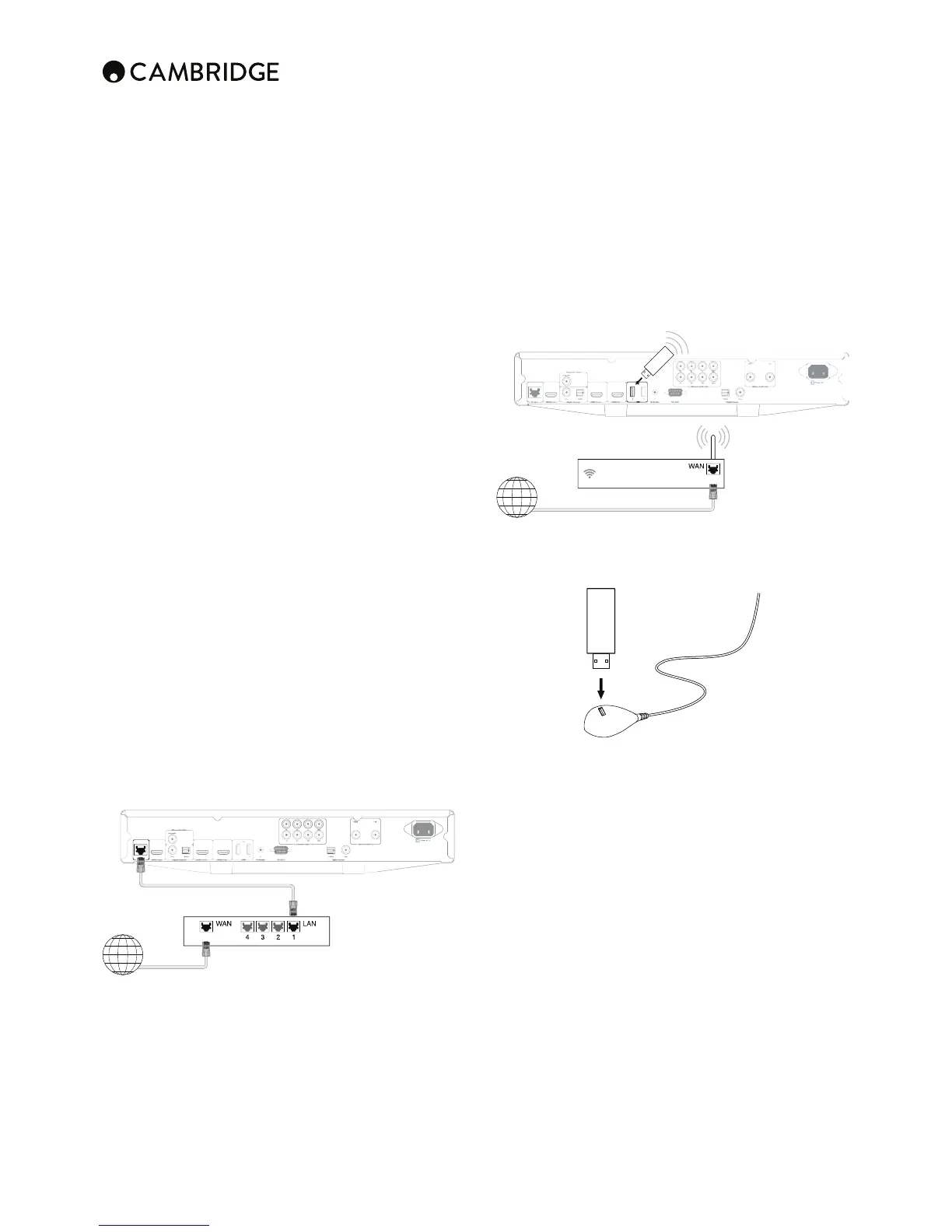
7S\NVULLUKVMHUL[^VYR JHISL*H[LNVY`,Z[YHPNO[[OYV\NO,[OLYUL[
cable) into the LAN port on the back of the unit.
7S\N[OLV[OLYLUKVM[OLUL[^VYRJHISLPU[VH3(5WVY[VU`V\YIYVHKIHUK
router or modem.
0M `V\ KV UV[ \ZL +/*7 (\[V 07 ZVTL UL[^VYR JVUÄN\YH[PVU TH` IL
required. Please refer to the Network Setup section of the manual for more
details.
Remote control cont.
Ethernet connection
Internet
Network cable (ethernet)
Broadband Internet connection
Broadband
router/modem
USB extension cable
Broadband Internet connection
Wireless broadband
router/modem
Wi-Fi USB
dongle
Internet


 To Next Page