12
HDMI connections
B
Righ
L
f
BR
oa
-232C
oax
omposite
ptical
n
ower AC
HDMI Out 1
B
Rig
L
f
BR
Coa
S-232
oax
om
osite
tical
n
ower AC
HDMI Out 2 HDMI Out 1
/+40 /PNO+LÄUP[PVU4\S[PTLKPH 0U[LYMHJLPZ HKPNP[HS JVUULJ[PVU[OH[ JHU
carry both audio and video in one cable. Direct digital transfer of video and
Z\WWVY[MVY]HYPV\Z[`WLZVMOPNOKLÄUP[PVU]PKLVJVU[LU[THRL[OPZ[OLILZ[
connection type for picture quality.
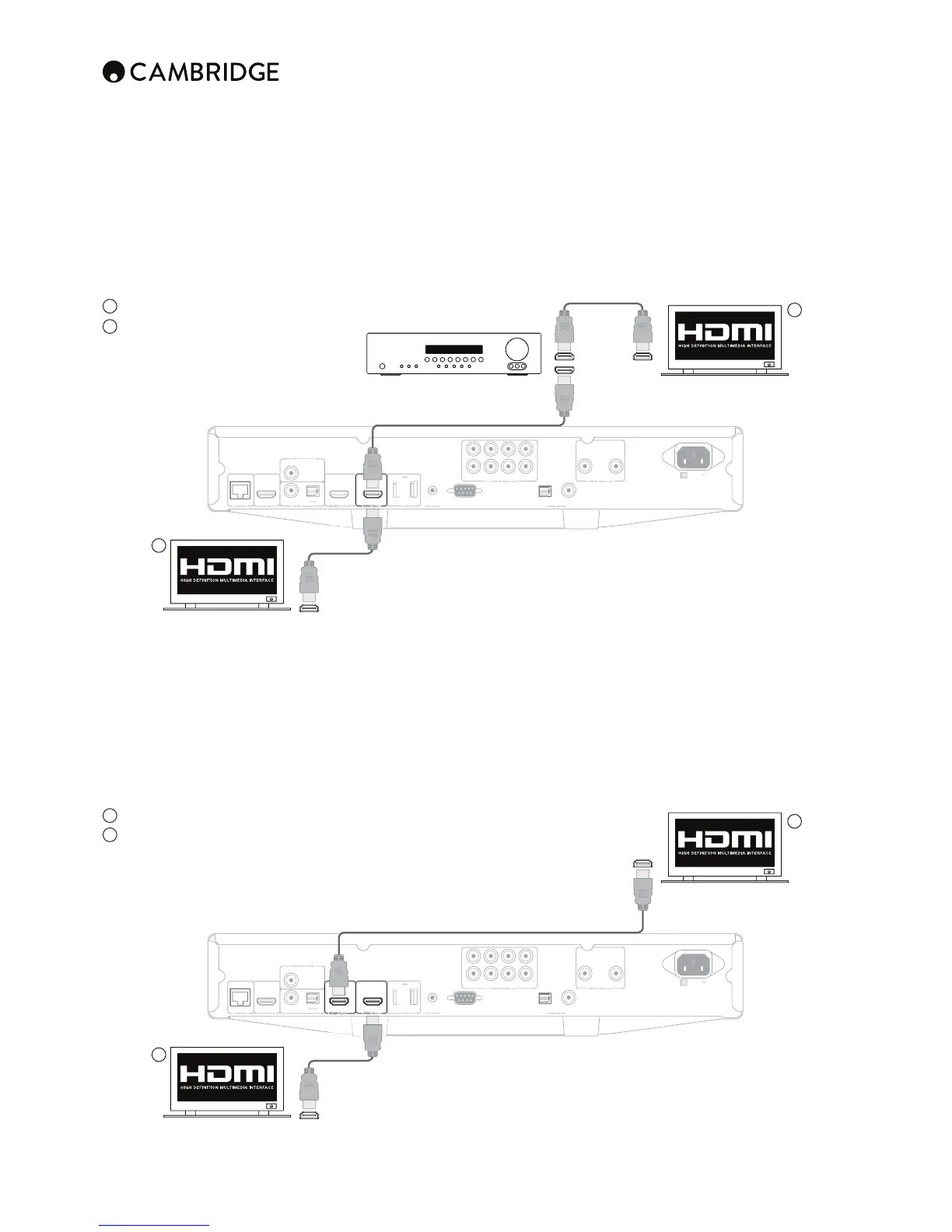
The CXU supports two HDMI outputs, both are 3D TV and ARC compatible.
For normal use with a single TV or TV and AV Receiver use HDMI output 1
7YPTHY`6\[W\[HZ[OPZILULÄ[ZMYVT[OL+HYILL=PKLVWYVJLZZVYHZZOV^U
below.
Set the Dual HDMI Output option in the video setup menu to 'Dual Display',
see later section.
1
Direct connection to a TV for HDMI 1
2
Connection to a TV via an AV Receiver
for HDMI 1.
Note: The Dolby Digital Plus, Dolby True HD, DTS HD High Resolution and
DTS HD Master Audio can only be passed by the CXU over HDMI.
As HDMI can carry both digital audio and video, HDMI can be used to
connect to AV receivers that support this function for external decoding.
1
1
2
2
AV receiver
HDMI cable
HDMI cable
HDMI cable
HDMI cable
HDMI cable
In
In
In
Out
In
TV/Monitor with HDMI input
TV/Monitor with HDMI input
TV/Monitor with HDMI input
TV/Monitor with HDMI input
HDMI 2, the secondary HDMI output of the CXU can be used either to allow
connection of two display devices or to allow separate HDMI audio and video
outputs as shown in the two examples below.
Connecting to two displays using dual HDMI
The CXU features two HDMI outputs.
If is therefore possible to connect two TVs or a TV and Projector etc. you
ZOV\SK[YLH[V\[W\[HZ[OL7YPTHY`OPNOLZ[X\HSP[`V\[W\[HZP[ILULÄ[ZMYVT
the in-built Darbee scaler.
1
Connection to a Primary TV/Monitor.
2
Connection to a Secondary TV/Monitor.
Both outputs can pass 3D TV signals and both can receive ARC.
Set the Dual HDMI Output option in the video setup menu to 'Dual Display',
see later section.
This is necessary to allow HDMI 2 to output high resolution audio.


 To Next Page