19
CXU
3OD\LQJPXVLFðOHV
;V WSH` KPNP[HS T\ZPJ ÄSLZ Z[VYLK VU HU VW[PJHS KPZJ VY <:) KYP]L ZLSLJ[
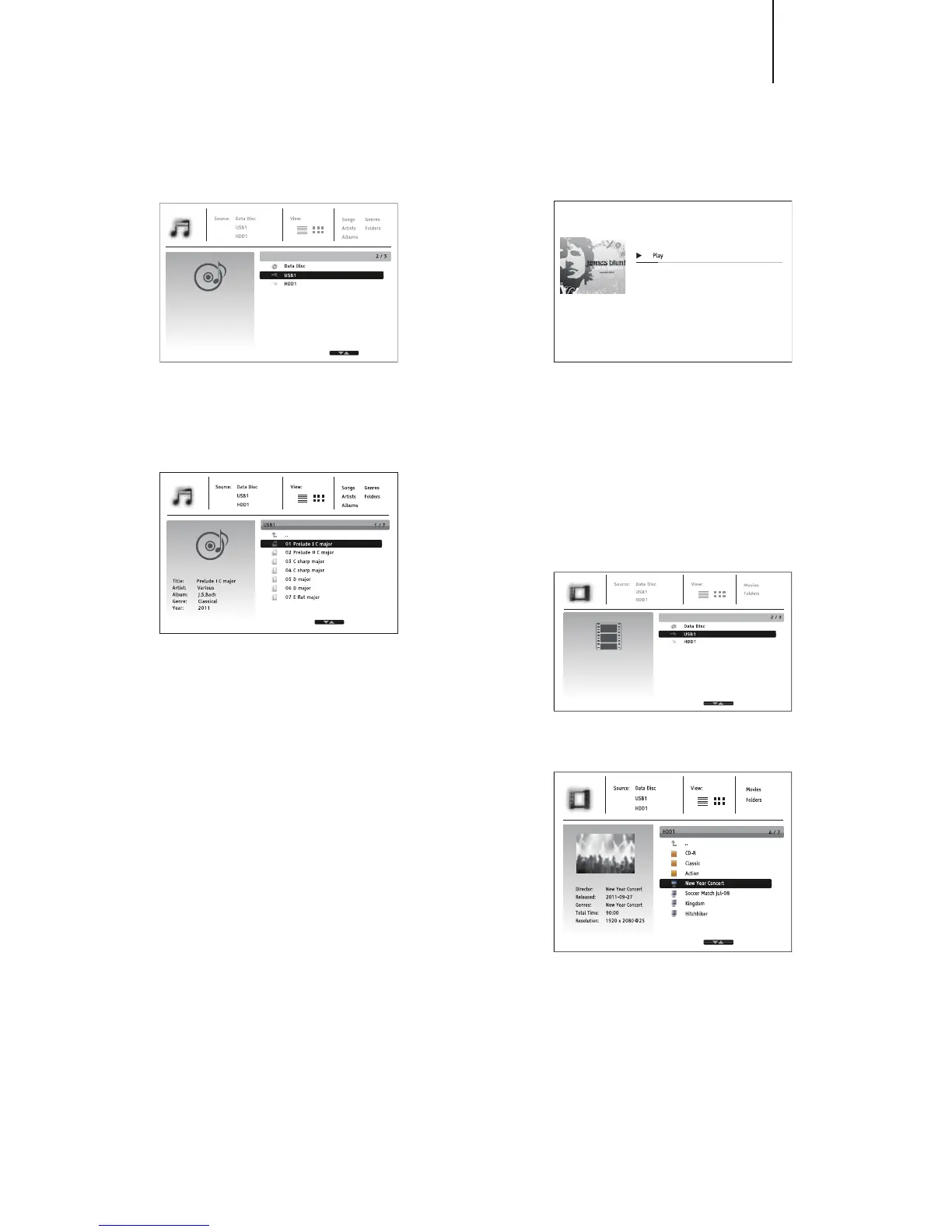
4\ZPJ MYVT [OL /VTL TLU\ ( ÄSL IYV^ZLY ^PSS HWWLHY [V HZZPZ[ `V\ PU
UH]PNH[PUN[OLÄSLZHUKMVSKLYZ
;OL ÄYZ[Z[LW PZ[V ZLSLJ[[OL +H[H +PZJ VY <:)KL]PJL [OH[JVU[HPUZ [OL
T\ZPJÄSLZ;OLWSH`LY^PSS[HRLHTVTLU[[VYLHK[OLKPZJHUKSPZ[[OLMVSKLYZ
HUKT\ZPJÄSLZ
In the music browser, you can perform the following operations:
Press the /I\[[VU[VTV]L[OLJ\YZVYHUKZLSLJ[T\ZPJÄSLZ
Press the Options button to gain access to features such as music information
and sort order. For more details, see later section of the manual.
Press the Top menu button to move the cursor to the category menu in the
top of the screen. This menu contains the following choices:
Source¶(SSV^Z`V\[VZ^P[JOIL[^LLUKPɈLYLU[JVUULJ[LKZ[VYHNLKL]PJLZ
View – Allows you to switch between list and folder view modes.
Sort¶ 3PZ[Z T\ZPJÄSLZMVSKLYZ I` KPɈLYLU[JH[LNVYPLZ Z\JOHZ ZVUN UHTL
artist, album and genre.
>OLUHT\ZPJÄSLPZOPNOSPNO[LKI` [OLJ\YZVYWYLZZ[OL,U[LY VY button
to start playback.
Note:
>OLU H KH[H KPZJVY<:) KYP]L PZPUZLY[LK[OL WSH`LY H\[VTH[PJHSS` Z[HY[Z
PUKL_PUN ÄSLZ HUKI\PSK HKH[HIHZL PU[OL IHJRNYV\UK+LWLUKPUN VU[OL
U\TILY HUK ZPaL VM ÄSLZ [OPZ WYVJLZZ JV\SK [HRL \W [V ZL]LYHS TPU\[LZ
Customers can only access the Category list (Artist, Album and Genre) when
the database has been built, otherwise, a warning message will appear.
0M H T\ZPJ ÄSL Z[HY[ZWSH`PUN HUK[OLYL PZUV V[OLY\ZLY VWLYH[PVU [OL 5V^
Playing screen will appear after a few seconds. You can also get to this
screen by pressing the Options button and then selecting Now Playing. This
screen provides the following information:
Shows playback status – , , , Track and Time.
Display and change playback mode ¶ :O\ɊL9HUKVT 9LWLH[ 6UL HUK
Repeat All.
Music information – Displays information like album art and tags.
The following operations are available while the Now Playing screen is shown:
Title:
Artist:
Album:
Genre:
High
James Blunt
Back To Bedlam
Pop
01 High.mp3
1 / 10 00:00:09 / 00:04:03
Normal playback control – , , , /, , and .
Special playback modes¶9LWLH[HUK:O\ɊL9HUKVT)S\LJVSV\YI\[[VU
Press the Options button to access the Option menu. For more details, see
later section of the manual.
Return to the browser without stopping the music: Press the Return button.
Stop playback and return to the browser: Press the button once.
3OD\LQJPRYLHðOHV
;VWSH`TV]PLÄSLZZ[VYLKVUHUVW[PJHSKPZJVY<:)KYP]LZLSLJ[4V]PLMYVT
[OL/VTLTLU\(ÄSLIYV^ZLY^PSSHWWLHY[VHZZPZ[`V\PUUH]PNH[PUN[OYV\NO
[OLÄSLZHUKMVSKLYZ
;OLÄYZ[Z[LWPZ[VZLSLJ[[OL+H[H+PZJVY<:)KL]PJL[OH[JVU[HPUZ[OLTV]PL
ÄSLZ;OLWSH`LY^PSS[HRLHTVTLU[[VYLHK[OLTLKPHHUKSPZ[[OLMVSKLYZHUK
TV]PLÄSLZ
In the movie browser, you can perform the following operations:
1. Press the /I\[[VUZ[VTV]L[OLJ\YZVYHUKZLSLJ[[OLTV]PLÄSL
2. Press the Options button to access features like video information. For
more details, see later section of the manual.
3. Press the Top menu button to move the cursor to the category menu in the
top of the screen. This menu function is the same as the one discussed in
7SH`PUNT\ZPJÄSLZVU[OLWYL]PV\ZZLJ[PVU
>OLUHTV]PLÄSLPZOPNOSPNO[LKI`[OLJ\YZVYWYLZZ[OL,U[LYVY buttons
to start playback.


 To Next Page