4. MECHANICAL SYSTEM
4-4
COPYRIGHT
©
2001 CANON INC. CANON CLC1000/1000S/3100 REV.2 MAY 2001 PRINTED IN JAPAN (IMPRIME AU JAPON)
C. Fans
1. Outline
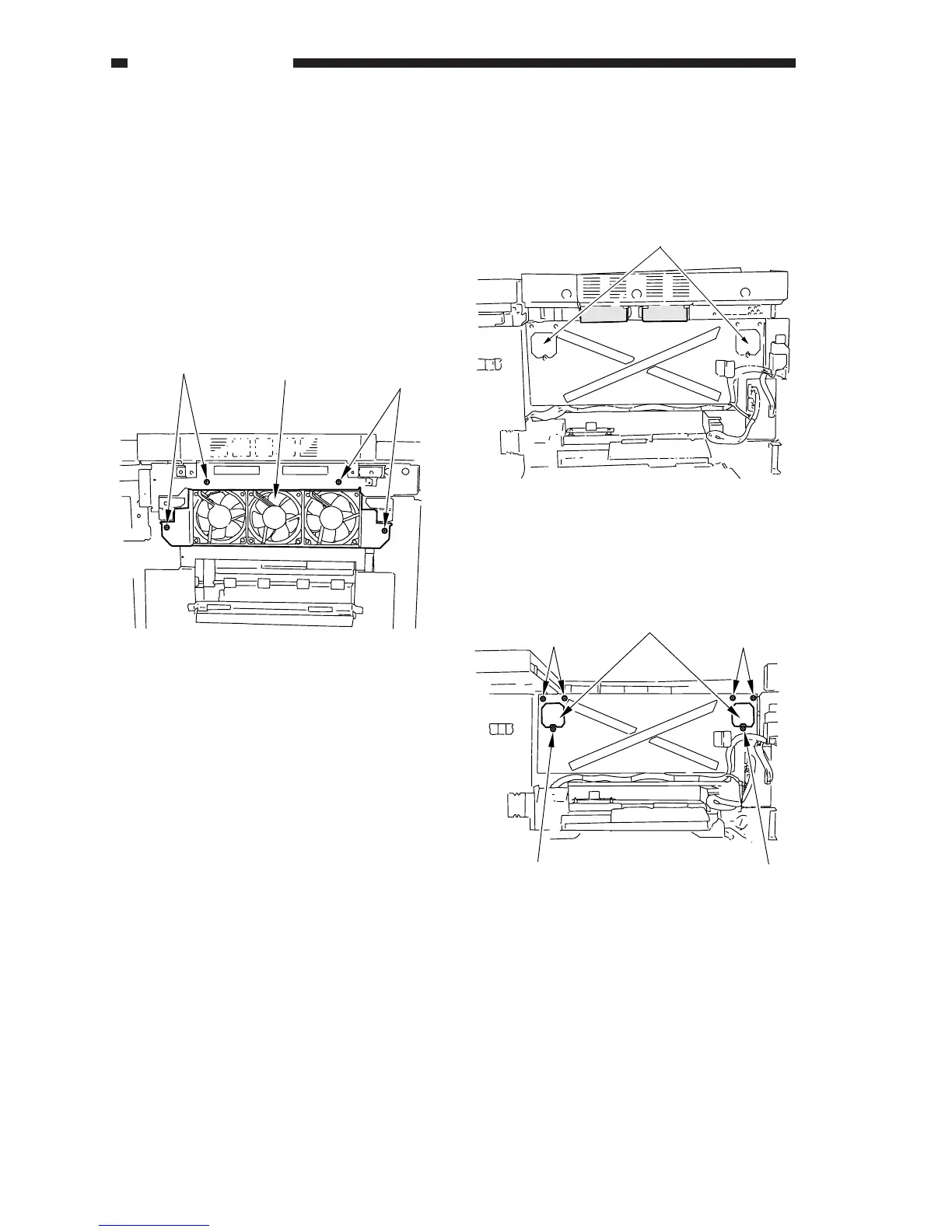
2. Removing the Delivery Cooling
Fan (FM1/2/3)
1) Remove the left cover.
2) Remove the ozone filter and the air filter.
3) Remove the four screws [1], and remove the
fan unit [2].
Figure 4-101C
4) Remove the four screws each, and remove
the fans from the fan unit.
3. Removing the Laser Cooling Fan
(FM4/5)
• Removing the Air Filters
1) Remove the multifeeder cover 1/2.
2) Remove the air filters [1].
[1]
[1]
[2]
Figure 4-102C
• Removing the Laser Cooling Fan
1) Shift up the digital unit.
2) Remove the three screws [1] each, and
remove the fans [2].
Figure 4-103C
[1]
[1]
[1]
[1]
[1]
[2]











 To Next Page