7-116
COPYRIGHT
©
2001 CANON INC. CANON CLC1000/1000S/3100 REV.2 MAY 2001 PRINTED IN JAPAN (IMPRIME AU JAPON)
7. TROUBLESHOOTING IMAGE FAULTS/MALFUNCTIONS
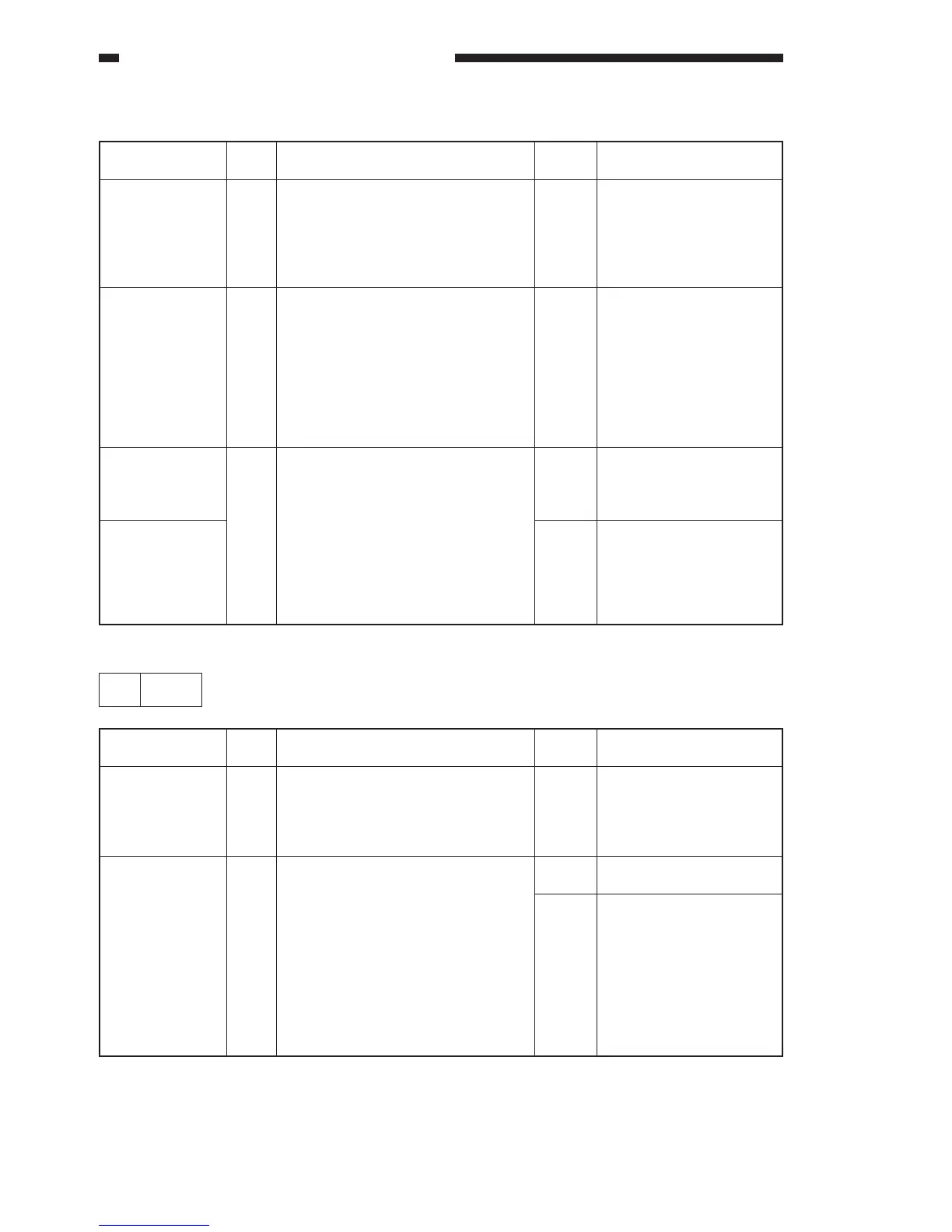
b. E100=xx02
Cause
DC power supply
PCB 1 (lower)
Video controller
PCB, Laser diver
PCB
Laser exposure
system
Laser unit, Video
controller PCB,
DC controller
PCB
Step
1
2
3
Checks
Is power present at J2101 on the
video controller PCB?
J2101-1 (+)–J2101-4 (-): 5 V
J2101-8 (+)–J2101-9 (-): -8 V
J2101-7 (+)–J2101-8 (-): 8 V
Is there a fault in the connection
between the video controller PCB
and the laser drive PCB of the color
for which ‘E100’ is indicated?
Y (detail code 0101) :J2106–J1301Y
M (detail code 0201) :J2107–J1301M
C (detail code 0301) :J2108–J1301C
Bk (detail code 0401)
:J2109–J1301K
Is the laser power normal? (See
“Adjusting the Laser Power.”
Yes/No
NO
YES
NO
YES
Action
Check the wiring; if
normal, replace the DC
power supply PCB
(lower).
Re-connect it.
Make adjustments.
If output is absent, re-
place the laser unit.
Try replacing the following
parts in sequence:
• Laser unit
• Video controller PCB
• DC controller PCB
25 E110
Cause
DC power supply
PCB 1 (upper)
Laser scanner
motor driver
PCB, DC control-
ler PCB
Step
1
2
Checks
Is power present at J6297 on the
laser scanner motor driver PCB?
J6297-3 (+) — J6297-1 (–): 24V
J6297-4 (+) — J6297-2 (–): 24V
Is there a fault in the connection
between the laser scanner motor and
J6035 or J6036 on the laser scanner
motor driver PCB?
Is there a fault in the connection
between J2208B on the DC control-
ler PCB and J6037 on the laser
scanner motor driver PCB?
Yes/No
NO
YES
NO
Action
Check the wiring: if
normal, replace the DC
power supply PCB 1
(upper).
Re-connect it.
Replace the following
parts in the order indi-
cated:
• DC controller PCB
• Laser scanner motor
unit
• Laser scanner motor
driver




 To Next Page