COPYRIGHT
©
2001 CANON INC. CLC1000/1000S/3100 REV.2 MAY 2001 PRINTED IN JAPAN (IMPRIME AU JAPON)
4-7
4. MECHANICAL SYSTEM
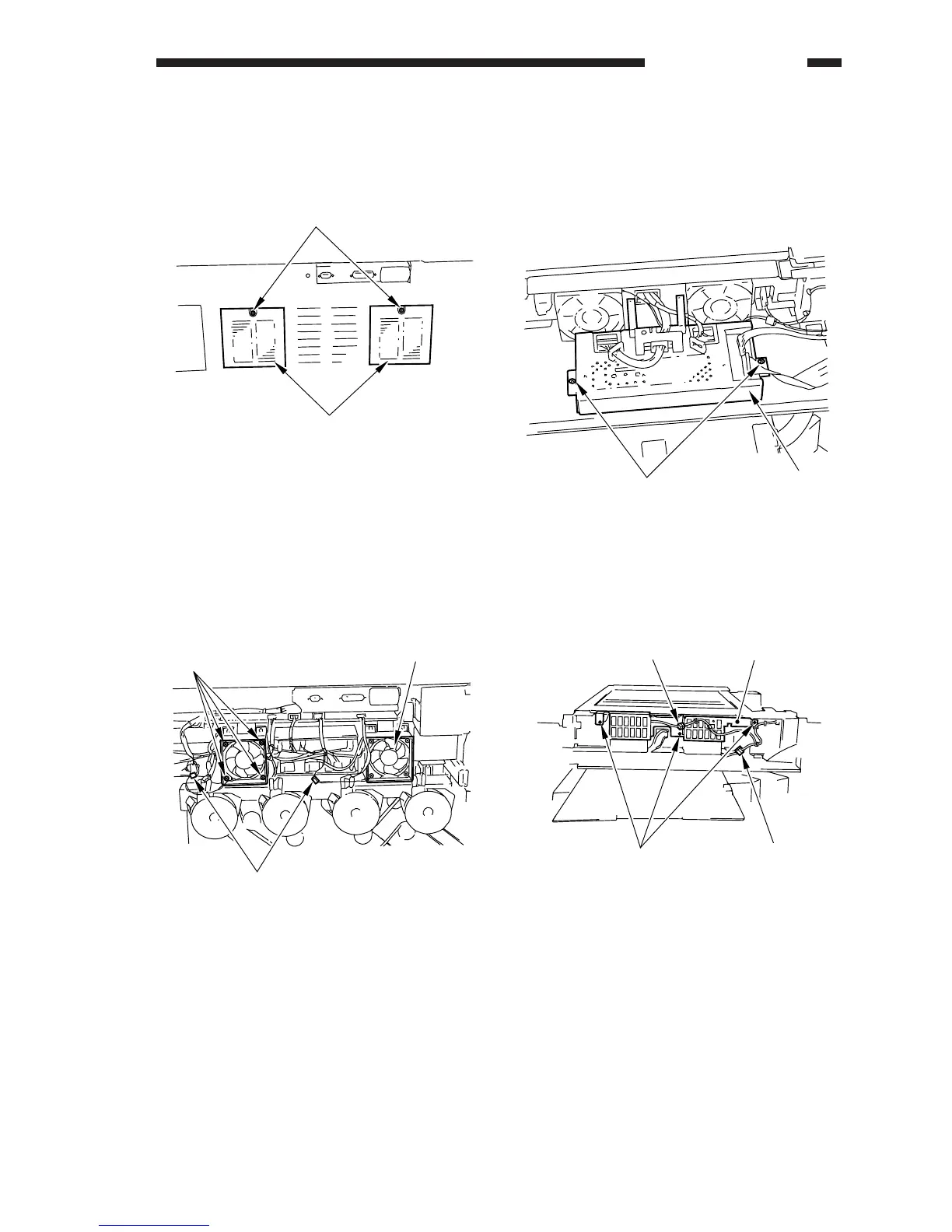
6. Primary Suction Fan (FM8/9)
• Removing the Filter
1) Remove the screw [1] (one each), and remove
the filter covers from the rear cover [2].
Figure 4-112C
2) Remove the filters.
• Removing the Primary Suction Fan
1) Remove the rear cover 2.
2) Disconnect the connectors [1] (one each), and
remove the four screws [2] each; then,
remove the fan [3].
Figure 4-113C
7. Removing the Scanner Suction
Fan (FM12/13)
1) Shift up the digital unit.
2) Remove the two screws [1], and shift the
analog processor PCB [2].
Figure 4-114C
3) Remove the three mounting screws [4], and
disconnect the two connectors [5]; then,
remove the fan guard plate [3].
Figure 4-115C
[1]
[2]
[1]
[2]
[3]
[1]
[2]
[4]
[5]
[5]
[3]











 To Next Page