4. MECHANICAL SYSTEM
4-56
COPYRIGHT
©
2001 CANON INC. CANON CLC1000/1000S/3100 REV.2 MAY 2001 PRINTED IN JAPAN (IMPRIME AU JAPON)
V. EXPOSURE SYSTEM
A. Original Exposure System
1. Removing the Scanning Lamp
1) Disconnect the power plug.
2) Remove the copyboard glass.
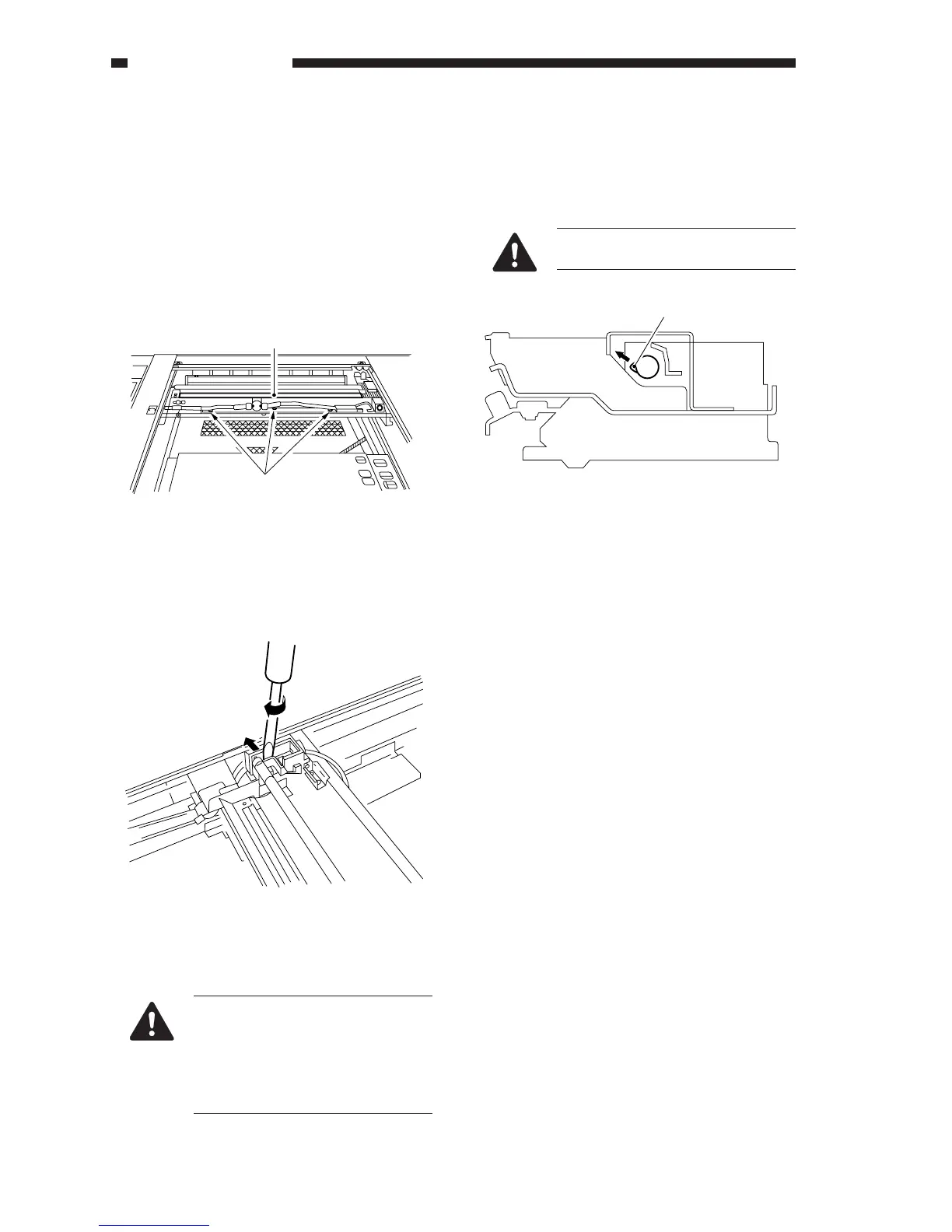
3) Remove the three screws [1], and remove the
reflection-proofing plate [2].
2. Orientation of the Scanning Lamp
Install the scanning lamp so that the boss [1] in
the middle of the lamp is in the direction of the
arrow; for the longer side, make sure that the logo
mark is toward the rear.
Figure 4-501A
4) Turn a flat-blade screwdriver in the direction of
arrow [3] to open the electrode plate in the
direction of arrow [4], thereby removing the
scanning lamp.
Figure 4-502A
1. Do not work until the surface of
the scanning lamp has cooled.
2. Do not leave fingerprints on the
scanning lamp.
3. If the surface of the scanning
lamp is soiled, dry-wipe it.
[1]
[2]
[4]
[3]
When handling the lamp, do not
touch the lamp portion.
Figure 4-503A
[1]











 To Next Page