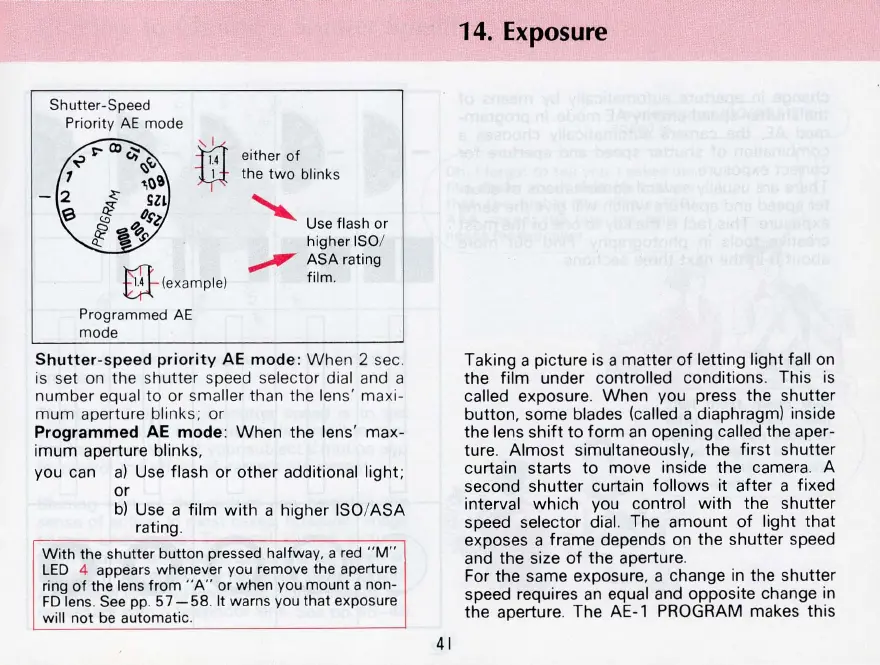
El-(eXam
Ple)
Programmed
AE
mode
either
of
the
two
blinks
Use fl
as
h or
higher
ISO/
ASA
rating
film,
Shutter
-speed
priority
AE
mode
:
Wh
en
2 sec,
is set on the shutter speed selec
tor
dial and a
number equal to
or
smaller th
an
the
len
s' m
ax
i-
mum
aperture blinks;
or
Programmed
AE
mode:
When
the lens' max-
imum aperture blinks,
you can
a)
Use flash
or
other additional light;
or
b)
Use a film
with
a higher ISO/
ASA
rating,
With
the shutter
button
pressed
halfw
ay,
a red " M"
LED
4 appears whenever you remove the aperture
ring
of
the lens
from
" A" or when you mount a non-
FD
le
ns
, See
pp
,
57
-58
, It warns
yo
u that exposure
will
not
be automatic,
41
14.
Exposure
Taking a picture is a
matter
of
letting light fall on
the
film
under controlled conditions, This
is
called exposure,
When
you press the shutter
button
, some blades (called a diaphragm) inside
the lens
shift
to
form
an
opening called the aper-
ture,
Almost
simultaneously, the
first
shutter
curtain starts
to
move inside the camera, A
second
shutter
curtain
follows
it after a fixed
interval
which
you control
with
the shutter
speed selector dial. The amount
of
light
that
exposes a frame depends on the shutter speed
and the size
of
the aperture,
For the same exposure, a change
in
the shutter
speed requires
an
equal and opposite change
in
the aperture, The
AE-l
PROGRAM makes this










 To Next Page