SHOOTING STYLES AND CONFIGURATION
43
EN
Shooting Styles and Configuration
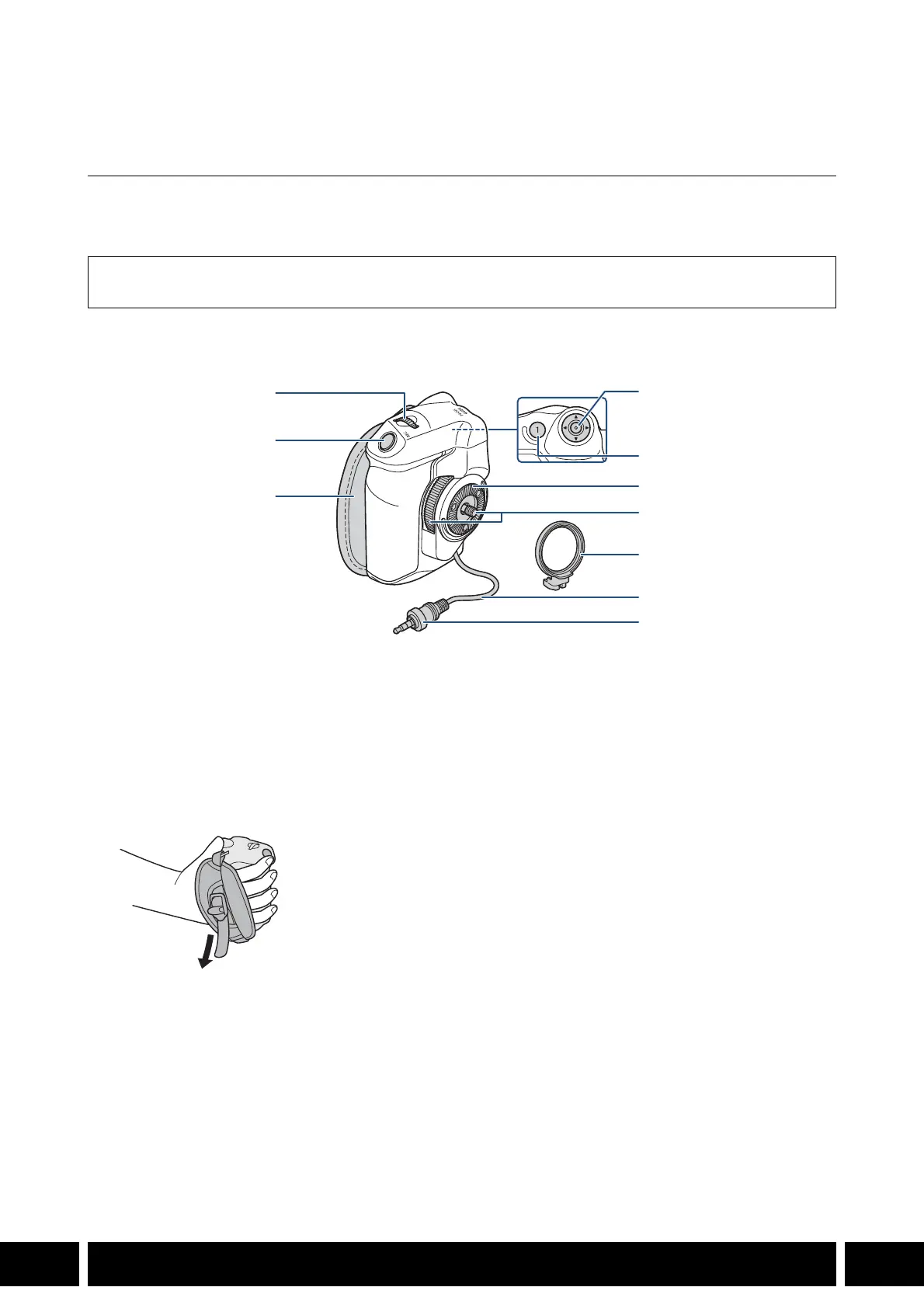
GR-V1 Camera Grip
Attach the camera grip to the camera to comfortably hold and operate the camera. The camera grip allows
you to start/stop recording and features also a joystick, control dial and one assignable button.
Names of Parts
Supplied Accessories
Grip attachment ring
1 Control dial
2 REC (start/stop recording) button
3 Grip belt
• Adjust the grip belt so that you can reach the
REC button on the camera grip with your
index finger but still have a comfortable but
secure grip.
4Joystick
5 FOCUS GUIDE button/
Assignable button Camera Grip 1
6Rosette
• Compliant with ARRI rosettes.
7 Locking screw
8 Grip attachment ring
9 Grip connection cable
10 Connection plug



 To Next Page