157
You can also view the still photos and movies on a TV set. Before
connecting or disconnecting the cable between the camera and
television, turn off the camera and television.
* Adjust the movie’s sound volume with the TV set.
* Depending on the TV set, part of the image displayed might be cut off.
1
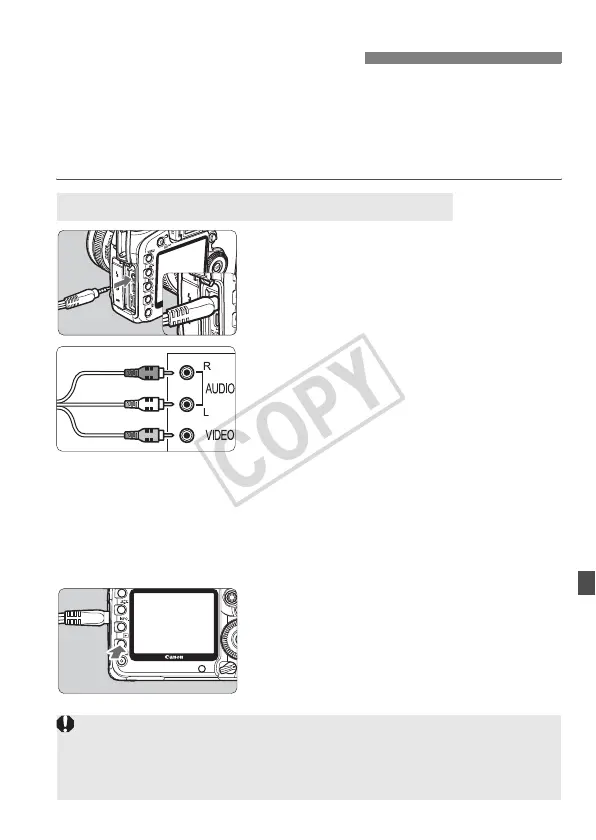
Connect the provided stereo
video cable to the camera.
Connect the stereo video cable to the
camera’s <q> terminal. Insert
the cable plug all the way in.
2
Connect the video cable to the TV
set.
Connect the stereo video cable to the
TV’s video IN terminal and to the
audio IN terminal.
3
Turn on the TV and switch the
TV’s video input to select the
connected terminal.
4
Set the camera’s power switch to
<1>.
5
Press the <x> button.
X The image will appear on the TV
screen. (Nothing will be displayed on
the camera’s LCD monitor.)
To playback the movie, see page 153.
Viewing the Images on TV
Viewing on Non-HD (High-Definition) TV Sets
(Red)
(White)
(Yellow)
I
f the video system format does not match the TV’s, the images will not be
displayed properly. Set the proper video system format with
[
6 Video system
].
Do not use any stereo video cable other than the one provided. Images
might not be displayed if you use a different video cable.














 To Next Page