44
Before You Start
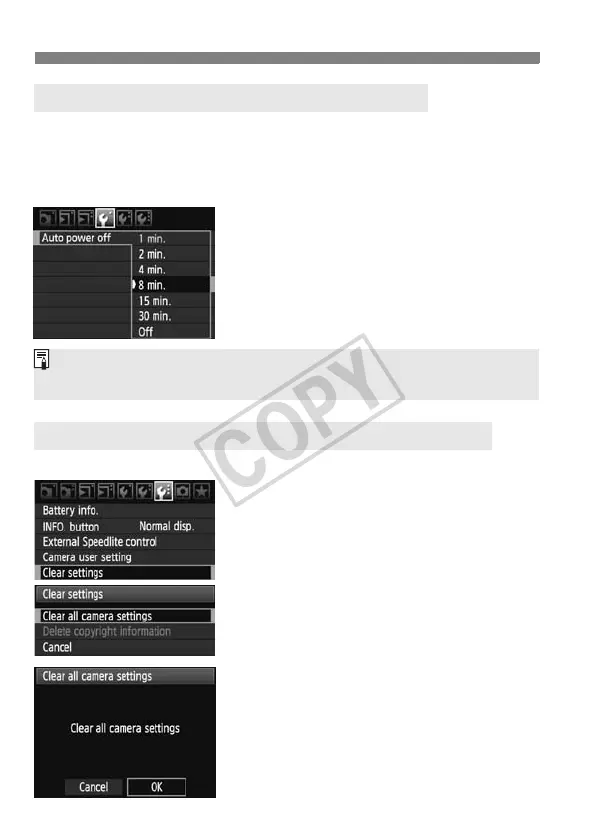
You can change the auto power-off time for the camera to turn off
automatically after a certain period of non-operation. If you do not want the
camera to turn off automatically, set this to
[Off]
. After the power turns off, you
can turn on the camera again by pressing the shutter button or other button.
1
Select [Auto power off].
Under the [5] tab, select [Auto
power off], then press <0>.
2
Set the desired time.
Turn the <5> dial to select the
setting, then press <0>.
The camera’s shooting settings and menu settings can be reverted to the default.
1
Select [Clear settings].
Under the [7] tab, select [Clear
settings], then press <0>.
2
Select [Clear all camera settings].
Turn the <5> dial to select [Clear all
camera settings], then press <0>.
3
Select [OK].
Turn the <5> dial to select [OK],
then press <0>.
X Setting [Clear all camera settings]
will reset the camera to the following
default settings:
3 Set the Power-off Time/Auto Power Off
3 Reverting the Camera to the Default SettingsN
Even if [Off] has been set, the LCD monitor will turn off automatically after
30 min. to save power. (The camera’s power does not turn off.)














 To Next Page