221
Menu Settings
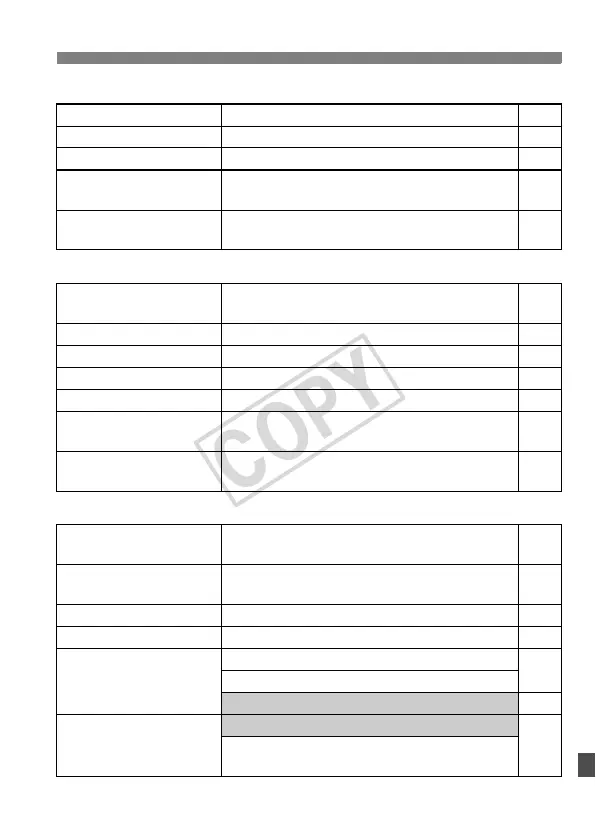
4 Playback 2 (Blue) Page
5 Set-up 1 (Yellow)
6 Set-up 2 (Yellow)
* In the <1/C> modes, the option will change to [Movie recording].
Highlight alert
Disable / Enable 145
AF point display
Disable / Enable 145
Histogram
Brightness / RGB 146
Slide show
Select the images, set the Play time and
repeat settings for automatic playback
155
Image jump w/6
1 image / 10 images / 100 images / Screen /
Date / Folder / Movies / Stills
148
Auto power off
1min. / 2 min. / 4 min. / 8 min. / 15 min. / 30
min. / Off
44
Auto rotate
OnzD / OnD / Off 164
Format
Initialize and erase data in the card 43
File numbering
Continuous / Auto reset / Manual reset 74
Select folder
Create and select a folder 72
WFT settings
Displayed when WFT-E4 II A/B/C/D or WFT-
E4/E4A (sold separately) is attached
–
Recording function+
media select
Displayed when external media is used via WFT-
E4 II A/B/C/D or WFT-E4/E4A (sold separately)
–
LCD brightness
Auto: Adjustable to one of three brightness levels
Manual: Adjustable to one of seven brightness levels
162
Date/Time
Set the date (year, month, day) and time (hour,
min., sec.)
42
Language
25 languages 42
Video system
NTSC / PAL 157
Sensor cleaning
Auto cleaning: Enable / Disable
166
Clean now
Clean manually 169
Live View/Movie
function settings
LV func. setting* / Silent shooting / Metering timer
108
Grid display / AF mode / Movie recording size /
Sound recording
113














 To Next Page