1-3
Before Using the Machine
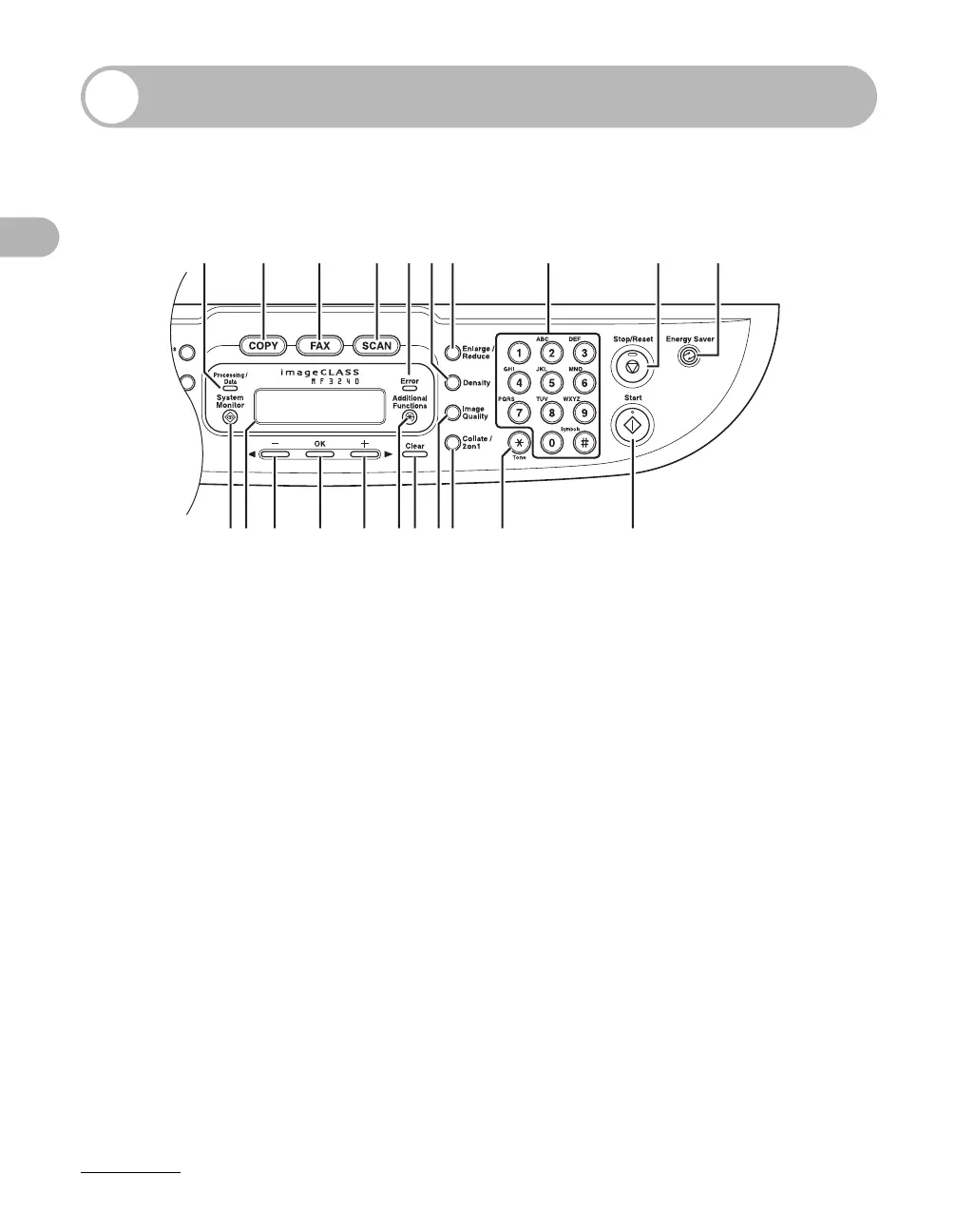
Operation Panel
Main Operation Panel
A Processing/Data indicator
Flashes during sending or receiving faxes.
Lights when the machine has waiting jobs.
B [COPY] key
Press to switch to Copy mode.
C [FAX] key
Press to switch to Fax mode.
D [SCAN] key
Press to switch to Scan mode.
E Error indicator
Flashes or lights when an error has occurred.
F [Density] key
Press to adjust copy or fax density.
G [Enlarge/Reduce] key
Press to enlarge or reduce copy ratio.
HNumeric keys
Enter letters and numbers.
I [Stop/Reset] key
Press to stop a current job. Also, press to
return the machine to standby mode.
J [Energy Saver] key
Press to set or cancel Sleep mode manually.
The key lights green when Sleep mode is set,
and goes off when the mode is canceled.
K[Start] key
Press to start copying, scanning and sending
faxes.
ABCDFEG H I J
KLMNOQPRSTU










 To Next Page