Chapter 4
4-14
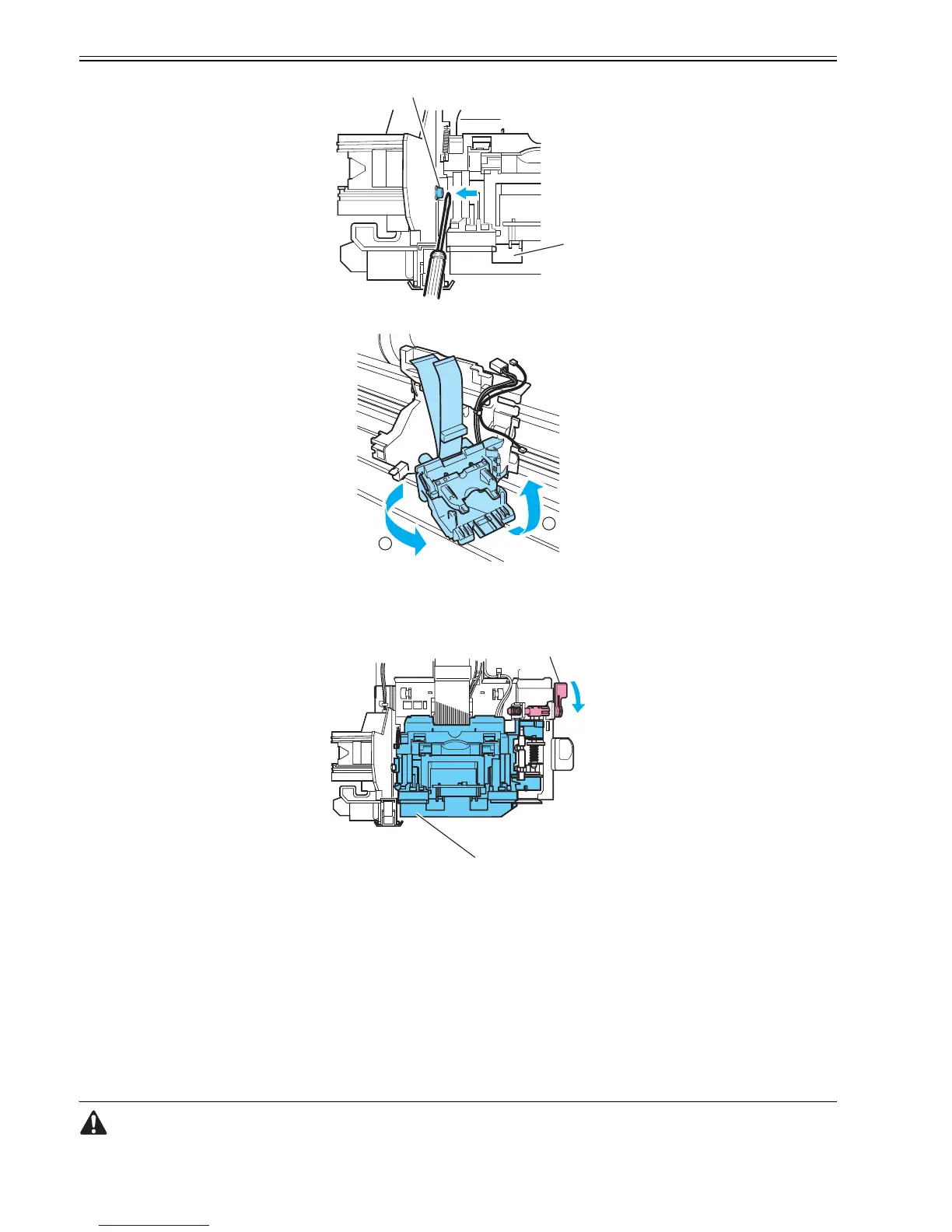
F-4-25
F-4-26
e. Reassembling the head holder
After the head holder has been reassembled, check that it lifts up and down in sync with the printhead height adjustment lever.
F-4-27
f. Multisensor correction
Because the mutisensor is varied from one unit to another, the printer as shipped has the sensor gain and color calibration adjusted for optical axis correction and
paper gap calibration purposes. When the carriage unit or multisensor has been replaced or disassembled and reassembled, therefore, execute service mode under
the following conditions:
*If the carriage unit or the multisensor has been replaced, replace the multisensor standard at the same time.
-Service mode: SERVICE MODE > ADJUST > GAP CALIB
-Service mode: SERVICE MODE > ADJUST > SENSOR CALIB
Test chart: CL-7 (Tool No.: FY9-9323 *Use a new chart form)
-Service mode: SERVICE MODE > ADJUST > PRINT PATTERN > OPTICAL AXIS
Media type: Gloss photo paper
Paper size: A2-width Paper or more
4.3.9 Feeder unit
0012-6372
a. Handling the feed roller
The feed roller is a functionally vital part. Observe these precautions when handling it:
[1]
[2]
2
1
[2]
[1]





 To Next Page