Chapter 1
1-10
1.6 Basic Operation
1.6.1 Operation panel
0012-6207
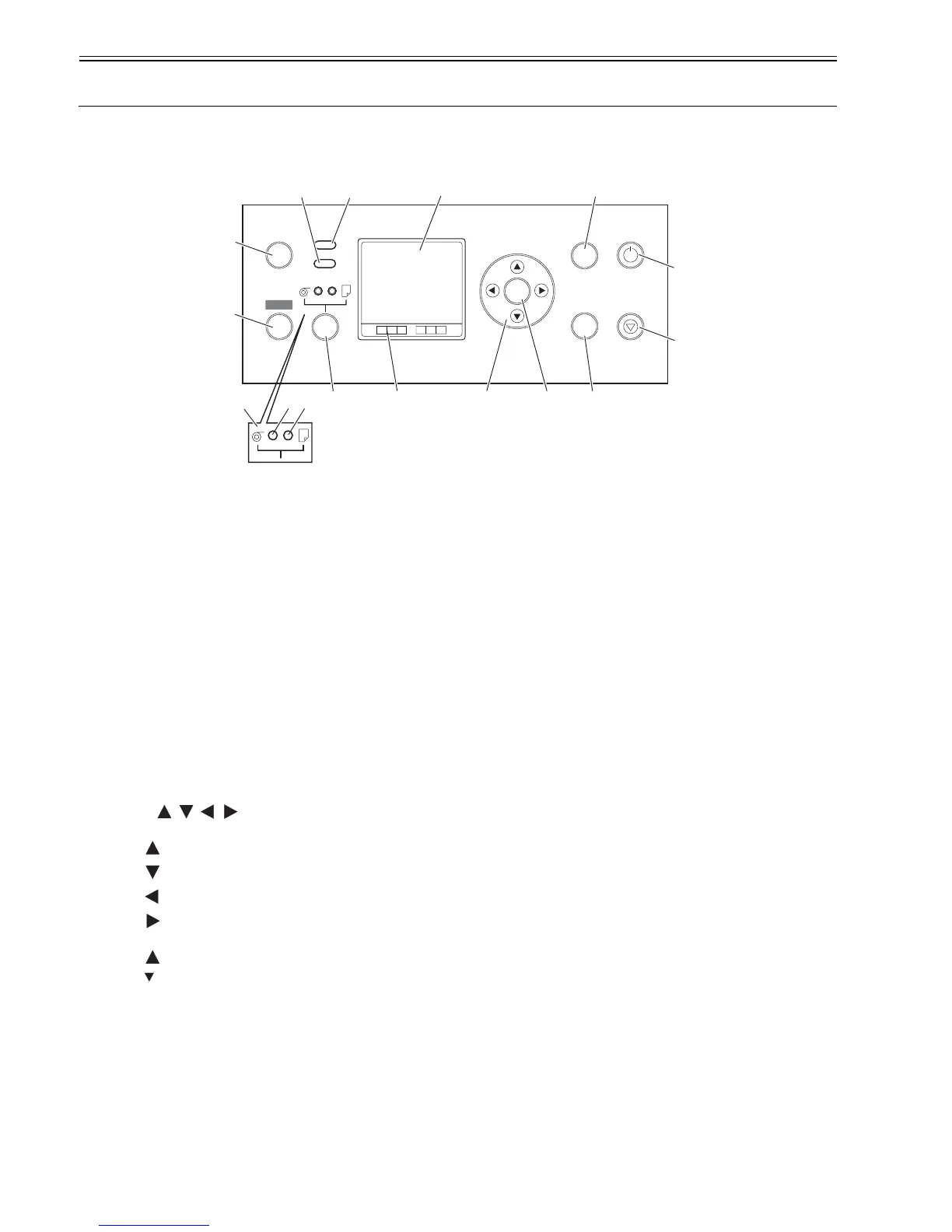
The functions of the keys and meanings of LED indications on the operation panel are described below.
F-1-14
[1] Display
Displays the printer menu, status or messages.
[2] Data lamp (green)
"Blinking" The printer is receiving or processing a print job when it is printing.
The printer has suspended a print job or is receiving firmware data when it is not printing.
"Off" No print job is available.
[3] Message lamp (orange)
"Lit continuously" A warning message is on display.
"Blinking" An error message is on display.
"Off" The printer is normal or is powered off.
[4] Online key
Switches the printer between two alternative modes: online and offline.
"Lit continuously" The printer is in online mode. Lights green.
"Off" The printer is in offline mode.
[5] Menu key
Displays a printer main menu.
[6] Paper source selector
[a] Roll media lamp (green)
"Lit continuously" Roll media have been selected as a paper source.
"Off" Cut media have been selected as a paper source.
[b] Cut media lamp (green)
"Lit continuously" Cut media have been selected as a paper source.
"Off" Roll media have been selected as a paper source.
[7] Paper source selector key
Toggles a paper source between roll and cut media each time the key is pressed.
[8] Color labels
Colors and names of ink tanks associated with the remaining ink levels appearing on the display.
[9] Keys
[Menu mode]
" key" Displays the previous action or setting.
" key" Displays the next action or setting.
" key" Opens the menu one level above.
" key" Opens the menu one level lower.
[Offline mode]
" key" Feeds roll media manually in the direction opposite to the direction in which paper is ejected.
" key" Feeds roll media manually.
[10] OK key
Sets or runs a selected action or value when the printer is in menu mode.
[11] eject key
Executing menu and ejects paper.
[12] Stop key
Quits a processing job.
[13] Power key
Switches the power to the printer on and off.
[14] Information key
Displays a printer submenu. Information about the inks and paper displays each time this key is pressed.
Hold this key for 3 seconds to clean the printhead.
OK
Online
Menu
Data
Message
Infomation
Power
Eject
Stop
Cleaning
(3 Sec.)
[4]
[5]
[3] [2]
[7] [8]
[1]
[9] [10]
[14]
[11]
[13]
[12]
[6]
[a]
[b]














 To Next Page