Chapter 2
2-15
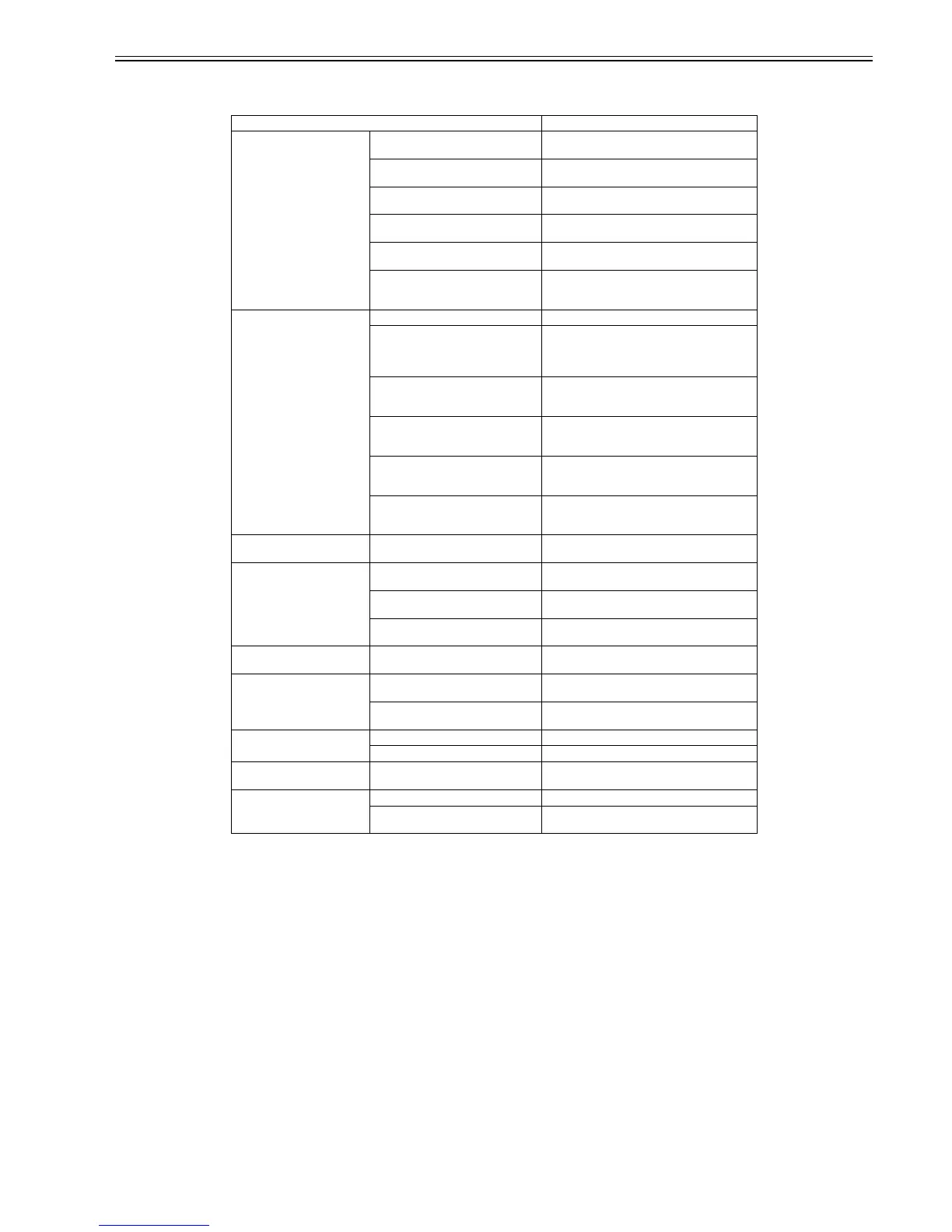
The cleaning operation is executed at the following timing:
T-2-4
c) Ink supply function
The suction pumps in the purge unit are activated, together with ink supply valves, during initial filling and ink level adjustment to supply inks from the ink tanks
to the printhead.
Printer status Description of cleaning
During standby Each time 120 minutes have elapsed with
the nozzles capped
Cleaning 1
(normal cleaning)
When 168 hours have elapsed since
capping
Idle ejection
When 360 hours have elapsed since
capping
Cleaning 2 (ink level adjusting cleaning)
When 720 hours have elapsed since
capping
Cleaning (normal cleaning)
When 2160 hours have elapsed since
capping
Cleaning 6 (normal (strong) cleaning)
When 168 hours have elapsed since
initial installation or previous agitation
of precipitated ink (cleaning 16)
Cleaning (precipitated ink agitation)
At power-on During initial installation Cleaning 3 (initial filling cleaning)
When the power is turned on after less
than 72 hours have elapsed since
abnormal end of print operation
(uncapped status)
Cleaning 1 (normal cleaning)
When the power is turned on after at least
72 hours have elapsed since abnormal
end of print operation (uncapped status)
Cleaning 6 (normal (strong) cleaning)
When the power is turned on after the
initial installation or previous
precipitated ink agitation (cleaning 16)
Cleaning (precipitated ink agitation)
When the power is turned on after at least
360 hours have elapsed since normal end
of print operation (capped status)
Cleaning 2 (fluid level adjusting)
When the power is turned on after at least
360 hours have elapsed since normal end
of print operation (capped status)
Cleaning 6 (normal (strong) cleaning)
At power-off When the power is turned off in the
uncapped status
Wiping + Idle ejection + Idle suction + Capping
Before starting printing Before printing after 168 hours have
elapsed since capping
Idle ejection
Before printing after 168 hours have
elapsed since capping
Cleaning 1 (normal cleaning)
Before cleaning after occurrence of an
error
Cleaning 1 (normal cleaning)
During printing Between scan operations during
scanning
Idle ejection + Wiping (idle suction)
After printing After printing exceeding the prescribed
dot count
Cleaning 16 (dot count suction) based on the count
or cleaning 6 (normal (strong) cleaning)
Each time 120 minutes have elapsed in
the cap open status
Cleaning 1 (normal cleaning)
When "Head Cleaning" menu is
selected
Manual cleaning (head cleaning A) Cleaning 1 (normal cleaning)
Manual cleaning (head cleaning B) Cleaning 6 (normal (strong) cleaning)
When "Replace Head" menu is
selected
After replacement of head Cleaning 2 (fluid level cleaning) + Cleaning 4 (ink
drainage after head replacement)
When "Move Printer" is selected When "Move Printer" is selected Cleaning 5 (ink drainage for secondary transport)
After the power is turned on during
secondary installation
Cleaning 10 (ink filling after secondary transport)





 To Next Page