Chapter 4
4-5
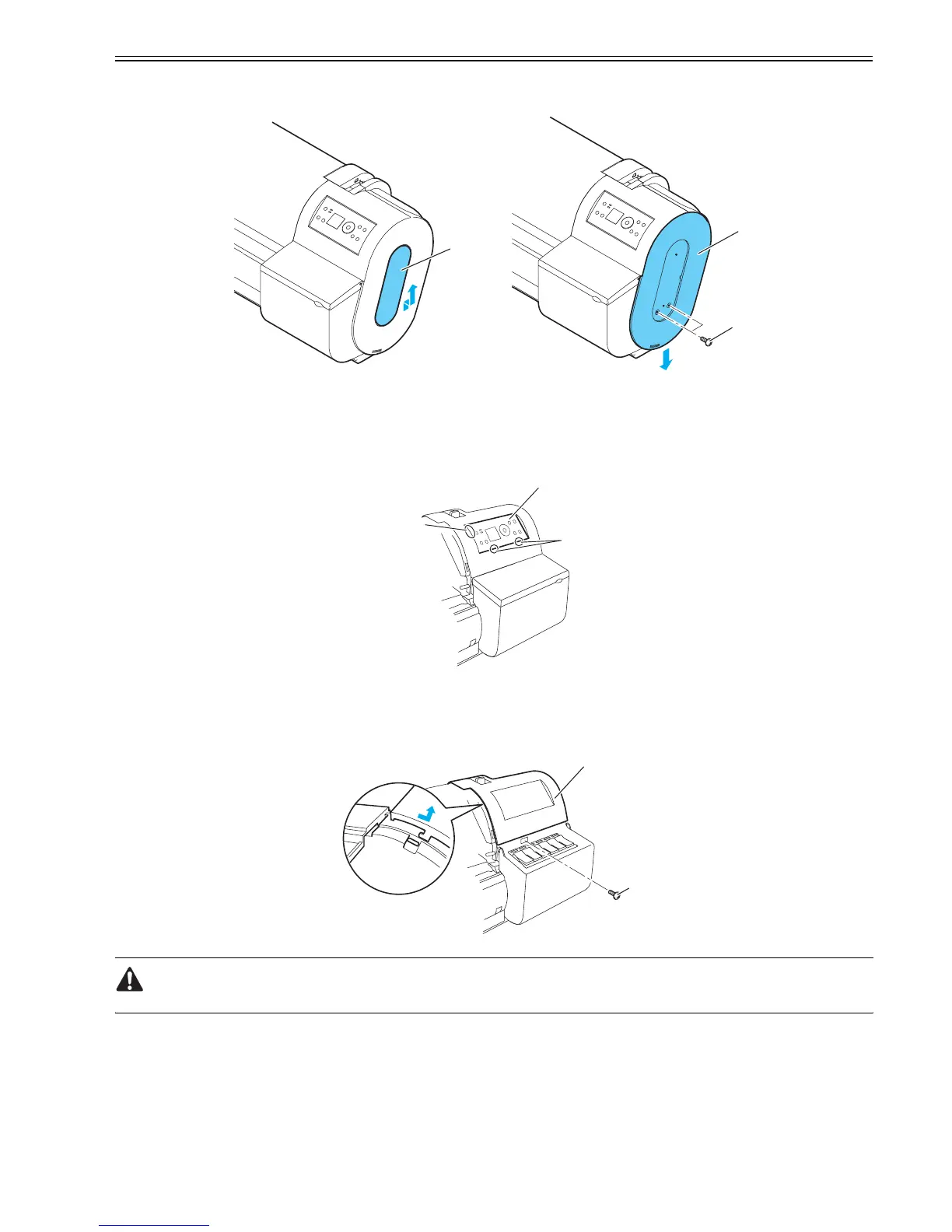
b. Right side and left side covers
To detach a side cover, slide up side cover S [1] in the middle. Unscrew two screws[3] hidden under side cover S [1] and slide downside cover [2] to detach the
slide cover.
F-4-7
c. Operation panel
To remove the operation panel, first open the top cover, insert your hand into the inside of the right upper cover from the left side and release two lower claws[2]
securing operation panel [1] in position. Then, push out operation panel [1] to front to release it from upper three hooks. Then, remove the two connectors[3]
from the back of operation panel [1] to which harnesses are attached.
F-4-8
d. Right upper cover
To detach the right upper cover[1], first open the top cover, remove the operation panel, right cover lid and right side cover, and then unscrew the front-panel
screws[2]. Next, pull the right side of the right upper cover to front and slide it down out of position by lifting up the upper left edge of the cover.
F-4-9
Take maximum care in reinstalling the right upper cover not to interfere with the harnesses connected to the operation panel.
[1]
[2]
[3]
[1]
[2]
[3]
[1]
[2]














 To Next Page