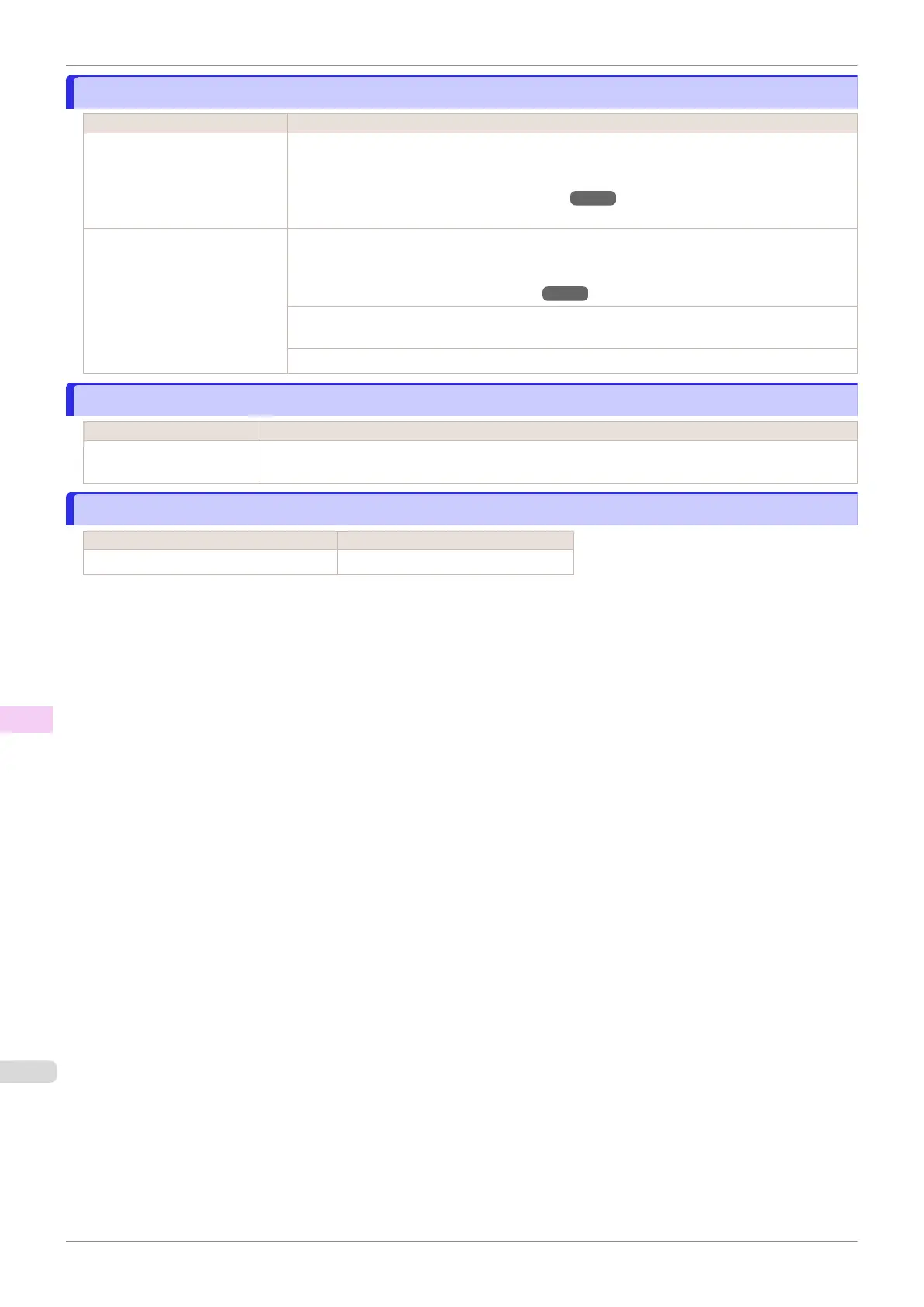
Paper position not suitable for borderless printing.
Paper position not suitable for borderless printing.
Cause Corrective Action
Because paper expands or con-
tracts depending on the environ-
ment of use, it may become nar-
rower or wider than the suppor-
ted width for borderless printing.
Press ▲ or ▼ to select Stop Printing, and then press the OK button.
Use each type of paper only where the recommended environmental conditions are met. For de-
tails on environmental conditions for various paper, see the Paper Reference Guide.
(See "Displaying the Paper Reference Guide.") ➔P.335
The paper is loaded askew. Press ▲ or ▼ to select Change Paper and straighten the paper so that the edges are between
the ink grooves for borderless printing.
Insert the roll firmly until it touches the flange of the Roll Holder.
(See "Attaching the Roll Holder to Rolls.") ➔P.342
Press ▲ or ▼ to select Print With Border, and then press the OK button to continue printing.
The document will be printed with a border.
Press ▲ or ▼ to select Stop Printing, and then press the OK button.
Roll feed unit error.
Roll feed unit error.
Cause Corrective Action
There is a problem with the
Roll Unit.
Turn off the printer and wait at least three seconds before restoring the power. If the message is dis-
played again, contact your Canon dealer for assistance.
The roll feed unit is loose.
The roll feed unit is loose.
Cause Corrective Action
The Roll Unit is detached from the printer. Push the Roll Unit firmly all the way in.
Paper position not suitable for borderless printing.
iPF840
User's Guide
Error Message Messages regarding paper
646















 To Next Page