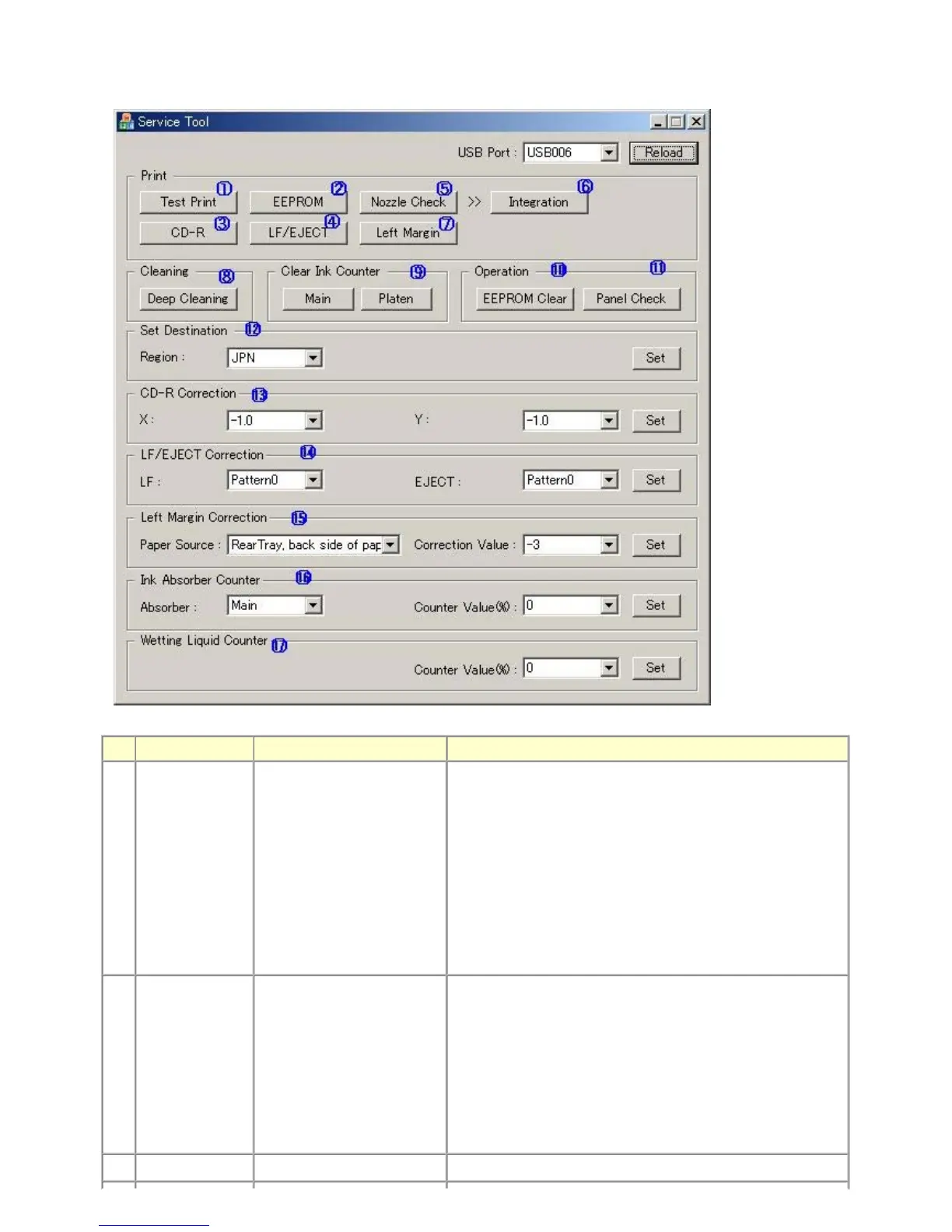
(2) Service Tool functions
Service Tool screen: Version 1.05
No. Name Function Remarks
(1) Test Print Service test print Paper (2 sheets) will feed from the rear tray.
Service test print items:
- Model name
- ROM version
- USB serial number
- EEPROM information
- Process inspection information
- Barcode (model name + destination + machine serial number)
- Ink system function check result
- CD / DVD sensor check result (printed on the second sheet)
(2) EEPROM EEPROM information print The dialog box opens to select the paper source. Select
Rear tray
or
Cassette
, and click
OK
.
EEPROM information print items:
- Model name
- ROM version
- Ink absorber counter value (ink amount in the ink absorber)
- Print information
- Error information, etc.
(3) CD-R CD-R check pattern print For refurbishment use. Not used in servicing.



 To Next Page