52
Effects ( 53)
Add flavor to your recordings.
Selecting a Fader
In mode, set the program selector to .
* Not available if the TV type is set to [NORMAL TV].
1. Open the FUNC. menu and select ( ) the digital
effects icon.
2. Select ( ) the [FADER] option and press ( ).
3. Select ( ) a setting option, press ( ) and close
the menu.
The symbol of the selected fader will appear on screen.
:
4. Fade in: In record pause mode, press the
D.EFFECTS button and begin recording by pressing
the start/stop button.
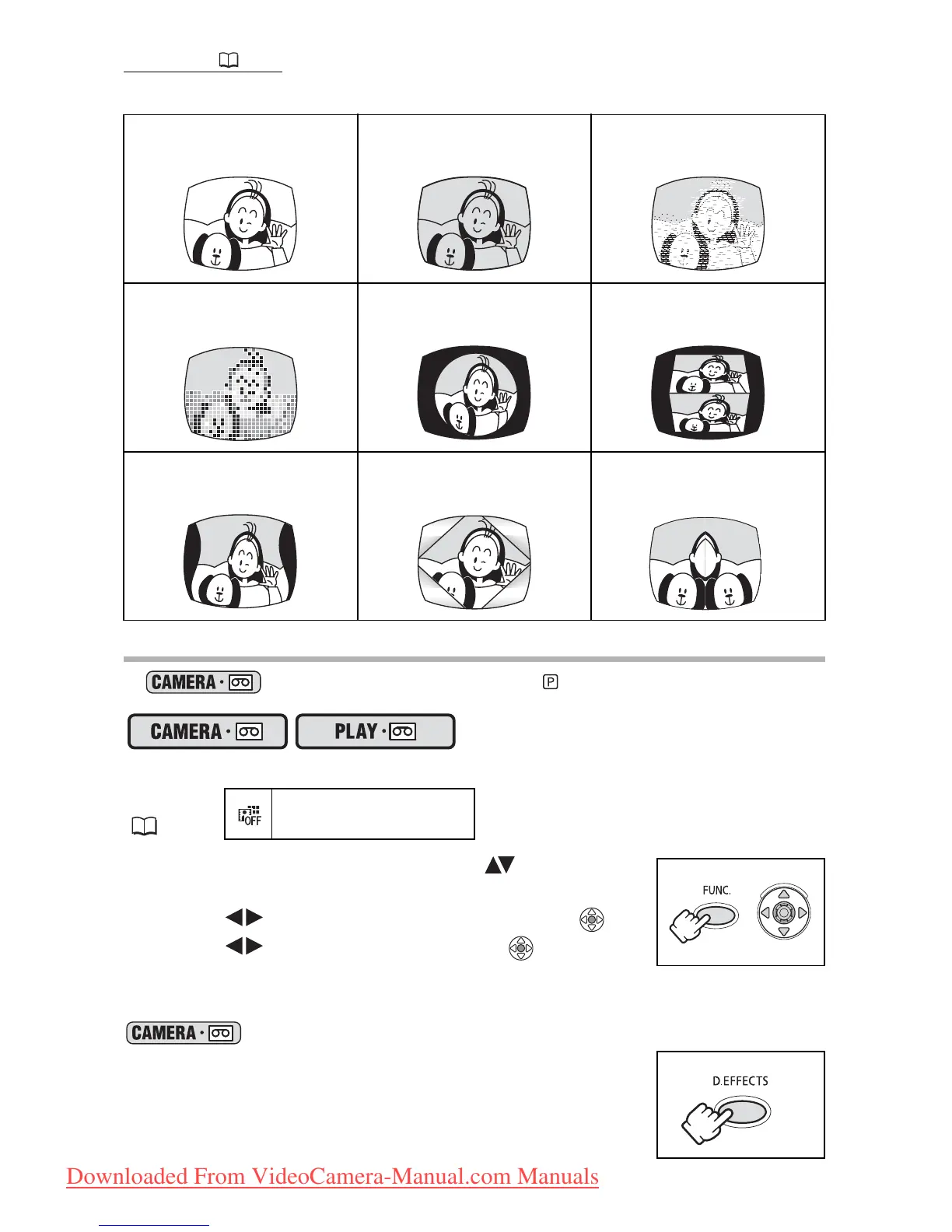
Black and White
(BLK&WHT)
Sepia (SEPIA) Art (ART)
Mosaic (MOSAIC) Ball (BALL) Cube (CUBE)
Wave (WAVE)
Color Mask (COLOR.)
Mirror (MIRROR)
MENU
( 33)
D.EFFECT OFF
*
Downloaded From VideoCamera-Manual.com Manuals



 To Next Page